|
|
| (13 intermediate revisions by the same user not shown) |
| Line 2: |
Line 2: |
| {{DISPLAYTITLE:openSUSE}} | | {{DISPLAYTITLE:openSUSE}} |
| <span class="weblink">[[File:Suse-small.jpg|link=http://en.opensuse.org/Sugar]]</span> | | <span class="weblink">[[File:Suse-small.jpg|link=http://en.opensuse.org/Sugar]]</span> |
| | ==[https://susestudio.com/a/F78UZ4/sugarsuse-leap-42-1 sugarSUSE-leap-42-1]== |
| | *02/17/2016 |
| | :https://susestudio.com/a/F78UZ4/sugarsuse-leap-42-1 |
| | *sugar 0.107.2 |
| | *f3 Home screen |
| | [[File:SugarSUSE-leap-f3.png|600px]] |
| | |
| ==openSUSE-Edu-li-f-e-13.2== | | ==openSUSE-Edu-li-f-e-13.2== |
| :12/02/2014 | | :12/02/2014 |
| *http://en.opensuse.org/openSUSE:Education-Li-f-e | | *(Contains GNOME; KDE; MATE; Sugar-emulator; and VirtualBox_OSE.) |
| | *Description of Contents: |
| | :http://en.opensuse.org/openSUSE:Education-Li-f-e |
| *'''D/L: http://sourceforge.net/projects/opensuse-edu/files/download/ISOs/ ''' | | *'''D/L: http://sourceforge.net/projects/opensuse-edu/files/download/ISOs/ ''' |
| : http://sourceforge.net/projects/opensuse-edu/files/latest/download?source=files | | : http://sourceforge.net/projects/opensuse-edu/files/latest/download?source=files |
| Line 76: |
Line 85: |
| http://download.opensuse.org/repositories/Education/openSUSE_12.1/sugar.ymp.mirrorlist | | http://download.opensuse.org/repositories/Education/openSUSE_12.1/sugar.ymp.mirrorlist |
| *openSUSE_12.2-sugar 0.96.2 | | *openSUSE_12.2-sugar 0.96.2 |
| :Download: http://download.opensuse.org/repositories/home:/dramwang/images/iso/sugar.i686-0.3.0-Build4.1.iso | | :Download: |
| | | :: http://download.opensuse.org/repositories/home:/dramwang/images/iso/sugar.i686-0.3.0-Build4.1.iso |
| | :: http://download.opensuse.org/repositories/home:/dramwang/images/iso/ |
| :Sugar Desktop 0.96.2 | | :Sugar Desktop 0.96.2 |
| :44 activities | | :44 activities |
| Line 171: |
Line 181: |
| [1] http://sourceforge.net/projects/opensuse-edu/files/download/ISOs/ | | [1] http://sourceforge.net/projects/opensuse-edu/files/download/ISOs/ |
|
| |
|
| ===[http://en.opensuse.org/MATE_Desktop '''MATE Desktop''']=== | | ===[[OpenSUSE#openSUSE-Edu-li-f-e-13.2 |openSUSE-Edu-li-f-e-13.2]]=== |
| | *'''MATE Desktop is included; and has Sugar 0.98.8 and VirtualBox Preinstalled''' |
| *"The MATE Desktop provides an intuitive and attractive classic desktop experience for Linux users; MATE is a fork of GNOME2." | | *"The MATE Desktop provides an intuitive and attractive classic desktop experience for Linux users; MATE is a fork of GNOME2." |
| *Also available in fedora 18
| |
|
| |
| ===openSUSE 11.3===
| |
| :http://download.opensuse.org/distribution/11.3/iso/
| |
|
| |
| * http://www.opensuse-education.org/
| |
| :''Welcome at openSUSE Education''
| |
| *'''The following work.'''
| |
| ====Sugar 12.1====
| |
| :One click install http://software.opensuse.org/search/download?base=openSUSE%3A12.1&file=Education%2FopenSUSE_12.1%2Fsugar.ymp&query=sugar
| |
| [[File:OpenSUSE-sugar.png|500px]]
| |
| *Sugar versions in opensuse build systems
| |
|
| |
| ===='''Sugar 11.3'''====
| |
| :http://download.opensuse.org/repositories/Education/images/iso/openSUSE-Sugar-11.3.i686-1.0.0-Build6.13.iso
| |
| :http://download.opensuse.org/repositories/Education/images/iso/
| |
| :OLD http://download.opensuse.org/repositories/Education/images/iso/openSUSE-Sugar-11.3.i686-1.0.0-Build6.8.iso
| |
| *'''for VirtualBox Install use Safe Boot option'''
| |
|
| |
| ===='''Sugar-11.3 VirtualBox'''====
| |
| *Appliance of openSUSE-Sugar-11.3
| |
| :http://www.opensuse-education.org/download/ISOs/appliance/
| |
| Build: "openSUSE 11.3 (i586)"
| |
| Sugar: sugar 0.88.0
| |
| :Download and import 3 files:
| |
| :openSUSE_sugar.ovf
| |
| :openSUSE_sugar.mf
| |
| :openSUSE-Sugar-11.3.vmdk
| |
| Features:
| |
| 8-GB VirtualBox hard disc
| |
| Language is English and English keyboard
| |
| USA-Los Angeles (Pacific timezone)
| |
| Autologin- user=sugar password=sugaruser
| |
| Ready to auto-configure to your hardware on first booting
| |
| *Note 1: Use the latest version of Oracle VM VirtualBox 3.2_3.2.8-64453
| |
| or later some Appliance exports have multiple HD controllers
| |
| (expanding HD) and earlier Sun VirtualBox 3.1 version does not
| |
| support them.
| |
| *Note 2: choose /dev/sda2 when prompted to do so on first run
| |
|
| |
| *source: http://download.opensuse.org/repositories/Education/images/iso/openSUSE-Sugar-11.3.i686-1.0.0-Build6.3.iso
| |
|
| |
|
| |
|
| |
| ====11.3 One Click Install of Sugar (not tested)====
| |
|
| |
| : {{Warning | Not working yet-IN DEVELOPMENT }} satellit 01/25/2011
| |
|
| |
| fcrozat: how do I install it into openSUSE-11.3-GNOME-LiveCD-i686.iso? what commands do I use?
| |
| I am trying to get a working sugar desktop for a VirtualBox 4 appliance:
| |
| In Browser
| |
| go to http://download.opensuse.org/repositories/X11:/Sugar/openSUSE_11.3/
| |
| and click
| |
| http://download.opensuse.org/repositories/X11:/Sugar/openSUSE_11.3/sugar-sucrose.ymp
| |
| http://download.opensuse.org/repositories/X11:/Sugar/openSUSE_11.3/sugar-cellulose.ymp
| |
| from your browser
| |
| it should add the repo and pull needed packages
| |
| then logout
| |
| use gdm switcher to start sugar
| |
| it will be available there
| |
|
| |
| ==openSUSE_11.1 (old)==
| |
| :http://download.opensuse.org/distribution/11.1/repo/oss/
| |
| zypper ar http://download.opensuse.org/distribution/11.1/repo/oss/ oss-main
| |
| zypper ar http://download.opensuse.org/repositories/devel:/languages:/python/openSUSE_11.1/ python
| |
| zypper ar http://download.opensuse.org/repositories/X11:/Sugar/openSUSE_11.1/ sugar
| |
| zypper refresh
| |
| zypper in sugar sugar-activities
| |
|
| |
| :"You should now have Sugar available at the login screen or test it by launching sugar-emulator from inside Gnome/KDE." from opeSUSE-EDU sugar wiki
| |
|
| |
| ===openSUSE-EDU===
| |
| :::Updated 09/26/2010
| |
| :http://en.opensuse.org/Sugar ('''main page''')
| |
| *[http://wiki.sugarlabs.org/go/Sugar_on_a_Stick/Linux/openSUSE openSUSE dd to USB with persistence]
| |
| :'''http://en.opensuse.org/Education/Live'''
| |
| :http://download.opensuse.org/repositories/Education/images/openSUSE-KIWI-LTSP-lite-liveUSB-unstable.i686-0.0.3-Build3.27.raw.bz2
| |
|
| |
| :'''http://en.opensuse.org/Education'''
| |
| :http://en.opensuse.org/Education_repositories
| |
|
| |
| ::Reviews: http://www.dedoimedo.com/computers/opensuse-11sp3-edu-life.html
| |
| :(See: cyberorg on #irc #sugar #opensuse-edu for details.)
| |
|
| |
| *SUSE is building and hosting appliances at these sites for downloading.
| |
|
| |
| =====Live CD=====
| |
|
| |
| * http://education.opensuse.org/download/ISOs/
| |
| * http://download.opensuse.org/repositories/Education/images/iso/
| |
| * http://en.opensuse.org/Derivatives
| |
|
| |
| ======Installation to VirtualBox; VMWare; & Hard Disk======
| |
| * Booted USB disk
| |
| :Sugar (root) terminal:
| |
| <code>su -
| |
| yast
| |
| (non-graphical '''YaST2 Control Center''' starts)
| |
| Miscellaneous/live-installer
| |
| </code>
| |
|
| |
| ======add user======
| |
| * Booted USB disk
| |
| :Sugar (root) terminal:
| |
| <code>su -
| |
| yast
| |
| (non-graphical '''YaST2 Control Center''' starts)
| |
| Security and Users/User and Group Management
| |
| Mult-User Sugar Appliance
| |
| Add User ie: Student1, student2
| |
| To switch users (Students) log out from Sugar and you are presented
| |
| with a list of users to connect to
| |
| </code>
| |
|
| |
| ======change networking======
| |
| * Booted USB disk
| |
| :Sugar (root) terminal:
| |
| <code>su -
| |
| yast
| |
| (non-graphical '''YaST2 Control Center''' starts)
| |
| Network Devices/Network Settings
| |
| </code>
| |
| [X] Traditional Method with ifup
| |
|
| |
|
| |
|
| |
| =====Prebuilt Sugar Appliances=====
| |
|
| |
| *1.) Oracle VirtualBox Appliance of openSUSE-Sugar-11.3 [http://download.opensuse.org/repositories/Education/images/iso/openSUSE-Sugar-11.3.i686-1.0.0-Build6.3.iso] Uploaded 09/26/2010<br>
| |
| :'''download 3 files''':openSUSE_sugar.ovf [http://people.sugarlabs.org/Tgillard/openSUSE_sugar.ovf] openSUSE_sugar.mf [http://people.sugarlabs.org/Tgillard/openSUSE_sugar.mf]openSUSE-Sugar-11.3.vmdk [[http://people.sugarlabs.org/Tgillard/openSUSE-Sugar-11.3.vmdk]
| |
| :::File/IMPORT these Files
| |
| :8 GB VirtualBox HD
| |
| ::english and english keyboard
| |
| ::USA-LA (Pacific TZ)
| |
| ::Autologin- user=sugar password=sugaruser
| |
| :::Ready to auto-configure to your hardware on first booting.
| |
| :::'''note choose /dev/sda2 when prompted to do so on first run'''
| |
|
| |
|
| |
| *2.) Prebuilt VMPlayer.vmx file for Download
| |
| : https://sourceforge.net/projects/opensuse-edu/files/Sugar/
| |
| :http://education.opensuse.org/download/ISOs/ (in .zip .vmx and.tar.bz2 formats)
| |
| :http://download.opensuse.org/repositories/Education/images/ (.raw format for USB Sticks)
| |
| * Run on VMware Player or VirtualBox after decompressing.
| |
|
| |
| ======Instructions======
| |
| '''Important, for VMX openSUSE Appliances:'''
| |
| openSUSE-Sugar-0.1.0-Build2.26.1.vmx
| |
| no password req to start
| |
| Password(root)=sugaruser
| |
| ====================================
| |
| To reset SUGAR ENTIY:
| |
| (Clear out name, color, and Sugar Journal contents)
| |
| <sugar terminal>
| |
| rm -rf ~/.sugar
| |
| su -
| |
| password:sugaruser
| |
| shutdown -h now
| |
| restart sugar
| |
|
| |
| INSTRUCTIONS ***VERY IMPORTANT!***
| |
| ======================================
| |
| when you open this VM Appliance with VMPlayer for first time:
| |
| use "I moved it"
| |
| NO NOT click "I Copied it"
| |
| Doing so generates a 2nd MAC id for the network card and leaves it as eth0
| |
| not configured (It will not work)
| |
| clearing the /.sugar entity (see above) does not affect Mac address
| |
| Nor does changing the color or name on the sugar control panel.
| |
|
| |
| ***** ALSO Do the following Right away after opening sugar for the first time:*****
| |
| *<sugar terminal>
| |
| su -
| |
| Password:xxx (see above)
| |
| yast2 sysconfig
| |
| System>Sysconfig>Enable Sysconfig>(NO)
| |
| (this locks out network reconfig)
| |
| exit, shutdown, restart
| |
| **(This seems to stop the autoconfiguration of openSUSE on restart)**
| |
| ---------------------------------------
| |
| IF F1 Neighborhood is not connecting:
| |
|
| |
| Try this First to start Network Manager:
| |
| *<sugar terminal>
| |
| su -
| |
| password:xxx
| |
| rcnetwork restart
| |
| =============
| |
| NETWORKING FIX:
| |
| (Networking Fix for loss of F1 Neighborhood:)
| |
| <sugar terminal>
| |
| su-
| |
| Password:xxx (see above)
| |
| yast2 lan
| |
| switch to non-Network Manager control
| |
| Delete other network cards
| |
| configure DHCP 4 with hardware and eth0
| |
| exit
| |
|
| |
| once you get networking to work;
| |
| *<sugar terminal>
| |
| su -
| |
| Password:xxx (see above)
| |
| yast2 lan
| |
| select Network Manager
| |
| exit
| |
| (change to network manager for wireless configration)
| |
| then:
| |
| *<sugar terminal>
| |
| su -
| |
| Password:xxx (see above)
| |
| yast2 sysconfig
| |
| System>Sysconfig>Enable Sysconfig>(NO)
| |
| (this locks out network reconfig)
| |
| exit, shutdown, restart
| |
|
| |
| ====Image USB/SD Drives====
| |
| *http://en.opensuse.org/Live_USB_stick#Bootable_USB_from_DVD_or_Net-install
| |
| :Newest versions of live .iso can be installed to USB/SD with dd command:
| |
| ::Now 2nd partition can be created with a script: http://en.opensuse.org/Live_USB_stick
| |
| ::http://en.opensuse.org/Live_USB_stick#Create_partition_from_remaining_space
| |
| *(x)be careful to use correct device or you can wipe your hard disk!
| |
| ===========unformatted 2 GB USB disk==================
| |
| dd if=openSUSE-Sugar.i686-11.2.0-Build2.1.iso of=/dev/sd(x) bs=4M
| |
| 151+1 records in
| |
| 151+1 records out
| |
| 636485632 bytes (636 MB) copied, 86.862 s, 7.3 MB/s
| |
| Add 2nd Persistent Partition:
| |
| fdisk /dev/sd(x)
| |
| The number of cylinders for this disk is set to 1959.
| |
| There is nothing wrong with that, but this is larger than 1024,
| |
| and could in certain setups cause problems with:
| |
| 1) software that runs at boot time (e.g., old versions of LILO)
| |
| 2) booting and partitioning software from other OSs
| |
| (e.g., DOS FDISK, OS/2 FDISK)
| |
| Command (m for help): pDisk /dev/sd(x): 2055 MB, 2055019008 bytes
| |
| 64 heads, 32 sectors/track, 1959 cylinders
| |
| Units = cylinders of 2048 * 512 = 1048576 bytes
| |
| Disk identifier: 0x3e698287
| |
| Device Boot Start End Blocks Id System
| |
| /dev/sd(x)1 * 1 607 621568 83 Linux
| |
| Command (m for help): n
| |
| Command action
| |
| e extended
| |
| p primary partition (1-4)
| |
| p
| |
| Partition number (1-4): 2
| |
| First cylinder (608-1959, default 608):
| |
| Using default value 608
| |
| Last cylinder, +cylinders or +size{K,M,G} (608-1959, default 1959):
| |
| Using default value 1959
| |
| Command (m for help): p
| |
| Disk /dev/sd(x): 2055 MB, 2055019008 bytes
| |
| 64 heads, 32 sectors/track, 1959 cylinders
| |
| Units = cylinders of 2048 * 512 = 1048576 bytes
| |
| Disk identifier: 0x3e698287
| |
| Device Boot Start End Blocks Id System
| |
| /dev/sd(x)1 * 1 607 621568 83 Linux
| |
| /dev/sd(x)2 608 1959 1384448 83 Linux
| |
| Command (m for help): w
| |
| The partition table has been altered!
| |
| Calling ioctl() to re-read partition table.
| |
| Syncing disks.
| |
|
| |
| ====raw file with dd command====
| |
| * Details on how to use uncompresses raw file: http://en.opensuse.org/Disc_image_howtos
| |
| Latest .raw file: http://download.opensuse.org/repositories/Education/images/
| |
|
| |
|
| * Extract raw file
| | === '''References For Advanced Users'''=== |
| : Unmount the USB first, then from terminal:
| |
| <code>sudo dd if=/home/suse/"myappliance".raw of=/dev/sdb bs=4k</code>
| |
| ===== Typical Imaging Session=====
| |
| With raw file on ~/Desktop (BE CERTAIN your USB is sdb (the volume ID). (DO NOT use sdb1, the first partition ID). Change, if different.
| |
| <pre>XXXX:~/Desktop/$ sudo dd if=openSUSE-Sugar-liveUSB-unstable.i686-0.0.3-Build4.17.raw of=/dev/sdb bs=4k
| |
| [sudo] password for XXXX:
| |
| 463360+0 records in
| |
| 463360+0 records out
| |
| 1897922560 bytes (1.9 GB) copied, 195.168 s, 9.7 MB/s
| |
| </pre>
| |
| ==== '''References For Advanced Users'''====
| |
| : '''http://en.opensuse.org/SDB:KIWI_Cookbook_Live_USB-Stick''' | | : '''http://en.opensuse.org/SDB:KIWI_Cookbook_Live_USB-Stick''' |
| *Login::http://susestudio.com/login?return_to= | | *Login::http://susestudio.com/login?return_to= |

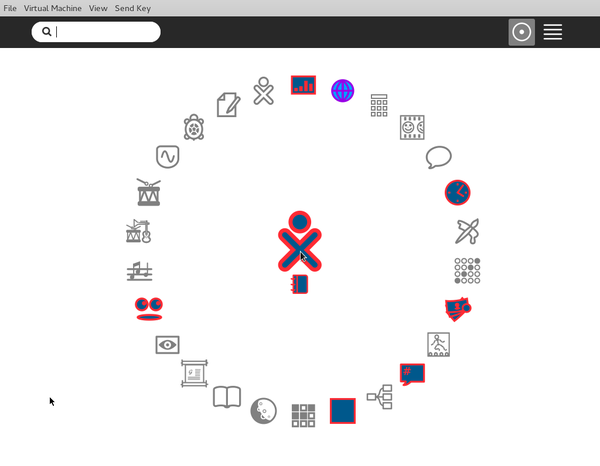
- https://susestudio.com/a/F78UZ4/sugarsuse-leap-42-1
- sugar 0.107.2
- f3 Home screen
openSUSE-Edu-li-f-e-13.2
- 12/02/2014
- (Contains GNOME; KDE; MATE; Sugar-emulator; and VirtualBox_OSE.)
- Description of Contents:
- http://en.opensuse.org/openSUSE:Education-Li-f-e
- http://sourceforge.net/projects/opensuse-edu/files/latest/download?source=files
- i686 : http://sourceforge.net/projects/opensuse-edu/files/download/ISOs/openSUSE-Edu-li-f-e.i686-13.2.1.iso/download
- http://sourceforge.net/projects/opensuse-edu/
- Make Persistent USB:
- https://en.opensuse.org/Live_USB_stick
openSUSE-Edu-li-f-e-gnome-classic-13.1.2
- openSUSE-Edu-li-f-e-gnome-classic iso, this update include GNOME 3.12, official openSUSE updates till date, and it brings back Sugar.(0.98)
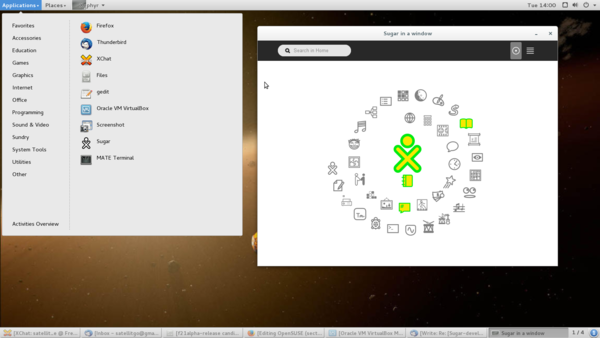
- Announcement and download links
- http://lizards.opensuse.org/2014/07/20/updated-opensuse-edu-li-f-e-gnome-classic/
- Download:http://sourceforge.net/projects/opensuse-edu/files/download/ISOs/openSUSE-Edu-li-f-e-gnome-classic.x86_64-13.1.2.iso/download
- Software:http://software.opensuse.org/131/en
- List of included Software
- http://en.opensuse.org/openSUSE:Education-Li-f-e
openSUSE-13-1-1
- Announcement and download links
- https://news.opensuse.org/2013/11/19/opensuse-13-1-ready-for-action/
- http://www.opensuse.org/en/
- http://software.opensuse.org/131
Gnome Classic edition of openSUSE-Education
- https://news.opensuse.org/2014/05/22/gnome-classic-edition-of-opensuse-education/
- VirtualBoxOSE r88780 is loaded
- Use Oracle_VM_VirtualBox_Extension_Pack-4.2.18-88780.vbox-extpack for USB
- http://download.virtualbox.org/virtualbox/4.2.18/VirtualBox-4.2-4.2.18_88780_openSUSE114-1.x86_64.rpm
- Start VirtualBox and Download Sugar as an appliance:
- http://wiki.sugarlabs.org/go/Sugar_Creation_Kit/sck/Sugar-in-Virtualization
- Updated 05/29/2014
- irc freenode is now #suse and #opensuse-edu cycberorg is good contact (India so TZ is important)
- Wiki: http://software.opensuse.org/123/en
- http://sourceforge.net/projects/opensuse-edu/?source=dlp
- http://cyberorg.co.in/myscool/
- opensuse-india@googlegroups.com
Sugar on openSUSE
- http://en.opensuse.org/Sugar
- https://en.opensuse.org/openSUSE:Education-Li-f-e
- Download: http://sourceforge.net/projects/opensuse-edu/
"openSUSE Education team is proud to present openSUSE-Edu Li-f-e (Linux for Education) based on openSUSE 12.3.
The image is a "hybrid" iso image, the same image can be used to burn a Live DVD or to create a Live USB stick.
This release includes carefully selected software for students, educators as well as parents.
The software selection encompasses everything required to make computers productive for either home or educational use without having to install anything additional.
The Live DVD contains KIWI-LTSP server that can be enabled even by non-technical user, it comes bundled with tons of useful applications from openSUSE Education, Build Service and Packman repositories.
With the KIWI-LTSP server you can PXE(network) boot other PCs to use this live DVD without installing or modifying anything on them. Booting from hard disk again will leave those PCs as they were.
(Please note that running LTSP from Live DVD/USB is meant for demo/testing purpose only, install on the hard disk to use it in production). "
opensuse-edu-li-f-e-12-2
- updated links 05/08/2013
announcement
http://news.opensuse.org/2012/09/14/opensuse-edu-li-f-e-12-2-out-now/
download
http://sourceforge.net/projects/opensuse-edu/?source=dlp
website
http://opensuse-edu.sourceforge.net/
Downloads
http://sourceforge.net/projects/opensuse-edu/files/download/ISOs/
VirtualBox Images
http://download.opensuse.org/repositories/home:/dramwang/images/
OpenSuse-Sugar
http://download.opensuse.org/repositories/Education/openSUSE_12.1/sugar.ymp.mirrorlist
- openSUSE_12.2-sugar 0.96.2
- Download:
- http://download.opensuse.org/repositories/home:/dramwang/images/iso/sugar.i686-0.3.0-Build4.1.iso
- http://download.opensuse.org/repositories/home:/dramwang/images/iso/
- Sugar Desktop 0.96.2
- 44 activities
I have updated most activities in X11:Sugar.
Some of them failed to start as no updated version is available, namely:
Analyze, Colors!, Connect, FiftyTwo, Mail, View Slides
Some other problems are:
1. DrGeoII failed to start.
2. Cursor in Story Builder does not display properly.
3. Speak runs a bit slow. (not sure if it is a problem)
4. Record failed to record audio.
5. Jukebox failed to play audio.
- Problem Activities I see:--Satellit 09:45, 9 September 2012 (EDT)
Typing Turtle Does not stop - starts and runs fine
Countries Icon is grey circle - starts and runs fine
dd to USB
- Not persistent 1GB USB min
- Note fdisk persistent 2nd partition install (shown below) no longer works.
# dd if=sugar.i686-0.3.0-Build1.2.iso of=/dev/sdb bs=2M
245+1 records in
245+1 records out
514625536 bytes (515 MB) copied, 141.381 s, 3.6 MB/s
- will install to HD via yast (see below)
Persistent USB image
- http://download.opensuse.org/repositories/home:/dramwang/images/sugar.i686-0.3.0-Build7.5.raw.xz
- http://download.opensuse.org/repositories/home:/dramwang/images/sugar.i686-0.3.0-Build7.5.raw.xz.sha256
# xzcat sugar.i686-0.3.0-Build7.5.raw.xz | dd of=/dev/sdb bs=2M
0+239113 records in
0+239113 records out
2241855488 bytes (2.2 GB) copied, 456.509 s, 4.9 MB/s
Install to USB or HD
- Real install 4GB USB recommended
- copies all features from the live CD including user info
su root -c "yast2 live-installer"
- Use [Tab] key to navigate text based installer
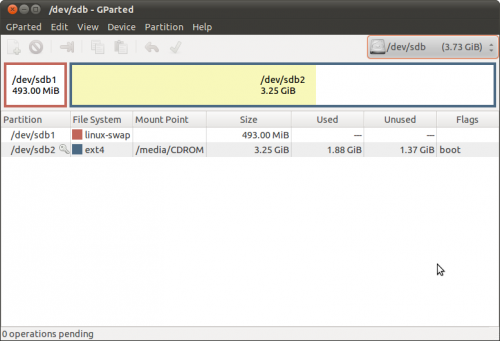
- gparted of 4 GB USB completed install using yast/Live-installer.
VirtualBox
- http://download.opensuse.org/repositories/home:/dramwang/images/sugar.i686-0.3.0-Build2.1-vmx.tar.bz2
- http://download.opensuse.org/repositories/home:/dramwang/images/sugar.i686-0.3.0-Build2.1-vmx.tar.bz2.sha256
- Extract files
- In VirtualBox, create a new virtual machine of openSUSE
- Use existing HD
- find sugar.i686-0.2.0.vmx and vmdk
- settings/processor [x] Enable PAE
- Start
- Sugar will come up in Chinese script
- Go to My Settings languages
- Change language
openSUSE-Edu Li-f-e DVD
live-fat-stick
- Download: https://github.com/cyberorg/live-fat-stick/blob/master/live-fat-stick
- Create multi boot USB stick with whole iso/s on vfat/fat32 partition
run this command as root (su -, not sudo)
  live-fat-stick isopath stickpartition
e.g.:
  live-fat-stick /home/geeko/openSUSE-Edu-li-f-e-12.2-1-i686.iso /dev/sdXY
To add Ubuntu iso to the stick, run the following:
   export distroname=ubuntu
   live-fat-stick /path/to/ubuntu-filename.iso /dev/sdXY
isopath should be full absolute path of iso image and the device should be
actual partition on the stick like /dev/sdb1, /dev/sdc1,/dev/sdc2...
The stick partition has to be vfat/fat32 format.
run live-fat-stick -l to list the possible usb sticks available.
It is possible to boot multiple iso images from same stick,
should work with all recent openSUSE or Ubuntu live iso images.
Liveinstall to USB
- Boot DVD - choose liveinstall from desktop
- 15 GB Partiton required and 1 GB Ram.
<cyberorg> IRC #opensuse-edu 09/10/2012:
openSUSE-Edu Li-f-e DVD will have sugar on it, that will be available on sourceforge link [1]
i hope to get it ready in a day or so
li-f-e is 4G stick with sugar, kde, gnome, cinnamon and tons more
sugar can be run on LTSP clients PXE booted off life as well, no need to install anything on the client you get lab full of sugar :)
clients can be any PC/laptop with 512MB ram and lan capable of pxe

[1] http://sourceforge.net/projects/opensuse-edu/files/download/ISOs/
- MATE Desktop is included; and has Sugar 0.98.8 and VirtualBox Preinstalled
- "The MATE Desktop provides an intuitive and attractive classic desktop experience for Linux users; MATE is a fork of GNOME2."
References For Advanced Users
- http://en.opensuse.org/SDB:KIWI_Cookbook_Live_USB-Stick


