Development Team/Arduino: Difference between revisions
RafaelOrtiz (talk | contribs) No edit summary |
RafaelOrtiz (talk | contribs) No edit summary |
||
| Line 25: | Line 25: | ||
EXE="$APP/Contents/Linux686" | EXE="$APP/Contents/Linux686" | ||
RES="$APP/Contents/Resources" | RES="$APP/Contents/Resources" | ||
exec "/usr/bin/squeak" \ | exec "/usr/bin/squeak" \ | ||
-plugins "$EXE" \ | -plugins "$EXE" \ | ||
| Line 35: | Line 34: | ||
== Installation and use procedure == | == Installation and use procedure == | ||
Having executed our initiation script we have an squeak project with essential particularities in order to run our Arduino. Inside Electronics flaps we can find different tools. | |||
But first we have to connect our arduino board, this is done in the following way, | |||
*1) Connect the board to the USB port. | |||
*2) If the board doesn't have Firmata we have to upload it form Arduino IDE. | |||
[[Image:Firmata1.png]] | |||
*3) To find out the serial port to which the board belongs we can go to Tools->Serial Port of a list we can always find the following: | |||
/dev/ttyUSB0 | |||
/dev/ttyS0 | |||
*4) Create an arduino board: open up the viewer and find "arduino - connection" category | |||
[[Image:Arduinoconection.png]] | |||
*5) Execute "Arduino board - connect on port - 5" | |||
[[Image:Connectonport.png]] | |||
*6) Wait more or less two seconds an then the slot "is connected" have to change to true. | |||
*7) After searching "arduino - digital pins mode" category and resetting the value of "arduino board - is reading digital pins" (going from false to true). That's how the digital inputs are set. | |||
[[Image:True-falsedigitalpins.png]] | |||
*8) Now we are ready to use it!. | |||
[[Image:Hypercubo1.png]] | |||
| Line 46: | Line 85: | ||
*http://git.sugarlabs.org/projects/turtleart/repos/arduino-support | *http://git.sugarlabs.org/projects/turtleart/repos/arduino-support | ||
TODO: Link to an XO bundle. | |||
This uses the same [http://www.firmata.org firmata] protocol that the arduino-squeak connection uses. | This uses the same [http://www.firmata.org firmata] protocol that the arduino-squeak connection uses. | ||
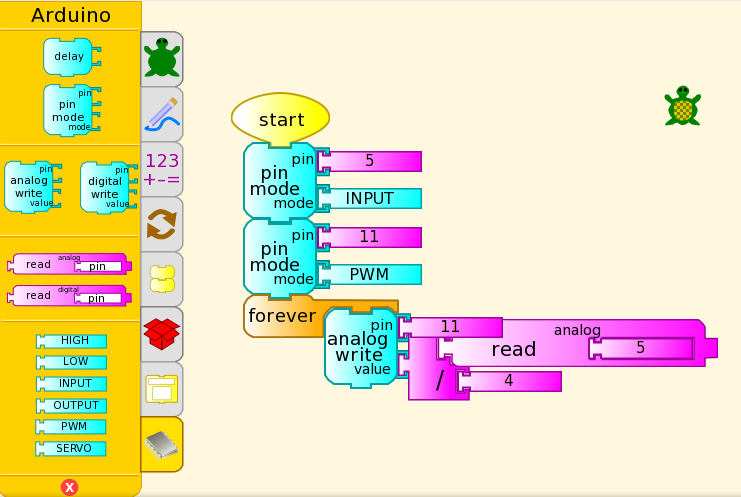
===Some use examples and | ===Some use examples and Screenshots=== | ||
* | *http://people.sugarlabs.org/sayamindu/ta_arduino.png | ||
* | *http://people.sugarlabs.org/rafael/Arduino-turtle1.png | ||
* | *http://people.sugarlabs.org/rafael/Draw-leds.png | ||
Revision as of 12:02, 22 December 2009
There are different options to connect your arduino board to Sugar (trough sugar-capable activities)
Squeak
Thanks to the great work found on Tecnodacta
We can download an squeak project and install it on our Sugar. This script can help in the process.
#/bin/bash
echo "Downloading.."
echo ""
curl -o Arduino.zip  http://tecnodacta.com.ar/gira/Arduino.7.zip
unzip Arduino.zip
echo "Executing.."
echo ""
cd Arduino.7/
./Arduino.sh.
Note that on an XO laptop you have to tweak some your Arduino.sh script in these or similar ways
#!/bin/sh
APP=`dirname $0`
#
EXE="$APP/Contents/Linux686"
RES="$APP/Contents/Resources"
exec "/usr/bin/squeak" \
-plugins "$EXE" \ -encoding latin1 \ -vm-display-X11 \ "$RES/Arduino.2.image"
Installation and use procedure
Having executed our initiation script we have an squeak project with essential particularities in order to run our Arduino. Inside Electronics flaps we can find different tools.
But first we have to connect our arduino board, this is done in the following way,
- 1) Connect the board to the USB port.
- 2) If the board doesn't have Firmata we have to upload it form Arduino IDE.

- 3) To find out the serial port to which the board belongs we can go to Tools->Serial Port of a list we can always find the following:
/dev/ttyUSB0
/dev/ttyS0
- 4) Create an arduino board: open up the viewer and find "arduino - connection" category

- 5) Execute "Arduino board - connect on port - 5"

- 6) Wait more or less two seconds an then the slot "is connected" have to change to true.
- 7) After searching "arduino - digital pins mode" category and resetting the value of "arduino board - is reading digital pins" (going from false to true). That's how the digital inputs are set.

- 8) Now we are ready to use it!.

Turtle Art
The code needed is located at (Thnks to Sayamindu Dasgupta)
TODO: Link to an XO bundle.
This uses the same firmata protocol that the arduino-squeak connection uses.