Trisquel: Difference between revisions
m →Trisquel Packages: remove header |
m →Trisquel 6.0: Install Sugar |
||
| Line 7: | Line 7: | ||
*Download::http://trisquel.info/en/download | *Download::http://trisquel.info/en/download | ||
"Trisquel, a 'libre' version of Ubuntu GNU/Linux, is now available for download and install (or update for those who already have it). It's one of the easiest 'libre' versions of Gnu/Linux to install and run. This version includes: Linux-Libre 3.2, Xorg, Abrowser 19 (a Firefox derivative that does not recommend non-free software), GNOME 3.4, and LibreOffice 3.5. They're also simplifying their release schedule: 'This release is a Long Term Support one, meaning that bugfix and security updates will be published until 2017. Along with this we have decided to change our release schedule from this point on: we will no longer publish short term support versions every 6 months, but focus on giving the best possible support to the LTS release, providing backported improvements to core packages like the kernel, the browser and the xorg server among others.'" | "Trisquel, a 'libre' version of Ubuntu GNU/Linux, is now available for download and install (or update for those who already have it). It's one of the easiest 'libre' versions of Gnu/Linux to install and run. This version includes: Linux-Libre 3.2, Xorg, Abrowser 19 (a Firefox derivative that does not recommend non-free software), GNOME 3.4, and LibreOffice 3.5. They're also simplifying their release schedule: 'This release is a Long Term Support one, meaning that bugfix and security updates will be published until 2017. Along with this we have decided to change our release schedule from this point on: we will no longer publish short term support versions every 6 months, but focus on giving the best possible support to the LTS release, providing backported improvements to core packages like the kernel, the browser and the xorg server among others.'" | ||
====Install Sugar==== | |||
*Trisquel is based on Ubuntu 12.04 LTS | |||
:Ubuntu will install a handicapped sugar 0.90 from it's repos | |||
:There are only 2 activities and they do not start. | |||
*'''Use Sweets_Distribution for a working Sugar-desktop''' | |||
*[[Sweets_Distribution#Installation|Install Sugar 0.94.1]] | |||
:The following is a summary of this link | |||
:Consult it for more detailed information | |||
*type the following commands in a terminal: | |||
wget ftp://download.sugarlabs.org/packages/sweets-distribution.sh | |||
sudo sh sweets-distribution.sh | |||
sweets-distribution status | |||
sudo sweets-distribution select 0.94 | |||
apt-get install {{Code|sweets-desktop}} | |||
(The full set of packages from Sweets Desktop.) | |||
:Sometimes, it may be required to downgrade packages while switching to another repository. | |||
:The easy way to do so is with the {{Code|sync}} command: | |||
sudo sweets-distribution sync | |||
:Most of the Sweets Distribution packages will be placed in the {{Code|/opt/sweets}} directory; :thus, it will be possible to use Sugar from the Sweets Distribution and from official packages at the same time. | |||
*Access sweets-sugar from: | |||
# menu/education/sugar | |||
# Or by logging out and logging in to sweets-sugar via gdm | |||
===Trisquel 5.5=== | ===Trisquel 5.5=== | ||
:[[File:Trisquel-5.5.png|400px]] | :[[File:Trisquel-5.5.png|400px]] | ||
Revision as of 12:46, 13 March 2013

Trisquel 6.0
- Updated 03/13/2013

- Release announcement: http://trisquel.info/en/trisquel-60-lts-toutatis-has-arrived
- Download::http://trisquel.info/en/download
"Trisquel, a 'libre' version of Ubuntu GNU/Linux, is now available for download and install (or update for those who already have it). It's one of the easiest 'libre' versions of Gnu/Linux to install and run. This version includes: Linux-Libre 3.2, Xorg, Abrowser 19 (a Firefox derivative that does not recommend non-free software), GNOME 3.4, and LibreOffice 3.5. They're also simplifying their release schedule: 'This release is a Long Term Support one, meaning that bugfix and security updates will be published until 2017. Along with this we have decided to change our release schedule from this point on: we will no longer publish short term support versions every 6 months, but focus on giving the best possible support to the LTS release, providing backported improvements to core packages like the kernel, the browser and the xorg server among others.'"
Install Sugar
- Trisquel is based on Ubuntu 12.04 LTS
- Ubuntu will install a handicapped sugar 0.90 from it's repos
- There are only 2 activities and they do not start.
- Use Sweets_Distribution for a working Sugar-desktop
- Install Sugar 0.94.1
- The following is a summary of this link
- Consult it for more detailed information
- type the following commands in a terminal:
wget ftp://download.sugarlabs.org/packages/sweets-distribution.sh
sudo sh sweets-distribution.sh

sweets-distribution status

sudo sweets-distribution select 0.94

apt-get install sweets-desktop
(The full set of packages from Sweets Desktop.)
- Sometimes, it may be required to downgrade packages while switching to another repository.
- The easy way to do so is with the
synccommand:
sudo sweets-distribution sync
- Most of the Sweets Distribution packages will be placed in the
/opt/sweetsdirectory; :thus, it will be possible to use Sugar from the Sweets Distribution and from official packages at the same time.
- Access sweets-sugar from:
- menu/education/sugar
- Or by logging out and logging in to sweets-sugar via gdm
Trisquel 5.5
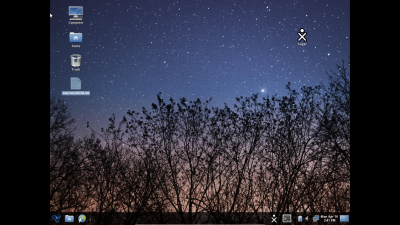
- Screenshot of Trisquel 5.5
- Also has optional sweets-distribution:Factory installed.
- Note Sugar XO Avitar in right top corner of desktop.

- See also: Trisquel On A Sugar Toast Sugar Only Version - Not yet available in 5.5 - Coming soon.
Trisquel GNU/Linux is a fully free operating system endorsed by the FSF. It has a stand alone Live/Installable image for CD and USB drives. It is based on Ubuntu, but is not Ubuntu.
- Versions: http://en.wikipedia.org/wiki/Trisquel#Versions
- Download:
- http://trisquel.info/download
- http://cdimage.trisquel.info/trisquel-images/
- http://mirror.fsf.org/trisquel-images/
- http://trisquel.info/en/download
- Trisquel Packages
Release announcement - 16 April 2012
- -- Rubén Rodríguez, Trisquel project leader
- Download: http://trisquel.info/download
- Note: Install to Hard Disk is located in "System Settings" Or use command "ubiquity" from terminal.
Trisquel 5.0
- http://devel.trisquel.info/dagda/iso/ NEW 07/27/2011 now has IceCat replacing Firefox
- http://mirror.fsf.org/trisquel-images/
- Trisquel 5.0
* Linux-Libre 2.6.38
* GNOME 2.32
       o LXDE 0.5 in Trisquel Mini
       o KDE 4.6 in Triskel
  * IceCat 5.0
  * LibreOffice 3.3.0
- Development Notes:https://trisquel.info/en/wiki/dagda-development
- CD Boots on Macintosh Pro i7
- Hold option button on boot; select CD
- Sound Works
- Bluetooth sees Magic Mouse but cannot see code
- Wired networking works
- Firefox works
Add Sugar 0.88.1 to Trisquel 5.0
- Talk:Trisquel#Install_Sugar_0.88.1x_on_Trisquel_5.0
- Preferred version Experimental Solution
Add Sugar 0.90 to Trisquel 5.0
- Talk:Trisquel#Install_Sugar_0.90.x_on_Trisquel_5.0
- This is an Experimental Solution
Note
- (Advanced)
- Sweets Distribution can be used to Add an additional Repository to synaptic
- Installing Toast (a Dextrose 3 variety of sugar 0.92.1) alongside the GNOME desktop of Trisquel 5.0
Notes on Wireless
- from trisquel-users@listas.trisquel.info (sirgrant 01/15/2012)
The package wireless-tools is free software and is in the Trisquel repository.  "firmware-ralink" is non-free software.
If you read the copyright file it says you can only distribute it in binary form without modification meaning it isn't libre software.  We can't recommend you install that package.
- https://trisquel.info/en/wiki/introduction-trisquel-gnu-linux Introduction to Trisquel GNU/Linux (has info about Free Software)
- http://www.h-node.com/ H-node a database of hardware that works/doesn't work with all Free Software
- https://trisquel.info/en/wiki/setup-wireless-card Trisquel's setting up a wireless card documentation
Boots on MacBook Air
- Will save settings if Persistent USB disk plugged in when booted from CD
- Insert USB disk in Mac
- Persistent USB disk can be made with Ubuntu-gnome "USB Startup Disk Creator:(usb-creator) or see section below to create one from a booted CD
- Boot from CD (hold down "C" key until isolinux screen appears-10sec or more) select Safe Graphics Mode
- To free up a USB port go to frame and disconnect the CD. Unplug the DVD/CD, then the network dongle can be inserted in the freed up USB port.
- (The MacBook Air only has 2 USB ports)
- Insert USB disk in Mac
- If you log out or change items in Control Panel that require a restart: user=trisquel Password= ( ) no entry
1-) usb-creator-gtk to make Persistent USB disk
- Live USB disk with persistence
- (Makes USB device with MacBook Pro i7 running VirtualBox 4.0.4 and Trisquel_4.1_amd64 Virtual Machine.)
- Does not boot with or without rEFIt BootCD on Mac.
- Works on Acer ASPIRE ONE as boot USB
- Requires:
- Running Trisquel Virtual Machine
- USB 2.0 Controller activated in Settings/Ports/USB/USB Device Filters
- 2 GB Target USB disk formatted as fat 16
- trisquel-sugar_4.1_i686.iso Downloaded to Virtual Machine
- OR:
- /dev/sr0 (Trisquel 4.1-Sugar-CD)
- Note:Using CD is much slower than using the trisquel-sugar_4.1_i686.iso Downloaded to Virtual Machine.
- IN Terminal: "usb-creator-gtk"
- Select other and chose CD or .iso
- Insert Target USB disk and select it
- move persistence slider to desired persistence
- "Make Startup Disk"
2-Install to USB disk from Booted CD
how-to-create-a-liveusb
Full install to USB disk as Hard Disk
- Requires:
- Trisquel-4.1-sugar.iso burned to CD
- 8 GB USB disk formatted as fat 16
- Install from CD boot screen
- select 8 GB USB disk as HD
- install
- boot USB disk
Use usb-creator-gtk on 8 GB USB disk to write a 2nd live USB disk
- Download firefox-6.xo from ASLO
- or drag drop from USB disk
- start firefox
- set firefox Preferences for Download to "ASK"
- go to http://devel.trisquel.info/sugar/
- Download trisquel-sugar_4.1_i686.iso
- save to /home/sugar/
- exit firefox
- Terminal: "usb-creator-gtk"
- other: select trisquel-sugar_4.1_i686.iso
- insert target USB disk (2 GB or larger)
- select target USB disk and set persistence
- Create USB disk
Trisquel On A Sugar Toast
- A live CD with Sugar-desktop only
Live image trisquel-sugar_3.0
You can download the (430 MB) iso image from here:
Notes
To create a live USB disk with user data persistence, you can burn the image in a CD and use it to start a live session. Then plug the USB unit, open the terminal, and run "usb-creator".(usb-creator-gtk) A launcher application is coming.
The usb-creator helper is also included in the Trisquel 3 (and later) desktop applications. If you use a different GNU/Linux distribution or Windows, you can use FUSBi instead.
You can now log out of your session and login into Sugar. If your computer is a LTSP server, it would be serving Sugar already.
Configure a Trisquel edu LTSP server
You can follow the instructions in the Trisquel wiki.
Installing Sugar on Trisquel 3.0
You can install Sugar with the above method, but using this repository line instead:
echo "deb http://us.archive.trisquel.info/trisquel sugar-dwyn main" | sudo tee -a /etc/apt/sources.list
sudo apt-get update
Trisquel 4.5 RC VirtualBox 4.0.4 appliance
- 03/18/2011
http://people.sugarlabs.org/Tgillard/trisquel_4.5-RC_i686surf115-cleared.ovf
http://people.sugarlabs.org/Tgillard/trisquel_4.5-RC_i686surf115-cleared-disk1.vmdk
- XChat; surf115-xo; updated; cleared of identity; autostart
- User=sugar
- password sugaruser
Install Sugar-Desktop 0.88.1 with Synaptic
synaptic
search sugar
install sugar-emulator
search  sugar
check all sugar applications (but not Trisquel-Sugar or Ubuntu Sugar remix)
install
- how to configure full screen,
- Open sugar
right click on central X0
My Settings
software update (13)
Insert 2nd USB disk with surf-115.xo
    you can download it from: http://people.sugarlabs.org/Tgillard/Surf-115.xo to a USB Stick
Click on journal
click on usb icon in bottom left corner
click on surf-115 and drag it to journal icon in bottom left corner
- Congratulations You have sugar-desktop installed
Create Live USB disk from trisquel_4.0.1_i686.iso
- Open System/Administration/USB Startup Disk Creator
- Password (root)
- <OTHER> File System/home/(user)/Desktop/trisquel_4.0.1_i686.iso
- Insert 4 GB USB disk
- Stored in extra reserved space (move slider for persistence)
- Make Start Up Disk
- Safely remove USB disk
- Boot Computer with Live CD
- Choose
- 1-) Try Trisquel without any changes to your computer
- Sugar-desktop 0.90.1 can be added; and run; from persistent USB
- 2-) Install Trisquel
- 1-) Try Trisquel without any changes to your computer
/etc/apt sources.list
i386 /etc/apt sources.list
- link: http://trisquel.info/en/wiki/packages-repository 32 and 64 bit listings
x86_64 /etc/apt sources.list
# Trisquel repositories for supported software and updates
deb http://ftp.rediris.es/mirror/Trisquel/ taranis main
deb-src http://ftp.rediris.es/mirror/Trisquel/ taranis main
deb http://ftp.rediris.es/mirror/Trisquel/ taranis-security main
deb-src http://ftp.rediris.es/mirror/Trisquel/ taranis-security main
deb http://ftp.rediris.es/mirror/Trisquel/ taranis-updates main
deb-src http://ftp.rediris.es/mirror/Trisquel/ taranis-updates main
#deb http://ftp.rediris.es/mirror/Trisquel/ taranis-backports main
#deb-src http://ftp.rediris.es/mirror/Trisquel/ taranis-backports main
Bugs
Post bugs to official Trisquel bug tracker.
- Screensaver will not turn off in Trisquel 4.5 install
- Fix:
- In terminal
sudo su
password____
xset -dpms
xset s off
exit
restart
References & Links
- Current
- http://trisquel.info/
- http://devel.trisquel.info/sugar/ trisquel 3.0 sugar only
- http://trisquel.info/en/download trisquel 4.0 Gnome
- http://libreplanet.org/wiki/Software_blacklist
- Development Betas
- http://devel.trisquel.info/sugar/trisquel-sugar_4.1_i686.iso sugar 0.88.1
- http://devel2.trisquel.info/slaine/iso/trisquel_4.5_i686.iso 21-Feb-2011
- http://devel2.trisquel.info/slaine/iso/trisquel_4.5_i686.iso.torrent
- http://devel2.trisquel.info/slaine/iso/trisquel_4.5_amd64.iso 21-Feb-2011
- http://devel2.trisquel.info/slaine/iso/trisquel_4.5_amd64.iso.torrent
- Customizing-trisquel-iso
- Grub
- Install Videos (Video of install from Windows)
- Preinstalled Laptops:
Contacts
- Aleksey Lim
- Rubén Rodríguez
- Tom Gilliard testing
- be involved and add yourself here