Marbles: Difference between revisions
No edit summary |
|||
| (One intermediate revision by the same user not shown) | |||
| Line 77: | Line 77: | ||
Below is the technical abstract for Marbles: | Below is the technical abstract for Marbles: | ||
:[[Image:marbles-flowchart.png|left| Marlbes-development environment.]] | |||
Thanks to '''James Henstridge''' and for his wonderful work on libglade which makes it easier to store the UI widget information and it's actions in xml file called GLADE. Using libglade will not only save the time of development but also makes the Marbles-output as platform independent. We can share the glade file for UI over network and recreate or edit the current glade file to make it more complex. It gives an option for children to play with it. | |||
I have also made a design without libglade library using database storage but after getting suggestions from sugar members, I removed that in my technical approach. Whole design is thus made very simple. Mentors can read that approach in my original GSOC proposal submitted to google. | |||
===== With LibGlade library ===== | ===== With LibGlade library ===== | ||
Libglade is a library designed to dynamically load a user interface from an XML file on disk. These UI description files can be created using the Glade UI builder. It provides several options for connecting callbacks up to the interface including an `autoconnect' option that scans the program's symbol table for callback functions. | |||
#Choosing UI widgets and dropping on canvas ( view ) | | #Choosing UI widgets and dropping on canvas ( view ) | | ||
| Line 85: | Line 96: | ||
#Option for Activity creation, Exporting to xo bundle, Debugging tool for Developers, sharing of code etc. | - Post building activities | #Option for Activity creation, Exporting to xo bundle, Debugging tool for Developers, sharing of code etc. | - Post building activities | ||
Creating GTK UI that can show various widgets icons and gives an option to select with the mouse, dragging and then dropping on canvas. It will | Creating GTK UI that can show various widgets icons and gives an option to select with the mouse, dragging and then dropping on canvas. It will be saved in glade-format file. this temporary glade file will then be read using libglade library in python and output can be shown on canvas. | ||
After completion of dragging and dropping, User can build the application using build activity in Marbles which takes input a glade file and outputs a python source code ( PyGTK framework ) capable of producing same output as glade does. | After completion of dragging and dropping, User can build the application using build activity in Marbles which takes input a glade file and outputs a python source code ( PyGTK framework ) capable of producing same output as glade does. | ||
Post-building activities like activity creation from python source code, sharing source code using xo bundle can be done later. | Post-building activities like activity creation from python source code, sharing source code using xo bundle can be done later. | ||
==== Design Goals ==== | ==== Design Goals ==== | ||
Latest revision as of 07:23, 16 April 2009
About Me
Q1. What is your name?
Ans. Puneet Girdhar
Q2. What is your email address?
Ans. puneetgirdhar.iiit@gmail.com
Q3. What is your Sugar Labs wiki username?
Ans. puneet
Q4. What is your IRC nickname?
Ans. chasedspeed
Q5. What is your primary language? (We have mentors who speak multiple languages and can match you with one of them if you'd prefer.)
Ans. hindi. good at english though.
Q6. Where are you located, and what hours do you tend to work? (We also try to match mentors by general time zone if possible.)
Ans.Hyderabad, India-500032. In summer, I can devote full time on open source activity. Any time suits me fine.
Q7. Have you participated in an open-source project before? If so, please send us URLs to your profile pages for those projects, or some other demonstration of the work that you have done in open-source. If not, why do you want to work on an open-source project this summer?
Ans.This would be my first active participation in open source development. I have worked on variety of projects ranging from web services, mobile development in j2me, python web server managment. I guess, I knew about GSOC before but was busy in learning open source technologies so could not apply before, but now after gaining enough experience about project development and technical skills I didn't want to lose the opportunity to contribute back to open source community.I want to get started here and wish to continue even after GSOC.
About My project
Q8. What is the name of your project?
Ans. Marbles : Shape the imagination
Q9. Describe your project in 10-20 sentences. What are you making? Who are you making it for, and why do they need it? What technologies (programming languages, etc.) will you be using?
Ans.We are supporting children imagination and trying to realize them in digtal world. Students often love to indulge themselves in various acivities ranging from playing to building stuff, to management . These are nothing but their imaginative reach trying to make it real. These creativity are the most important one and the most beneficial in child development. Computers on other hand are meant for catching imagination and creating artificial reality, then why shouldn't we attach them both. We would be using computers digital approach to support child creativity. Children can play games, learn programming , build application, learn graphics and many other activities.
Use case scenarios :
Students can use this project for
- create a simple UI application with simple drag and drop widgets.
- they would be able to resize the widget, reorder them and associate some event handlers to the widgets.
- Programming support would be given for advanced students where they can test and improve their programming skills for beginners, a step-by-step instruction sets for introducing them in programming.
- We can go for sound support with gstreamer library, where we can interact the program with simple sounds, since children get attracted to sound
more easily than text - Help Manual to get started for students. Special care will be taken for information supplied, they would be concise and expressive.
This project also targets the developers, they can use our application to
- add / remove activity
- modify activity, Activity modules would be independent of architecture and easily modifiable to suit current needs.
- sugar bot support for unit-testing
- debugger integration with gui to facilitate debugging the activity.
We can associate various group activities among students to encourage them in developing environment. Technologies I will be using are pygtk, XML parsers ( if sharing of information is required ) . Pygtk, gives a gtk libraries support which we can code them to interact with the enviornment and develop UI applications. XML communication would be required if there is need to transfer the information from one end to another. Some of key points would be :
- Primary aim would be to provide basic learning experience in UI application with minimal programming efforts.
- Secondary aim would be to increase Scope for development for future developers.
- Application would be built as simple as possible with highlighting and attractive features.
- Sharing of code over network, integrating of code in program directly.
- Exception handlers, should be interactive for users and should take minor decisions automatically.
Basic Design Principles
Marbles is the GUI builder tool for pygtk almost like glade, but would be optimized for sugar environment.Basic components include:
- Python
Python is powerful,easy and fun. It is an excellent choice both for development and usages for children,students as well for professionals for even
writing complex applications.if GUI builder is to be compared with RAD, I would say R(Rapid) in RAD stands for python. - GTK+
A face for GNOME, Sugar and other desktop managers.- The python bindings (PyGTK) of this toolkit are elegant and both GTK+ and PYGTK have excellent documentation.
Technical Approach
Below is the technical abstract for Marbles:
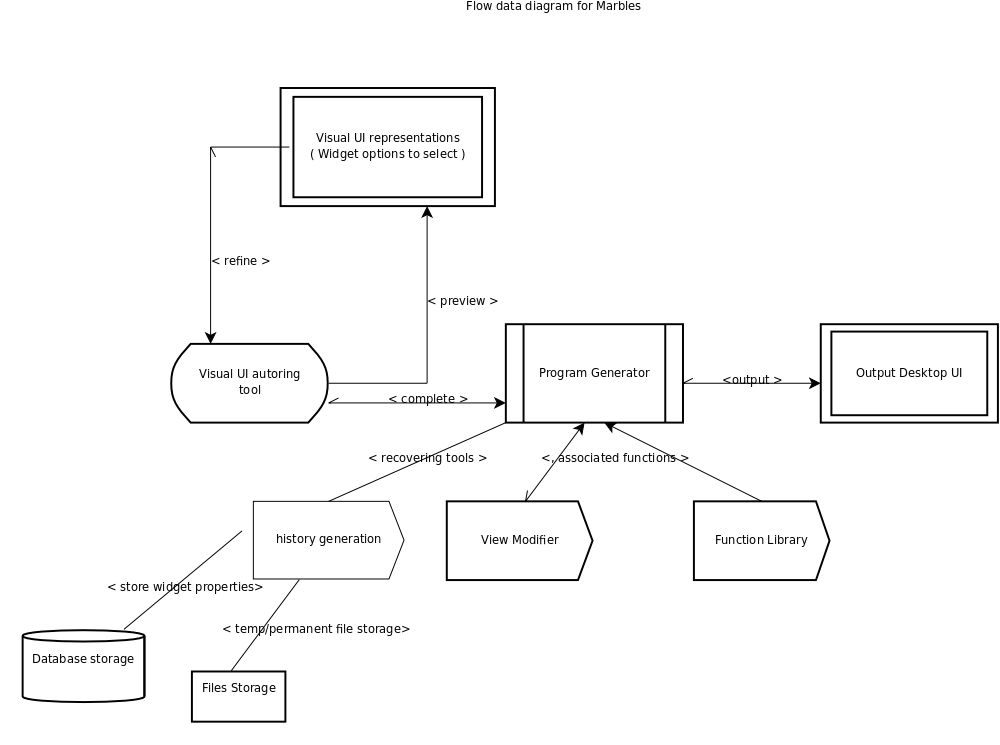
Marlbes-development environment.

Thanks to James Henstridge and for his wonderful work on libglade which makes it easier to store the UI widget information and it's actions in xml file called GLADE. Using libglade will not only save the time of development but also makes the Marbles-output as platform independent. We can share the glade file for UI over network and recreate or edit the current glade file to make it more complex. It gives an option for children to play with it.
I have also made a design without libglade library using database storage but after getting suggestions from sugar members, I removed that in my technical approach. Whole design is thus made very simple. Mentors can read that approach in my original GSOC proposal submitted to google.
With LibGlade library
Libglade is a library designed to dynamically load a user interface from an XML file on disk. These UI description files can be created using the Glade UI builder. It provides several options for connecting callbacks up to the interface including an `autoconnect' option that scans the program's symbol table for callback functions.
- Choosing UI widgets and dropping on canvas ( view ) |
- Showing the current output on canvas ( Temp glade file ) | - UI builder tool
- Getting the output in Python code |
- Option for Activity creation, Exporting to xo bundle, Debugging tool for Developers, sharing of code etc. | - Post building activities
Creating GTK UI that can show various widgets icons and gives an option to select with the mouse, dragging and then dropping on canvas. It will be saved in glade-format file. this temporary glade file will then be read using libglade library in python and output can be shown on canvas.
After completion of dragging and dropping, User can build the application using build activity in Marbles which takes input a glade file and outputs a python source code ( PyGTK framework ) capable of producing same output as glade does.
Post-building activities like activity creation from python source code, sharing source code using xo bundle can be done later.
Design Goals
- Design Goals
- Good design
I am greatly impressed by Turtle activity of sugar, and would like to achieve if not same, then try to reach the UI clearity
as much as possible. Usability would be primary aim for design. - Good help system
Since it involves various new widgets which children might not know .It better to have help-activity along with GUI
builder to offer help to users for building the UI. - Automatic Decision System
Minor decisions for widget placements, size ratio with desktop resolution and other script associations should be done automatically. - User Input
Mouse input is more preferrable than Keyboard input. - Final Considerations
Below are the final considerations for Marbles (Future goals as well)- Quality
prefers quality of features over quantity. - Promote Collaboration
Promote collaboration through good documentation, careful modular design and quality code. - Modularity
Design will allow extending to other target languages and other GUI toolkits.
- Quality
Q10. What is the timeline for development of your project? The Summer of Code work period is 7 weeks long, May 23 - August 10; tell us what you will be working on each week. (As the summer goes on, you and your mentor will adjust your schedule, but it's good to have a plan at the beginning so you have an idea of where you're headed.) Note that you should probably plan to have something "working and 90% done" by the midterm evaluation (July 6-13); the last steps always take longer than you think, and we will consider cancelling projects which are not mostly working by then.Convince us, in 5-15 sentences, that you will be able to successfully complete your project in the timeline you have described. This is usually where people describe their past experiences, credentials, prior projects, schoolwork, and that sort of thing, but be creative. Link to prior work or other resources as relevant.
Ans.
In summer, I plan to follow the following schedule:
- Preparation phase( Time : April 20 - may15 )
- gathering requirements of the project
- getting involved with Mentor in verifying and validating the requirements.
- Writing abstract classes for all widgets and specifications
- Creating of canvas to support widget dragging and dropping.
- This phase, I would be communicating with people as much as possible, getting requirements and verifying
with people or community. I would also go to the pre-releases of similar softwares to get prons and cons and trying to improve in my project
development.I am sure to get community support on this very interesting project. - Delieverables Final design and technical approach to mentors and getting reviewed by them.
- Coding Phase ( Time: May 15- July1 { This phase would be subdivided to different phases } )
- Implementation of program generator to generate the required code.
- Creation of programming libraries such as History generation, View modifier, function associations for code generation.
- Work on intelligent sizers HBOX or VBOX to minimize the use of old technique sizers in UI creation.
- Delieverables Basic UI design with dragging and dropping facility for widgets and UI application output as a python code.
- Coding & Internal Testing Phase ( Time: July7- July 25 )
- Creation of final UI output for UI builder.
- Creation of help activity for helping students in UI building.
- Full testing of system with different widgets.
- use coverage analysis to know the redundance code and improving it further
- Documentation support for widgets and UI creation.
- Delieverables Release of Marbles-Alpha version for external testing.
- Final Evaluation ( July 26 - END )
- This phase is basically for porting the UI builder solution to sugar's upstream development and checking for bugs in different environment.
- Delieverables full said project to sugar community.
Time line: Seems very little time to do so many things, but I will try to give the best from my side.
I have worked on variety of projects ranging from web application, mobile j2me midlets, Web server management( python project ) and desktop application. One of the interesting projects I worked on is "cross platform windows explorer" which I built in python using wxwidget, in which we (team work) handled the issues like portability, searching and UI designs. If I am not exagerating, that would not be wrong to say that I am a fast learner.
Believe me, I have that talent needed to build and design a complex system for customers. Below are some of the projects I worked on
- Shallow file browser: cross platform browser
- Multithreaded multi media-server : A multithreaded cross platform media-server for streaming podcast or mulitimedia contents to mediadevices.
It is currently being used by medicare services to stream health podcasts to the users. - Mobile Softwares: I had done some freelance work in mobile computation last semester. Major projects, I was associated with are Mobile
Shopping, SRV navigation tool for medicare services (SRV is an open source hardware(robot) for education purposes). - Web Development & Services: I have been actively involved in web-development from past 1 year and used Ruby on rails and Django for development. Django, by
far, was among my best tool for Web-UI applications. - Minor projects on kernel implementation ( as a part of OS course ), Database managment projects and others.
My "Open Source" activites
- Check out the source code of shallow file browser at http://code.google.com/p/shallow-file-browser. Do check the snapshot of browser in action.
- Minute-Shell: Well, it's a part of my course project. I created a small program to emulate linux shell. This code is hosted at http://code.google.com/p/minute-shell/ .
Me and the community
Q11. If your project is successfully completed, what will its impact be on the Sugar Labs community? Give 3 answers, each 1-3 paragraphs in length. The first one should be yours. The other two should be answers from members of the Sugar Labs community, at least one of whom should be a Sugar Labs GSoC mentor. Provide email contact information for non-GSoC mentors.
Ans. This project support children creativity and imagination. These small games, development activity will surely help them to become problem solvers, innovators, and creative thinkers. These activities will also help the children to develop many important skills that boost a child's learning and success.
Q12. Sugar Labs will be working to set up a small (5-30 unit) Sugar pilot near each student project that is accepted to GSoC so that you can immediately see how your work affects children in a deployment. We will make arrangements to either supply or find all the equipment needed. Do you have any ideas on where you would like your deployment to be, who you would like to be involved, and how we can help you and the community in your area begin it?
Ans. That would be a great idea to go with. I've been working in NGO for primary children education called "ASHA-KIRAN" in our college and it would a great learning experience for them. Here, in hyderabad, We have a language problem, they don't understand hindi, my mother tongue, and I don't understand, telgu ( local language ). So, I always use different activities to teach them like sound creation, drawing, Word dictionary, some local plays etc. I believe in case of language problems like India, We should teach the children as:
- Alphabet creation, as a drawing practice
- Sound, give alphabets some sound, try to echo them loudly, may be in funnier way.
- Try to associate meaning to words, here imagination comes into play. I use some stories behind words, or pictures
- Last, use them in sentence.
I can associate these features in my project and sugar lab can help us to provide technical equipments to teach children. We already have a good infrastructure in campus, so I will start using my project even in development stage with them and report the status to sugar community.
Q13. What will you do if you get stuck on your project and your mentor isn't around?
Ans. I have been using open source projects for quite a long time and I know, we always get stuck with some problem may be installation, compiling, syntax error, many more but I guess this is where the interesting part begins and open source community comes into play. In my views, we always learn new things about the error/software if we ask doubts in community. So, if I ever get stuck on the project, I will raise my doubts in mailing lists, request clearifications in irc chat, write in blog or on some related community sites where I can get any assistant from.
Other assistant I am sure to get it from my seniors, they all have been participating in GSOC from past years and would love to assist me if need occurs.
Q14. How do you propose you will be keeping the community informed of your progress and any problems or questions you might have over the course of the project?
Ans. I love interactive with people and I will keep community members duly informed. I can try following things to work this out
- Chatting on IRC chat
- Mailing lists
- tracking specific person or related to the area personally via email.
- Posting queries on blog
Miscellaneous

Q15. We want to make sure that you can set up a development environment before the summer starts. Please send us a link to a screenshot of your Sugar development environment with the following modification: when you hover over the XO-person icon in the middle of Home view, the drop-down text should have your email in place of "Restart." See the image on the right for an example. It's normal to need assistance with this, so please visit our IRC channel, #sugar on irc.freenode.net, and ask for help.
Ans. I am a fedora loving guy and installed sugar system on my fedora. I googled for the installation and successfully completed the following tasks
- Installed the system using yum packages.
This is just double click installation like windows. But I could not find the development procedure for rpm packages.
- Built using source.
I used jhbuild to install and update the source code needed for the sugar development. I tested it by creating some activities given on wiki
page of sugar lab and it was working fine.
I've started exploring things and really looking forward for a good open source development.
Q16. Describe a great learning experience you had as a child.
Ans. As a child, I had a great interest in science and was more curious to know everything. One thing I would like to share is, When I was in 8th standard, I was more impressed by Einsten-theory "One theory for every theories" and still I am. I remember discussing my new science theories on unification of world and discoveries with my science teacher and which ofcourse he won't like and always got irritated, but what he always suggested me, is to read & analyze before coming to conclusions. This habit of me is still continuing. Now the views have changed, questions are different but thirst for knowing things is still the same. My teacher not only answers my query but it gives me a life time dose to approach for my problems.
Q17. What is your t-shirt size? (Yes, we know Google asks for this already; humor us.)
Ans. medium
Q18. Is there anything else we should have asked you or anything else that we should know that might make us like you or your project more?
Ans. Just for introduction, I am pursuing my BTECH degree from IIIT Hyderabad. I had started using linux from past 2 years and since then I love every bit of it. I also have research interest and working on my research paper on "simulation of rigid blocks during earthquake". I am an
active coder in SPOJ and topcoder and have a strong python programming skills. I have also worked as an intern in california based company.
"buddibot" developing medicare services for elderly people.
No matter if I get selected or not, but I love to continue with sugar community.I already registered myself in sugar bug reporting tool and trying to study source code. Please let me know how can I assist to open source community.<br>
Thank You & Regards,
Puneet.
Recent Editing
- Basic Design principles for marbles are explained in GSOC document http://socghop.appspot.com/document/show/user/chasedspeed/design.
- Reponse for http://wiki.sugarlabs.org/go/Summer_of_Code/Application_review_notes#Don.27t_reinvent_the_wheel can be found at http://socghop.appspot.com/document/show/user/chasedspeed/marbles.
Comments / Suggestions on Marbles are always welcome.