0.88/Turtle Art: Difference between revisions
m moved 0.88/TurtleArt to 0.88/Turtle Art: deCamelCase |
|||
| (18 intermediate revisions by 2 users not shown) | |||
| Line 1: | Line 1: | ||
<noinclude> | <noinclude></noinclude> | ||
<big>'''Turtle Art'''</big> | |||
== Introduction == | == Introduction == | ||
Turtle Art is an activity with a Logo-inspired graphical "turtle" that draws colorful art based on snap-together visual programming elements. | Turtle Art is an activity with a Logo-inspired graphical "turtle" that draws colorful art based on snap-together visual programming elements. | ||
Turtle Art is intended to be a stepping stone to the Logo programming language, but there are many restrictions compared to Logo. (Only numeric global variables and stack items are available, no lists or other data-structures. The conditionals and some of the functions only take constants or variables, not expressions. Limited screen real-estate makes building large programs unfeasible.) However, you can export your Turtle Art creations to Berkley Logo. The | Turtle Art is intended to be a stepping stone to the Logo programming language, but there are many restrictions compared to Logo. (Only numeric global variables and stack items are available, no lists or other data-structures. The conditionals and some of the functions only take constants or variables, not expressions. Limited screen real-estate makes building large programs unfeasible.) However, you can export your Turtle Art creations to Berkley Logo. The [http://git.sugarlabs.org/projects/turtleart/repos/arduino-support Arduino fork] of Turtle Art also has a facility for sensor input, so, for example, you can move the Turtle based upon sound volume or pitch. | ||
Turtle Art is in the same tradition as Etoys, Scratch, Lego Mindstorms™, and Lego Microworlds™. | Turtle Art is in the same tradition as Etoys, Scratch, Lego Mindstorms™, and Lego Microworlds™. | ||
Turtle Art is used extensively in Sugar deployments and numerous materials for support in the classroom have been developed. Of course, since Turtle Art is a Logo derivative, many of the classic Logo exercises are well suited for engaging students in Turtle Art. For example, Tony Forster has been [http://tonyforster.blogspot.com blogging about a wide variety of Turtle Art activities]. Gonzalo Odiard has written a [https://sites.google.com/site/godiard/TurtleArt.ppt?attredirects=0&d=1 short introduction to Turtle Art]. | Turtle Art is used extensively in Sugar deployments and numerous materials for support in the classroom have been developed. Of course, since Turtle Art is a Logo derivative, many of the classic Logo exercises are well suited for engaging students in Turtle Art. For example, Tony Forster has been [http://tonyforster.blogspot.com blogging about a wide variety of Turtle Art activities]. Gonzalo Odiard has written a [https://sites.google.com/site/godiard/TurtleArt.ppt?attredirects=0&d=1 short introduction to Turtle Art]. | ||
Turtle Art will let you export your project as PNG, HMTL, SVG or Logo. In other words, you can use Turtle Art to make presentations and as an SVG generator. | |||
More Info: | More Info: | ||
* Turtle Art Sugar Activity [[Activities/ | * Turtle Art Sugar Activity [[Activities/Turtle Art|homepage]] | ||
* Turtle Art gallery (See [http://www.turtleart.org]) | * Turtle Art gallery (See [http://www.turtleart.org]) | ||
* Turtle Art Manual (See [http://en.flossmanuals.net/turtleart]) | * Turtle Art Manual (See [http://en.flossmanuals.net/turtleart]) | ||
| Line 37: | Line 40: | ||
File:100Turtles.png|100 Turtles | File:100Turtles.png|100 Turtles | ||
File:TA-savesvg.svg|SVG output using the save SVG block | File:TA-savesvg.svg|SVG output using the save SVG block | ||
File:TA-multivariable.png|Multi-variable Python blocks | |||
</gallery> | </gallery> | ||
| Line 42: | Line 46: | ||
Minor bugs and feature changes include: | Minor bugs and feature changes include: | ||
83 | 83 | ||
| Line 67: | Line 72: | ||
** save SVG block lets you generate SVG with Turtle Art | ** save SVG block lets you generate SVG with Turtle Art | ||
** improved export-to-HTML logic | ** improved export-to-HTML logic | ||
** new translations | ** new translations (hi) | ||
** multi-variable in-line Python-code blocks | |||
** traceback for checking errors in in-line Python code | |||
* completed a major refactoring of the code | * completed a major refactoring of the code | ||
** | ** download bundle-size is only 40% of previous versions | ||
** faster first-time launch | ** faster first-time launch | ||
** greatly simplified i18n maintenance | ** greatly simplified i18n maintenance | ||
| Line 137: | Line 144: | ||
== Internationalization (i18n) and Localization (l10n) == | == Internationalization (i18n) and Localization (l10n) == | ||
* added fi, hi | |||
== Compatibility == | == Compatibility == | ||
| Line 143: | Line 152: | ||
== Detailed changes == | == Detailed changes == | ||
As of '''Version 83''' | As of '''Version 83''' | ||
* {{Bug|180}} COPYING file is missed | |||
* {{Bug|194}} turtleart: en.po syntax error, breaks build | |||
* {{Bug|240}} [portfolio] named variables cause errors in "+=" | |||
* {{Bug|299}} Permissions for TAPortfolio samples not set correctly? | |||
* {{Bug|472}} Remove unexpected 'save/load' tab from toolbar | * {{Bug|472}} Remove unexpected 'save/load' tab from toolbar | ||
* {{Bug|489}} Turtle Art text entry should use Entry widget | * {{Bug|489}} Turtle Art text entry should use Entry widget | ||
* {{Bug|491}} Turtle Art sharing needs new logic | |||
* {{Bug|673}} Logo program should be displayable in the document View Source | * {{Bug|673}} Logo program should be displayable in the document View Source | ||
* {{Bug| | * {{Bug|1110}} missing mime types | ||
* {{Bug|1220}} sugar 85 olpc fedora11 jhbuild 20aug9 turtle art doesn't start. No log for sugar art in log dir. | |||
* {{Bug|1330}} turtle art clean brick | |||
* {{Bug|1465}} add a start brick upon launching new project in Turtle Art | |||
* {{Bug|1466}} add a trash can to turtle art | |||
* {{Bug|1482}} Turtle Art Activity crash | |||
* {{Bug|1484}} TurtleArt-71 canvas lockup if you enter a number block with a decimal point | |||
* {{Bug|1557}} Moving tiles in TurtleArt let a trace on the screen | |||
* {{Bug|1583}} TurtleArt creates strange tamyblock.py journal entry | |||
* {{Bug|1600}} Marking strings as "not to be translated" and so forth | |||
* {{Bug|1633}} Numeric and text input fails on Turtle Art v81 under Debian 5.0 | |||
* {{Bug|1657}} Turtle Art has some .png images | |||
* {{Bug|1685}} Problem with Spanish translation of "random" | |||
* {{Bug|1840}} activity title should be set to sample name after a sample is loaded | |||
==Open tickets== | ==Open tickets== | ||
* {{Bug| | * {{Bug|155}} Turtle Art with Sensors has different requirements for non-XO hardware | ||
* {{Bug| | * {{Bug|548}} Turtle Art: read and write to text file | ||
* {{Bug| | * {{Bug|552}} Turtle art: reinstate sensor input | ||
* {{Bug|1057}} Turtle Art feature to add support for "pages" | * {{Bug|1057}} Turtle Art feature to add support for "pages" | ||
* {{Bug|1188}} Load samples from turtleart.org | * {{Bug|1188}} Load samples from turtleart.org | ||
* {{Bug|1203}} Rebase Turtle Art graphics on Cairo | * {{Bug|1203}} Rebase Turtle Art graphics on Cairo | ||
* {{Bug| | * {{Bug|1709}} Colors used for block highlighting (current running block vs. error-reporting) | ||
* {{Bug| | * {{Bug|1613}} sound brick only sounds once inside a template | ||
== Credits == | == Credits == | ||
* Walter Bender and Raúl Gutiérrez Segalés (with help from Simon Schampijer) | * Walter Bender and Raúl Gutiérrez Segalés (with help from Simon Schampijer, Matt Gallagher, and Jamie Boisture) | ||
* Especially helpful community feedback from Tony Forster, Ed Cherlin, and Bill Kerr | * Especially helpful community feedback from Tony Forster, Ed Cherlin, Jeff Elkner, and Bill Kerr | ||
* Brian Silverman is the first author of Turtle Art | * Brian Silverman is the first author of Turtle Art | ||
Latest revision as of 12:28, 23 July 2012
Turtle Art
Introduction
Turtle Art is an activity with a Logo-inspired graphical "turtle" that draws colorful art based on snap-together visual programming elements.
Turtle Art is intended to be a stepping stone to the Logo programming language, but there are many restrictions compared to Logo. (Only numeric global variables and stack items are available, no lists or other data-structures. The conditionals and some of the functions only take constants or variables, not expressions. Limited screen real-estate makes building large programs unfeasible.) However, you can export your Turtle Art creations to Berkley Logo. The Arduino fork of Turtle Art also has a facility for sensor input, so, for example, you can move the Turtle based upon sound volume or pitch.
Turtle Art is in the same tradition as Etoys, Scratch, Lego Mindstorms™, and Lego Microworlds™.
Turtle Art is used extensively in Sugar deployments and numerous materials for support in the classroom have been developed. Of course, since Turtle Art is a Logo derivative, many of the classic Logo exercises are well suited for engaging students in Turtle Art. For example, Tony Forster has been blogging about a wide variety of Turtle Art activities. Gonzalo Odiard has written a short introduction to Turtle Art.
Turtle Art will let you export your project as PNG, HMTL, SVG or Logo. In other words, you can use Turtle Art to make presentations and as an SVG generator.
More Info:
- Turtle Art Sugar Activity homepage
- Turtle Art gallery (See [1])
- Turtle Art Manual (See [2])
- Turtle Art teacher guides from Uruguay (See [3])
- Turtle Art teacher guides from Peru (See [4])
- Turtle Art student guide (See [5])
- Tony Forster blog on Turtle Art (See [6])
- Bill Kerr blog on Turtle Art (See [7])
- Barry Newell worksheet (See [8])
What is new for users
The most visible change is the incorporation of the new scalable block design.
-
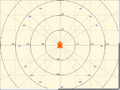 Cartesian and polar coordinate grids
 -
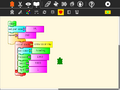 Collapsible stack
 -
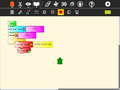 Collapsed stack
 -
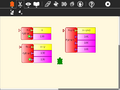 Python function with one, two, or three variables
 -
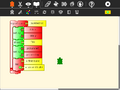 Expandable bullet list (two bullets)
 -
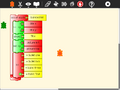 Expandable bullet list (four bullets)
 -
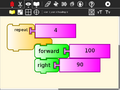 Enlarged blocks
 -
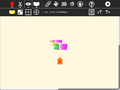 Shrunken blocks
 -
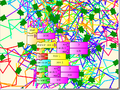 100 Turtles
 -
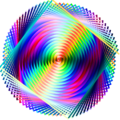 SVG output using the save SVG block
 -
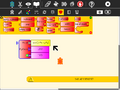 Multi-variable Python blocks


![[8]](http://1.bp.blogspot.com/_r-MQun1PKUg/SpuoxMM_JmI/AAAAAAAABEA/DIEF5r3OYe8/s1600-h/BNcropped.jpg)
Minor bugs and feature changes include:
83
- added new user-interface features
- support for multiple turtles
- expandable blocks
- collapsible stacks
- runtime block highlighting
- error highlighting
- trash palette (with restore)
- palette better integrated into Sugar toolbar
- variable-length string blocks
- editable string blocks
- paste text from Sugar clipboard to string blocks
- new prefix boolean logic
- showblock to compliment hideblock
- fullscreen block
- Cartesian and polar coordinate blocks
- color blocks
- editable macros (used for presentation blocks)
- labels on coordinate-grid overlays
- more complete support in non-Sugar environments
- new (and improved) sample code
- Logo code for project added to View Source
- save SVG block lets you generate SVG with Turtle Art
- improved export-to-HTML logic
- new translations (hi)
- multi-variable in-line Python-code blocks
- traceback for checking errors in in-line Python code
- completed a major refactoring of the code
- download bundle-size is only 40% of previous versions
- faster first-time launch
- greatly simplified i18n maintenance
- easier to extend with new blocks and palettes
82
- minor updates to Spanish translations
81
- fixed keyboard input bug introduced in v79
80
- new Finnish translations
79
- backspace enabled when entering numbers
- arbitrarily long numeric strings enabled
- fixed Python error in sample code
- clean up of en artwork
- fix bug in load_image
- detecting XO 1.5 hardware for font-scaling problem
- keyboard and gamepad navigation
- expanded hover help
- better logic for block selection used by copy/paste
78
- new artwork for pen palette
- color blocks
77
- hide status block on start up
- save reference to Python code loaded from the Journal
76
- fixed import error in project
- fixed bullets in exporthtml
- added proper scaling for coordinate blocks
- moved status layer forward
75
- Cartesian coordinates overlay
- polar coordinates overlay
- coordinate display on View Toolbar
- Option to rescale coordinate system to 100x100 on View Toolbar
- Reordered the palettes (moved misc. down)
74
- load start block for new projects
- fixed bug with reloading descriptions from Journal
- added hover help to command line version
- initiate the import Python chooser when Python block is clicked
- saving pastable code to html export
- fixed some problems in export to HTML code
What is new for developers
Raúl Gutiérrez Segalés and I completed a major refactoring for 0.88 which includes a block factory--a more object-oriented approach that should facilitate a more decentralized development approach.
Internationalization (i18n) and Localization (l10n)
- added fi, hi
Compatibility
Compatible with all versions of Sugar although some functionality is lost with pre-0.82 versions and sharing is incompatible with previous versions.
Detailed changes
As of Version 83
- #180 COPYING file is missed
- #194 turtleart: en.po syntax error, breaks build
- #240 [portfolio] named variables cause errors in "+="
- #299 Permissions for TAPortfolio samples not set correctly?
- #472 Remove unexpected 'save/load' tab from toolbar
- #489 Turtle Art text entry should use Entry widget
- #491 Turtle Art sharing needs new logic
- #673 Logo program should be displayable in the document View Source
- #1110 missing mime types
- #1220 sugar 85 olpc fedora11 jhbuild 20aug9 turtle art doesn't start. No log for sugar art in log dir.
- #1330 turtle art clean brick
- #1465 add a start brick upon launching new project in Turtle Art
- #1466 add a trash can to turtle art
- #1482 Turtle Art Activity crash
- #1484 TurtleArt-71 canvas lockup if you enter a number block with a decimal point
- #1557 Moving tiles in TurtleArt let a trace on the screen
- #1583 TurtleArt creates strange tamyblock.py journal entry
- #1600 Marking strings as "not to be translated" and so forth
- #1633 Numeric and text input fails on Turtle Art v81 under Debian 5.0
- #1657 Turtle Art has some .png images
- #1685 Problem with Spanish translation of "random"
- #1840 activity title should be set to sample name after a sample is loaded
Open tickets
- #155 Turtle Art with Sensors has different requirements for non-XO hardware
- #548 Turtle Art: read and write to text file
- #552 Turtle art: reinstate sensor input
- #1057 Turtle Art feature to add support for "pages"
- #1188 Load samples from turtleart.org
- #1203 Rebase Turtle Art graphics on Cairo
- #1709 Colors used for block highlighting (current running block vs. error-reporting)
- #1613 sound brick only sounds once inside a template
Credits
- Walter Bender and Raúl Gutiérrez Segalés (with help from Simon Schampijer, Matt Gallagher, and Jamie Boisture)
- Especially helpful community feedback from Tony Forster, Ed Cherlin, Jeff Elkner, and Bill Kerr
- Brian Silverman is the first author of Turtle Art