Activities/Turtle Art/Portfolios: Difference between revisions
Tonyforster (talk | contribs) |
m moved Activities/TurtleArt/Portfolios to Activities/Turtle Art/Portfolios: deCamelCase |
||
| (5 intermediate revisions by one other user not shown) | |||
| Line 30: | Line 30: | ||
* [http://www.eportfolio.lagcc.cuny.edu/conference/connections.html Making Connections National Resource Center] | * [http://www.eportfolio.lagcc.cuny.edu/conference/connections.html Making Connections National Resource Center] | ||
===Sharing=== | ===Sharing a presentation=== | ||
From version 106, pen trails, fill, show text and show images are shared with other laptops in a shared session. | From version 106, pen trails, fill, show text and show images are shared with other laptops in a shared session. Screen erase is not shared. A slideshow can be broadcast to other laptops. Its simple, just these 2 blocks are required to broadcast a slide to all the laptops in the shared session. | ||
[[File:Show-media.jpg]] | |||
Use <i>set scale</i> to set image size. Full screen images take longer than smaller images. See below for using the keyboard to advance slides and other presentation ideas. | |||
===Quick Tutorial on using the portfolio features=== | ===Quick Tutorial on using the portfolio features=== | ||
| Line 48: | Line 52: | ||
File:Portfolio14.png|Run your slide show by clicking on the Run Button on the Main toolbar. | File:Portfolio14.png|Run your slide show by clicking on the Run Button on the Main toolbar. | ||
File:Portfolio15.png|In this example, we use keyboard input to transition between slides. | File:Portfolio15.png|In this example, we use keyboard input to transition between slides. | ||
File:Slideshow-fwd-back.jpg|Using the f and b keys to advance or go back slides. | |||
</gallery> | </gallery> | ||
Latest revision as of 11:37, 23 July 2012
Presentations and Portfolios
A portfolio feature lets you use Turtle Art to create multimedia slide shows from material retrieved from your Journal. The basic idea is to import images (and eventually movies, audio, and text files) into slide templates, not unlike Powerpoint, and then show a presentation by stepping through them. The portfolio includes the typical major functions of presentation software: an editor that allows text to be inserted and formatted (this is largely incomplete), a method for inserting images (from the Journal), and a slide-show system to display the content. What makes it a bit different than tools such as Powerpoint is that you can program your slides using Turtle Art blocks. Turtle Art also has an export-to-HTML function so that presentations can be viewed outside of the Sugar environment. (These features have been merged into the main branch of Turtle Art.)
Background
In the era of high-stakes testing, we have the means to measure “which child knows more”; these data tell us about relative merit of the school in which a child is enrolled. The Turtle Art portfolio feature is an assessment tool that shows “what a child knows”; children become the curators of their own work. They advance their own learning and help their teachers, parents, and school administrators understand better the depth and breadth of what they have learned.
A recent article in the Chronicle of Higher Education claims:
- ePortfolios can integrate student learning in an expanded range of media, literacies, and viable intellectual work;
- ePortfolios enable students to link together diverse parts of their learning including the formal and informal curriculum;
- ePortfolios engage students with their learning;
- ePortfolios offer colleges a meaningful mechanism for accessing and organizing the evidence of student learning.
Turtle Art portfolios engage children in the process of reflecting on their work—what they have done, how they have done it, and how success these efforts have been—as they create a multimedia narrative to show their teachers, parents and peers what they have learned. Turtle Art Portfolio builds upon the journaling functionality of the Sugar learning platform, where every action or activity a child takes in the classroom is automatically recorded in a folder: (1) by enabling the child to select important learning achievements, be they in reading, writing, arithmetic, arts, music, physical education, history and social science, etc. Children answer questions such as “I chose this piece because...” (2) creating a multimedia narrative presentation from their selections (including audio voice-overs and video), reflective of the multiple ways in which children learn; and (3) sharing their presentation with classmates, both to celebrate what they have learned, but also to engage in a critical dialog about their work.
Turtle Art portfolio is innovative in three ways: (1) it builds upon a journal of *all* learning activities that is automatically collected; (2) it has unique programmability, fun and accessible to even the youngest elementary school children, but interesting and engaging to middle-school children as well; and (3) it has unique tools for both collaborating on the construction of the portfolio and its subsequent sharing with others.
Portfolios have been shown to be “a powerful means for children to assess their own work, set goals, and take responsibility for their future learning.” But portfolio assessment has seen limited applicability. It is a practical, engaging means to using portfolios. By building upon the automatic accumulation of work in journal (including a “screen capture” of their work) the portfolio process can readily be integrated into the classroom routine. Reflection becomes the norm: children are encouraged write in their journals (young children record audio notes) for a few minutes after *every* class. The numbing question, “what did you do in school today?” need no longer a necessary part of the parent-child dialog. Instead, the parent can talk to the child about actual artifacts.
Culling from the journal becomes part of the end-of-term assessment process. The process of telling one's story as a learning requires further reflection. At a “portfolio social”, parents are invited to view presentations and ask children about their learning; the child's voice is heard.
The classroom teacher can add addition assessment slides to the portfolio about themes such as work habits and personal growth, as part of an archive that travels with a child across grade levels. Through juxtaposition, the child and teacher can see what has changed over the course of the years, trends, and areas for improvement, Also, a classroom portfolio can be assembled as part of a teacher-assessment process.
Some additional background on ePortfolios can be found here:
- Inter/National Coalition for ePortfolio Research
- ePortfolio Action & Communication – ePAC
- Helen Barrett’s ePortfolio site
- Handbook of Research on ePortfolios
- EuroPortfolio
- Making Connections National Resource Center
Sharing a presentation
From version 106, pen trails, fill, show text and show images are shared with other laptops in a shared session. Screen erase is not shared. A slideshow can be broadcast to other laptops. Its simple, just these 2 blocks are required to broadcast a slide to all the laptops in the shared session.

Use set scale to set image size. Full screen images take longer than smaller images. See below for using the keyboard to advance slides and other presentation ideas.
Quick Tutorial on using the portfolio features
-
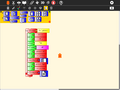 Start by selecting a slide template from the palette. The templates will automatically expand into a stack.
 -
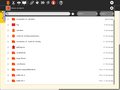 Click on the Journal icon to initiate a search for slide content.
 -
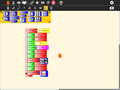 Select a journal object, such as an image, audio file, movie, or activity. A thumbnail will appear in the template.
 -
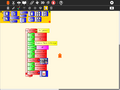 The description field for the Journal object will automatically be loaded.
 -
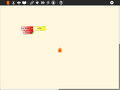 Once loaded, the slide stack can be labeled and collapsed.
 -
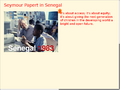 Click on the slide template to view the slide. (Click on the Hide Blocks button on the View toolbar to hide any blocks that are covering your slide.)
 -
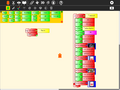 Try using some of the other templates.
 -
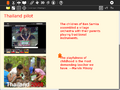 View them by clicking on them (you may want to use the Eraser button first).
 -
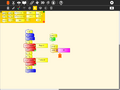 You can program a simple slide show by making a stack: fullscreen; hide blocks; clear the screen; show Slide 1; wait; clear the screen; show Slide 2; wait; show blocks.
 -
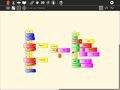 You can also program stacks for your slide decorations and slide transitions.
 -
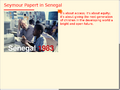 In this example, we draw a rule under the title of each slide.
 -
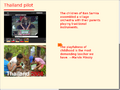 Run your slide show by clicking on the Run Button on the Main toolbar.
 -
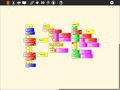 In this example, we use keyboard input to transition between slides.
 -
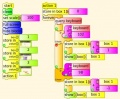 Using the f and b keys to advance or go back slides.


A video of the portfolio basics is available here.
A PDF of a Turtle Art portfolio presentation can be downloaded File:Desktop-Summit.pdf.