Activities/VisualMatch: Difference between revisions
| Line 110: | Line 110: | ||
===New features=== | ===New features=== | ||
* As of Version 9, Visual Match includes number-search and word-search games in addition to the pattern-search game. | * As of Version 9, Visual Match includes number-search and word-search games in addition to the pattern-search game. | ||
'''Note:''' Prior to Version 9, you needed to click the "+3" button for extra cards to be dealt when there are no matches on the board. | |||
* As of Version 14, Visual Match includes a computer (robot) assistant. | * As of Version 14, Visual Match includes a computer (robot) assistant. The robot will help you find matches. It operates on a timer—finding matches after an adjustable number of seconds. The robot is enabled/disabled by clicking on the button the the Tool menu. | ||
* As of Version 15, Visual Match includes Beginner and Expert Modes. | * As of Version 15, Visual Match includes Beginner and Expert Modes. In Beginner Mode, there are only 27 (3<sup>3</sup>) cards and only three card characteristics. In Expert Mode, there are 81 (3<sup>4</sup>) cards and four card characteristics. | ||
* As of Version 16, Visual Match supports sharing. | * As of Version 16, Visual Match supports sharing. | ||
| Line 131: | Line 132: | ||
File:Visualmatch-level-2.png|expert mode mode (color, number, shape, and fill) | File:Visualmatch-level-2.png|expert mode mode (color, number, shape, and fill) | ||
</gallery> | </gallery> | ||
===Show me the code=== | ===Show me the code=== | ||
Revision as of 18:33, 9 January 2010

The basics
How to play:
- 12 cards are on the playing surface at any time.
- Click on three cards to make a match.
- The most recent match is displayed on the left.
About Visual Match
Visual Match is a pattern-matching game written for Sugar; it is included as part of the Honey collection of Sugar add-ons. The object of the game is to find sets of three cards where each attribute—color, shape, number of elements, and shading—either match on all three cards or are different on all three cards. The current version doesn't yet support sharing with multiple players or saving to the Journal, but it can be played by a single player.
i18n
Visual Match has not yet been translated into any languages other than English.
(See our Pootle server for details about how to translate Visual Match into your language.)
More details
- Cards have four different attributes: color, shape, fill texture, and number of elements.
- The number version works with prime factors instead of shapes and textures.
- The word version works with semantic groupings.
- Play by clicking on three cards to make a match. If it is a valid match, it will be moved on the left (in the blank-card zone.) It will be replaced by new cards from the deck.
- A valid match is defined by cards where each attribute is either the same on each card or different on each card, e.g, all three red cards or one red, one green, and one blue card.
- An invalid match is when two cards share and attribute and the third card does not, e.g., one red and two green cards.
- Matches must be valid across all four attributes. Examples of valid and invalid matches are shown below.
- At the end of the game, all of the matches are displayed in a simple animation.
- As of Version 16, a simple cooperative sharing model is supported.
- Everyone works cooperatively to find matches.
- Only the initiator of the shared session can start new games, change game type or level.
- Also as of Version 16, the game state is saved to the Journal and restored upon resume. (Note: Restore is currently broken on Sugar pre-0.82.)
Note:
- The grid layout is arbitrary; there is no need to pick in rows or columns, or one from each column.
- The blank cards on the left are a place to display the most recent match; they can be otherwise ignored.
Watch out, because VisualMatch can be very addictive.
Examples of valid matches


 colors, shapes, and shade match; numbers are different

 numbers match; colors, shapes and shade are different

 everything is different
Examples of invalid matches
 two of the same colors (red)
 two of the same shape (X)
 two of the same shade (solid)

 two of the same number (2)
When there is no match

On occasion, there is no match. If there is no match, three additional cards are dealt as illustrated in the figure above.
The toolbars

From left to right:
- (a) The standard Sugar 'activity' button used to access the activity menu, which includes sharing (the latter not yet implemented);
- (b) The 'new pattern game' button used to start a new pattern game;
- (c) The 'new number game' button used to start a new number game;
- (d) The 'new word game' button used to start a new word game;
- (e) The toolbar used to access the computer assistant and the number-game variants
- (f) The number of cards remaining in the deck is displayed;
- (g) The number of matches found is displayed;
- (h) The number of seconds that have elapsed since the last match was found is displayed;
- (i) The current status is displayed; Once all of the matches have been found, the total elapsed time is displayed. Note that there may be some cards left on the playing field at the end of the game that do not make a match.
- (j) The 'stop' button is used to exit the activity.

From left to right:
- (a) The level button switches between beginner (Level 1) and expert (Level 2) modes;
- (b) The robot button is used to turn on/off computer assistance;
- (c) The time (in seconds) before computer assistance starts;
Number card options:
- products, Roman numerals, words, Chinese, hash marks, dots in circles, points on a star, dice, dots in rows

From left to right:
- (a) Sugar Activity title;
- (b) Sharing button;
- (c) Sugar Keep button;
- (d) Journal-entry update button.
Note: In older versions of Sugar, these buttons appear under the 'Project' tab.

New features
- As of Version 9, Visual Match includes number-search and word-search games in addition to the pattern-search game.
Note: Prior to Version 9, you needed to click the "+3" button for extra cards to be dealt when there are no matches on the board.
- As of Version 14, Visual Match includes a computer (robot) assistant. The robot will help you find matches. It operates on a timer—finding matches after an adjustable number of seconds. The robot is enabled/disabled by clicking on the button the the Tool menu.
- As of Version 15, Visual Match includes Beginner and Expert Modes. In Beginner Mode, there are only 27 (33) cards and only three card characteristics. In Expert Mode, there are 81 (34) cards and four card characteristics.
- As of Version 16, Visual Match supports sharing.


-
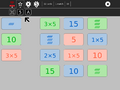 Prime factors (1,2,3,5,7 and 11) are used to determine matches
 -
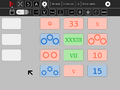 Roman numerals and dots in a circle
 -
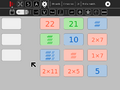 Hashes and products
 -
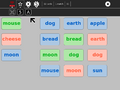 semantic word groups (animal, food, celestial objects) are used to determine matches
 -
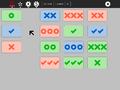 beginner mode (color, number, and shape)
 -
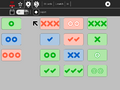 expert mode mode (color, number, shape, and fill)


Show me the code
You can explore the Visual Match source code [cloning the project] directly from git.