0.88/Notes: Difference between revisions
| Line 11: | Line 11: | ||
== What is new for users == | == What is new for users == | ||
=== Connect to the Internet using | === Connect to the Internet using a GSM modem === | ||
You can use | You can use a GSM modem with Sugar to connect to the Internet. GSM modems are often found in mobile phones but there are also standalone modems that can be connected over USB to a computer. When a GSM modem is attached to the computer, a device is added to the Sugar Frame from which you can connect to the Internet. The settings for the connection—such as service provider and password—can be made from the Sugar Control Panel. This [[Features/3G_Support | feature]] provides Sugar learners with more ways to access the Internet. | ||
Developers and | Developers and educators from [http://www.ceibal.edu.uy/ Plan Ceibal] and [http://www.paraguayeduca.org/ Paraguay Educa] worked together to add the GSM feature to Sugar. | ||
[[Image:3G_Device.png|thumb|none|800px|The 3G device icon]] | [[Image:3G_Device.png|thumb|none|800px|The 3G-device icon]] | ||
[[Image:3G_CP_select.png|thumb|none|800px|The 3G | [[Image:3G_CP_select.png|thumb|none|800px|The 3G control-panel icon]] | ||
[[Image:3G_CP.png|thumb|none|800px|The 3G | [[Image:3G_CP.png|thumb|none|800px|The 3G control-panel section]] | ||
=== Update an activity translation independently of the Sugar release process === | === Update an activity translation independently of the Sugar release process === | ||
Revision as of 12:40, 31 March 2010
| Please copy/paste "{{Translationlist | xx | origlang=en | translated={{{translated}}}}}" (where xx is Translation Team/ISO 639 language code for your translation) to 0.88/Notes/translations | HowTo [ID# 50446] +/- |
Sucrose 0.88 Release Notes
Introduction
Sucrose 0.88 is the latest version of the Sugar learning platform, consisting of Glucose, the base system environment; and Fructose, a set of demonstration activities.
Sucrose is released every six months. Each new release contains new features, improvements, bug fixes, and translations. Sucrose 0.88 continues this tradition and is our fourth well-planned release to date.
You can learn more about Sugar itself by studying the Sugar definition or by reading the comic strip about the learning platform from Dongyun Lee. Even better, why not try Sugar today?
What is new for users
Connect to the Internet using a GSM modem
You can use a GSM modem with Sugar to connect to the Internet. GSM modems are often found in mobile phones but there are also standalone modems that can be connected over USB to a computer. When a GSM modem is attached to the computer, a device is added to the Sugar Frame from which you can connect to the Internet. The settings for the connection—such as service provider and password—can be made from the Sugar Control Panel. This feature provides Sugar learners with more ways to access the Internet.
Developers and educators from Plan Ceibal and Paraguay Educa worked together to add the GSM feature to Sugar.


Update an activity translation independently of the Sugar release process
In general the translation process is tightly coupled with the release workflow. In order to get the latest translations for a particular activity, deployments need to either wait for the activity maintainer to make a new release, or use the language pack mechanism, which is distribution specific, and an ugly hack at its best. The Enhanced Gettext Feature adds an extra search path for translation files for Sugar activities. This allows deployments to add and update activity translations independently of the release process. The alternate search path can be configured using GConf configuration system.
With this Feature life should become a lot easier for deployments who rely on a small translator team to accomplish the job which often find it more difficult to keep up with the Sugar release cycle. Furthermore, we hope to take the burden from activity maintainers to make new releases to incorporate newer translations with this enhancement.
A message is displayed when an activity fails to start
In previous versions of Sugar there was no feedback if an activity failed to start or if it is still launching. Furthermore, stopping an activity that failed to start was not ossible from the user interface. This Feature displays a message when an activity fails to start with a button to allow to stop the activity.

Customize the Sugar font size
This Feature adds the possibility for distributors and deployers to customize the Sugar font size. The proposed solution is one similar to the solutions used in other desktop environments like GNOME and KDE: allow customization of the base font size used across the entire desktop platform. This is another important step to bring Sugar more in-line with the desktop world and distributors like OLPC will be able to select font sizes without ugly hacks. In Sugar 0.90 there will be a new control panel section that users will be able to customize font size to suit their needs, too.
A refactored, new feature rich Turtle Art
Turtle Art has undergone a major rewrite for this release. Many new features have found their way into this release including Cartesian and polar coordinate grids, support for multiple turtles, resizable blocks, SVG export, and run-time block highlighting.
-
 Cartesian and polar coordinate grids
 -
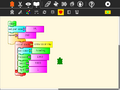 Collapsible stack
 -
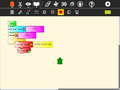 Collapsed stack
 -
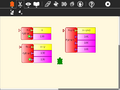 Python function with one, two, or three variables
 -
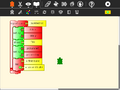 Expandable bullet list (two bullets)
 -
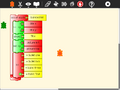 Expandable bullet list (four bullets)
 -
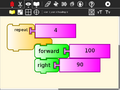 Enlarged blocks
 -
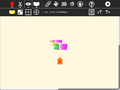 Shrunken blocks
 -
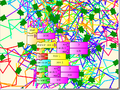 100 Turtles
 -
 SVG output using the save SVG block
 -
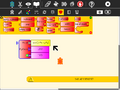 Multi-variable Python blocks


See Turtle Art 0.88 Release Notes for more details.
Update to this version
Please use the instructions for your distribution (SoaS, Fedora, Ubuntu, Debian etc) of choice to upgrade to this release. Note that it may take a while until the release is packaged for each distribution. Please stay tuned for distribution specific announcements and watch out for updates at Get Sugar.
What's new for developers
The following changes are important for developers using the Sucrose 0.88 developer platform.
Widgets
API
Dependencies
Activity Authors guidelines
What's new for packagers
- sugar: cjson -> simplejson: Sugar moved back to use simplejson instead of cjson. cjson has a big bug dealing with slashes, this is a significant long-term bug and upstream has not been responsive other than acknowledging it. This bug breaks journal entry bundles #1553.
- sugar-toolkit: the python module dateutil has been added. Please add this to the requires (i.e. in Fedora python-dateutil).
Internationalization (i18n) and Localization (l10n)
More than 80% of the core sugar user interface and toolkit has been translated to 23 languages, which are (in order of percent translated):
- Vietnamese
- Spanish
- Portuguese (Brazil)
- Papiamento
- Japanese
- Italian
- Greek
- German
- French
- Chinese (Taiwan)
- Arabic
- Hindi
- Dutch
- Swedish
- Portuguese
- Indonesian
- Tamil
- Sinhala
- Pashto
- Slovenian
- Russian
- Nepali
- Dari
This work has been made possible thanks to the tireless efforts of the members of the translation team.
Compatibility
possible compatibility issues
Getting the sources
If you want to package sugar for your favourite distribution or just want to examine sugar's lovely code ;) you can find all the source code of each module at the links below.
Glucose
- sugar-toolkit 0.88.0
- sugar 0.88.0
- sugar-datastore 0.88.0
- sugar-artwork 0.88.0
- sugar-base 0.88.0
- sugar-presence-service 0.88.0
- etoys-4.0.2340-2
- Etoys 115
- hulahop 0.7.1
Looking at the release cycle details
You can browse the notes of each development release in 0.114. Their respective sources are listed there as well.
Looking Forward to 0.90
Planning of the next release cycle has started at 0.90/Roadmap. One of the most interesting goals is the refactoring of Collaboration on which Tomeu and the Collabora team are working on.
Credits
Many people contributed to this release indirectly, including testing, documentation, translation, contributing to the Wiki, outreach to education and developer communities. On behalf of the community, we give our warmest thanks to the developers and contributors who made this Sugar release possible.