Activities/Turtle in a Pond: Difference between revisions
| Line 114: | Line 114: | ||
</pre> | </pre> | ||
The dots are stored in a | The dots are stored in a 13✕13 array. Each dot has an attribute, 'type', that determines it status. The edges have a type=None. Occupied dots have a type=True. Unoccupied dots have a type=False. | ||
Your strategy should start with: | Your strategy should start with: | ||
| Line 128: | Line 128: | ||
There are some resources that you can use in your program, including: | There are some resources that you can use in your program, including: | ||
;self._dots: the array of dots. | ;self._dots: the array of dots from which you can test the type attribute (self._dots[i].type==None → edge; self._dots[i].type==False → open; self._dots[i].type==True → blocked) | ||
;self. | |||
;self._orientation:you can set the orientation of your turtle by assigning a number from 0-5 (clockwise beginning with 30 degrees from north) | ;self._orientation:you can set the orientation of your turtle by assigning a number from 0-5 (clockwise beginning with 30 degrees from north) | ||
;self._set_label('your message here'):you can write a message on the toolbar if you want to communicate what your turtle is thinking | ;self._set_label('your message here'):you can write a message on the toolbar if you want to communicate what your turtle is thinking | ||
;self._grid_to_dot((column, row)): returns the dot that is at a grid position (column, row) | ;self._grid_to_dot((column, row)): returns the dot that is at a grid position (column, row) | ||
;self._dot_to_grid(dot): returns an array (column, row) representing the grid position of a dot | ;self._dot_to_grid(dot): returns an array (column, row) representing the grid position of a dot | ||
;CIRCLE: a | ;CIRCLE: a 2✕6✕2 array of offsets that can used to find the column and row of the dots surrounding the turtle. | ||
A bit more explanation about the CIRCLE constant: | A bit more explanation about the CIRCLE constant: | ||
Revision as of 14:01, 30 November 2011
Turtle in a Pond Activity
Turtle in a Pond is a strategy game. The goal is to surround the turtle before it runs of the screen.

How to play Turtle in a Pond
Click on the dots to keep the turtle from escaping.
-
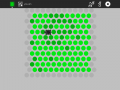 The turtle is captured
 -
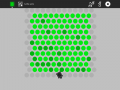 The turtle escaped


Did you know that:
The Toolbars

- from left to right
- the Activity toolbar button (shown in the open position)
- the New-game button
- an area for messages
- the Load-new-strategy button
- the Reload-the-default-strategy button
- the Activity stop button
Strategy
Cut and paste these examples into Pippy and save then to your Sugar Journal. Then use the Load-strategy button in Turtle in a Pond to try them.
In this strategy, the turtle moves down, regardless of whether the dot is open.
def _turtle_strategy(self, turtle):
    turtle[1] += 1
    return turtle
In this strategy, the turtle moves down until it is blocked (i.e., when the dot type s True).
def _turtle_strategy(self, turtle):
    if not self._dots[self._grid_to_dot((turtle[0], turtle[1]+1))].type:
       turtle[1] += 1
    return turtle
In this strategy, the turtle searches for an open dot, looking clockwise.
def _turtle_strategy(self, turtle):
    evenodd = turtle[1] % 2
    for i in range(6):
        column = turtle[0] + CIRCLE[evenodd][i][0]
        row = turtle[1] + CIRCLE[evenodd][i][1]
        if not self._dots[self._grid_to_dot((column, row))].type:
            return [column, row]
    return turtle
In this version, the turtle orientation is set as well.
def _turtle_strategy(self, turtle):
    evenodd = turtle[1] % 2
    for i in range(6):
        column = turtle[0] + CIRCLE[evenodd][i][0]
        row = turtle[1] + CIRCLE[evenodd][i][1]
        if not self._dots[self._grid_to_dot((column, row))].type:
            self._orientation = i
            return [column, row]
    return turtle
In the default strategy, the turtle choose a random direction and goes there if the dot is open.
def _turtle_strategy(self, turtle):
    evenodd = turtle[1] % 2
    n = int(uniform(0, 6))
    for i in range(6):
        column = turtle[0] + CIRCLE[evenodd][(i + n) % 6][0]
        row = turtle[1] + CIRCLE[evenodd][(i + n) % 6][1]
        if not self._dots[self._grid_to_dot((column, row))].type:
            self._orientation = (i + n) % 6
            return [column, row]
    return turtle
In this strategy, the turtle will go off the edge if it can.
def _turtle_strategy(self, turtle):
    evenodd = turtle[1] % 2
    for i in range(6):
        column = turtle[0] + CIRCLE[evenodd][i][0]
        row = turtle[1] + CIRCLE[evenodd][i][1]
        if self._dots[self._grid_to_dot((column, row))].type is None:
            self._orientation = i
            return [column, row]

    n = int(uniform(0, 6))
    for i in range(6):
        column = turtle[0] + CIRCLE[evenodd][(i + n) % 6][0]
        row = turtle[1] + CIRCLE[evenodd][(i + n) % 6][1]
        if not self._dots[self._grid_to_dot((column, row))].type:
            self._orientation = (i + n) % 6
            return [column, row]
    return turtle
The dots are stored in a 13✕13 array. Each dot has an attribute, 'type', that determines it status. The edges have a type=None. Occupied dots have a type=True. Unoccupied dots have a type=False.
Your strategy should start with:
def _turtle_strategy(self, turtle):
The turtle argument is a tuple containing the column and row of the current turtle position. That is, turtle[0] is the horizontal position and turtle[1] is the vertical position.
Your strategy should return a tuple containing the column and row of the new turtle position, e.g.,
return [column, row]
There are some resources that you can use in your program, including:
- self._dots
- the array of dots from which you can test the type attribute (self._dots[i].type==None → edge; self._dots[i].type==False → open; self._dots[i].type==True → blocked)
- self._orientation
- you can set the orientation of your turtle by assigning a number from 0-5 (clockwise beginning with 30 degrees from north)
- self._set_label('your message here')
- you can write a message on the toolbar if you want to communicate what your turtle is thinking
- self._grid_to_dot((column, row))
- returns the dot that is at a grid position (column, row)
- self._dot_to_grid(dot)
- returns an array (column, row) representing the grid position of a dot
- CIRCLE
- a 2✕6✕2 array of offsets that can used to find the column and row of the dots surrounding the turtle.
A bit more explanation about the CIRCLE constant:
CIRCLE contains tuples of offsets (a column offset and a row offset) that allow you to find the grid coordinates (column and row) of the 6 dots that surround the turtle. It is complicated by the fact that the rows are staggered (in order to form hexagons) so when the turtle is on an even row (turtle[1] % 2 == 0) we use one set of offsets (CIRCLE[0]) and when it is on an odd row (turtle[1] % 2 == 1) we use a second set of offsets (CIRCLE[1]).
Where to get Turtle in a Pond
The Turtle in a Pond activity is available for download from the Sugar activity portal: Turtle in a Pond
The source code is available on the Sugar Labs Gitorious server.