Tutorials/Chatting with the Chat Activity: Difference between revisions
m add Blue bars |
|||
| Line 1: | Line 1: | ||
{| width="100%" cellpadding="0" cellspacing="0" | |||
|- | |||
|width=25% align=left bgcolor=#C3D9FF|← '''[[Sugar_Creation_Kit/sck/How_to_use_IRC|How to use IRC]]''' | |||
|width=50% align=center bgcolor=#C3D9FF|'''[[Sugar_Creation_Kit/sck/Introduction_to_Sugar_Interface|Introduction to the Sugar Interface]]''' | |||
|width=25% align=right bgcolor=#C3D9FF| '''[[Community/Distributions/Fedora-SoaS|Fedora-SoaS]]''' → | |||
|} | |||
:'''Chat''' is an example of a '''shared activity''' which allows '''Collaboration''' over a '''Jabber Connection''' | :'''Chat''' is an example of a '''shared activity''' which allows '''Collaboration''' over a '''Jabber Connection''' | ||
:There are many different '''shared activities''' in the '''Sugar-Desktop''' | :There are many different '''shared activities''' in the '''Sugar-Desktop''' | ||
| Line 56: | Line 61: | ||
*Click on it | *Click on it | ||
*You return to the '''Home (or f3)''' screen | *You return to the '''Home (or f3)''' screen | ||
{| width="100%" cellpadding="0" cellspacing="0" | |||
|- | |||
|width=25% align=left bgcolor=#C3D9FF|← '''[[Sugar_Creation_Kit/sck/How_to_use_IRC|How to use IRC]]''' | |||
|width=50% align=center bgcolor=#C3D9FF|'''[[Sugar_Creation_Kit/sck/Introduction_to_Sugar_Interface|Introduction to the Sugar Interface]]''' | |||
|width=25% align=right bgcolor=#C3D9FF| '''[[Community/Distributions/Fedora-SoaS|Fedora-SoaS]]''' → | |||
|} | |||
Revision as of 14:05, 15 December 2011
| ← How to use IRC | Introduction to the Sugar Interface | Fedora-SoaS → |
- Chat is an example of a shared activity which allows Collaboration over a Jabber Connection
- There are many different shared activities in the Sugar-Desktop
- It is one of Sugar's Strongest features.
Boot Sugar
- The Home (or f3) Screen appears

- The Chat icon
 is on right side of the Spiral of Activities
 - You must be connected to the internet for Chat to Collaborate

Start Chat
- Click on the Chat Icon

Send Chat Message
- Type your message in the bottom field of Chat
- Hit return
- Here Testing Chat is the message
- Note that the User's Avitar name is displayed on the line before the message
- In this case Tris5-sugar: Testing Chat
- This becomes useful if several other users join the chat
Use emoticons in your chat
Click on the "happy face" icon on the top bar
- A drop Down menu appears and you can click on any of the emoticons on it

- hit return
- the emoticon is added to your message

- Click on the 0 with a dot inside icon on the top bar
- Click
 in the drop down menu


- You are now collaborating in a shared session
- Your Shared Chat will show an Icon on the f1 Neighborhood.
- Other users can join your chat from there.
- This is an example of joining another users shared chat
- Click in the frame or Hit F1 key and you switch to the Neighborhood View.
- Move mouse pointer to center of window to retract frame.
- Join Chat
- Hover the mouse cursor over the Chat icon
- Click Join on the drop down menu
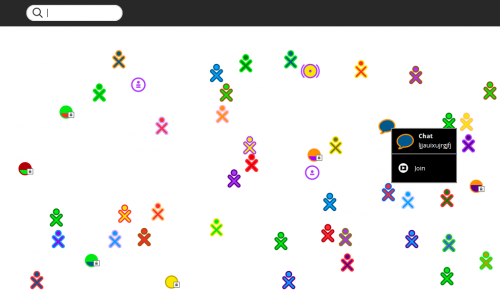
- You are Chatting (Collaborating) in the other user's Chat
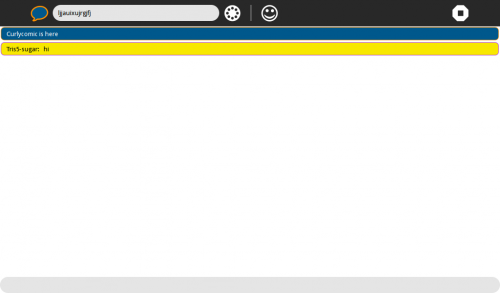
- You can see your messages (yellow) and Other user's messages in (blue)
- Other's user's color will match the colors of their XO Avitar
- It will not always be blue.


Stop Chat

- click on the white octagon icon with a black square in it, in the right top bar
- "Stop Ctrl+Q" appears in drop down menu
- Click on it
- You return to the Home (or f3) screen
| ← How to use IRC | Introduction to the Sugar Interface | Fedora-SoaS → |