Running Linux Applications Under Sugar: Difference between revisions
transfer content from Activities |
report of success with Sugar 0.96.2 |
||
| Line 26: | Line 26: | ||
*only works with programs that use the same command every time (i.e., a single command with no qualifiers). It doesn't work for roto's current mplayer configuration, because the mplayer command requires an input file name to start the program. | *only works with programs that use the same command every time (i.e., a single command with no qualifiers). It doesn't work for roto's current mplayer configuration, because the mplayer command requires an input file name to start the program. | ||
{{Note/warning|NOTE:|The procedure outlined below | {{Note/warning|NOTE:|The procedure outlined below may not work for some versions of Sugar and Fedora. For example on F11 / S0.84 and newer activities sugarized this way crash X.org in some conditions with a BadWindow error. '''A workaround <!-- the solution is to fix X to not crash so easily, is this logged anywhere as a denial of service? -->''' is to obtain the source to libsugarize.c and build libsugarize.so from it -- see http://dev.laptop.org/git/users/albert/sugarize/ . Also recommended: the shell version of 'sugarize', at http://lists.laptop.org/pipermail/devel/2008-January/009387.html | ||
:Some tests with Sugar 0.96.2 were successfull (see [[{{TALKPAGENAME}}#It works!|this comment]]).}} | |||
===To setup (one time):=== | ===To setup (one time):=== | ||
Latest revision as of 10:53, 31 August 2012
Note: This article is about running standard GNU/Linux applications inside Sugar by using the Activities icon panel rather than starting them from the Terminal.
Running GNU/Linux Applications Under Sugar
There are two ways to run GNU/Linux applications as Activities under Sugar (meaning you don't need to use Terminal to load them):
- Sugar Coating - Making Linux apps run under Sugar, but not modifying them to take advantage of Sugar's collaborative capabilities
- Sugarizing - A fully integrated Linux application, re-engineered to take advantage of Sugar's advanced collaboration abilities
- See these instructions: How to sugarize an application: [1]
Sugar Coating Activities
To run Linux apps under Sugar (i.e., making them to run in the Sugar interface, without the collaboration and other Sugar integration programmed into them), read these instructions on Running Linux Applications Under Sugar.
In the future, we hope that Sugar will be able to run Linux applications natively without these steps.
Sugarizing Activities
See Activity Team for information on porting regular applications to run as native Sugar Activities.
Sugar Coating
Many standard GNU/Linux programs can be run within Sugar, but without the collaboration and other Sugar integration programmed into them. The process of adding an icon to the Sugar Activities panel is called "Sugar Coating".
A simple script to automate the process was created by a woman named CatMoran. The script:
- has be confirmed to work with Firefox, Seamonkey, Midnight Commander, TuxType2, TuxPaint and Totem. It it presumed to work with many other GNU/Linux programs.
- only works with programs that use the same command every time (i.e., a single command with no qualifiers). It doesn't work for roto's current mplayer configuration, because the mplayer command requires an input file name to start the program.

To setup (one time):
- Start a Terminal activity.
- Enter the following commands: mkdir sugarize wget http://dl.dropbox.com/u/1203534/sugarize/libsugarize.so chmod 755 libsugarize.so wget http://dl.dropbox.com/u/1203534/sugarize/sug chmod 755 sug (What do those commands do? They log you in as root, gets a copy of Albert Cahalan's compiled libsugarize file, and gets the script CatMoran created, modified by akiwiguy.) Next, run this: vi sug and change the CREATEPATH variable to /home/$yourusernamehere/Activities Optional, if you want to use one of the icons CatMoran created: wget
 wget
wget  wget
wget 
To Run (once per program that you want to Sugar Coat):
- Locate an icon you want to use/reuse.
- You can copy any .svg file located in /usr/share/activities/*.activity/activity/*.svg
- Or you can use one of the icons CatMoran created--and downloaded using the wget commands listed above. plain.svg is a plain circle, ff.svg is a circle with the letters FF (for Firefox) inside, l.svg is a circle with the single letter L inside. Both of the latter files can be easily edited using any text editor and one or both character(s) changed. Each letter is in plain text just before the </tspan> tags, replace them and save the file.
- Enter the following commands, to log in as root and execute the sug script. T quit the script at any time, just enter nothing at the prompt and hit the Enter button.
- In Uruguay, the XO laptops do not allow you to login as root because LATU have blocked this.
Sugar Coat Script Mirror Servers
- Main Page - http://www.archive.org/details/Sugarize
- The HTTP - http://ia341002.us.archive.org/3/items/Sugarize
- The FTP - ftp://ia341002.us.archive.org/3/items/Sugarize
- See also: - Sugarize_an_application_for_use_in_a_SoaS_USB
- Alternate Instructions: wiki-sugarize.txt
- Local storage of needed files:http://people.sugarlabs.org/Tgillard/sugarize/ with permission from Albert Cahalan.
- Source - http://olpcnews.com/forum/index.php?topic=1555.0
- http://dev.laptop.org/git/users/albert/sugarize/
Comments
Look at: http://people.sugarlabs.org/Tgillard/sugarize/wiki-sugarize.txt
I haven't been able to get this to work in Update.1 --leetcharmer
Rob - I modified the script to work in Update 1 for SeaMonkey, but it requires an effective disabling of security. The crux of the problem is that Rainbow 1) runs your application as a totally new user each time (never as "olpc"), 2) these "on-the-fly" users don't have write access to their home directories, and 3) these "on-the-fly" users are destroyed on reboot. All of these users are created in the same persistent group, and all share write access to a common "data" directory for the group. (The preceding is just a paraphrase of the Rainbow docs - should likely be a link). In the case of non-Sugar apps, the application has no idea that the usual role of a user has been migrated to a group, and so the application is unlikely to create it's data files with the correct permissions. Further, since the "on-the-fly" users are destroyed on each reboot, if the username appears in persistent data (e.g., absolute pathnames), the application will fail after a reboot. All of these issues are addressed in the following for the SeaMonkey application.
Note Well: The following instructions essentially remove all security on your machine. If you have set passwords on any of the machine accounts (root, olpc, etc.), likely you don't want to execute these instructions.
[olpc@xo ~]$ su
[olpc@xo ~]# chmod a+s /bin/chmod
These lines allow any user to change permissions on any file and/or directory in the system. Therefore, having something only readable / executable by root is no longer a protection, since an unprivileged user can just change the permissions. In my case, I couldn't lose what I didn't have -- I have no password for the root or olpc users, so there was no effective change.
In general sudo would be a more graceful approach to this problem, but I couldn't get it to work in a script (first, you need to allow all uids > 10000; second, you need it to not prompt for a password; and third, su can't be invoked from a Sugar script because stdin is not a tty, even if no password is required).
After using the above to allow the Rainbow "on-the-fly" users to change permissions on files they don't own, we use the chmod ability in the script. The following script is just CatMoran's script with a few lines added at the beginning. Any other minor formatting changes are accidental and a result of my editing the file 100 times to try to find out why it wasn't working. I've only tested this script with SeaMonkey -- but I think similar ideas would work for other applications.
#!/bin/sh

# Causes SeaMonkey to put the .mozilla directory in a
# place that is writable, and also where Rainbow wants
# it.  SUGAR_ACTIVITY_ROOT/data is not directly suitable
# since it contains a reference to a user that will
# be destroyed on reboot, and SeaMonkey stores absolute
# pathnames in its persistent data.
export HOME=`/bin/ls -l $SUGAR_ACTIVITY_ROOT/data | /usr/bin/awk '{ print $10 }'`

# libgnomevfs ignores the HOME environment variable,
# so make our actual home directory writable for the
# .gnome2 and .gnome2_private directories.
chmod g+w $SUGAR_ACTIVITY_ROOT

# SeaMonkey ignores umask and makes everything
# only user-accessible.  But, we're running as
# a different user each time.  So make everything
# in HOME group-accessible (at a minimum, make
# .mozilla and everything in it group-accessible).
chmod -R g+rwx $HOME/.*
chmod -R g+rwx $HOME/*

while [ -n "$2" ] ; do
     case "$1" in
         -b | --bundle-id)     export SUGAR_BUNDLE_ID="$2" ;;
         -a | --activity-id)   export SUGAR_ACTIVITY_ID="$2" ;;
         -o | --object-id)     export SUGAR_OBJECT_ID="$2" ;;
         -u | --uri)           export SUGAR_URI="$2" ;;
         *) echo unknown argument $1 $2  ;;
     esac
     shift;shift
done
export LD_PRELOAD="$SUGAR_BUNDLE_PATH/lib/libsugarize.so"
export NET_WM_NAME="SeaMonkey"
exec /usr/bin/seamonkey
Brian - To make this work for SoaS Release 1 (Sugar 0.84.2) the sug script needs to be updated.
CREATEPATH=/home/liveuser/Activities/
Useful GNU/Linux Applications
VLC Media Player
The VLC media player is a highly portable multimedia player for various audio and video formats (MPEG-1, MPEG-2, MPEG-4, DivX, mp3, flv, avi, ogg, ...) as well as DVDs, VCDs, and various streaming protocols. It can also be used as a server to stream in unicast or multicast in IPv4 or IPv6 on a high-bandwidth network.; the VLC Player is considered to be better by some users then MPlayer because it offer more settings, options and features. There is also no need to run it from Terminal. Read Activities/VLC to learn how to install it.
Seamonkey
SeaMonkey has inherited the successful all-in-one concept of the original Netscape Communicator and continues that product line based on the modern, cross-platform architecture provided by the Mozilla project.
- The Internet browser at the core of the SeaMonkey suite uses the same rendering engine as its sibling Mozilla Firefox, with popular features like tabbed browsing, popup blocking, find as you type and a lot of other functionality for a smooth web experience.
- SeaMonkey's Mail and Newsgroups client shares lots of code with Mozilla Thunderbird and features adaptive Junk mail filtering, labels and mail views, multiple accounts, S/MIME, address books with LDAP support and is ready for both private and corporate use.
- Additonal components include an easy-to-use HTML Editor, the ChatZilla IRC chat application and web development tools like a DOM Inspector and a JavaScript debugger.
- If that's still not enough, SeaMonkey can be extended with numerous Add-Ons that provide additional functionality and customization for a complete Internet experience.
Seamonkey can be Sugar-coated.
Midnight Commander
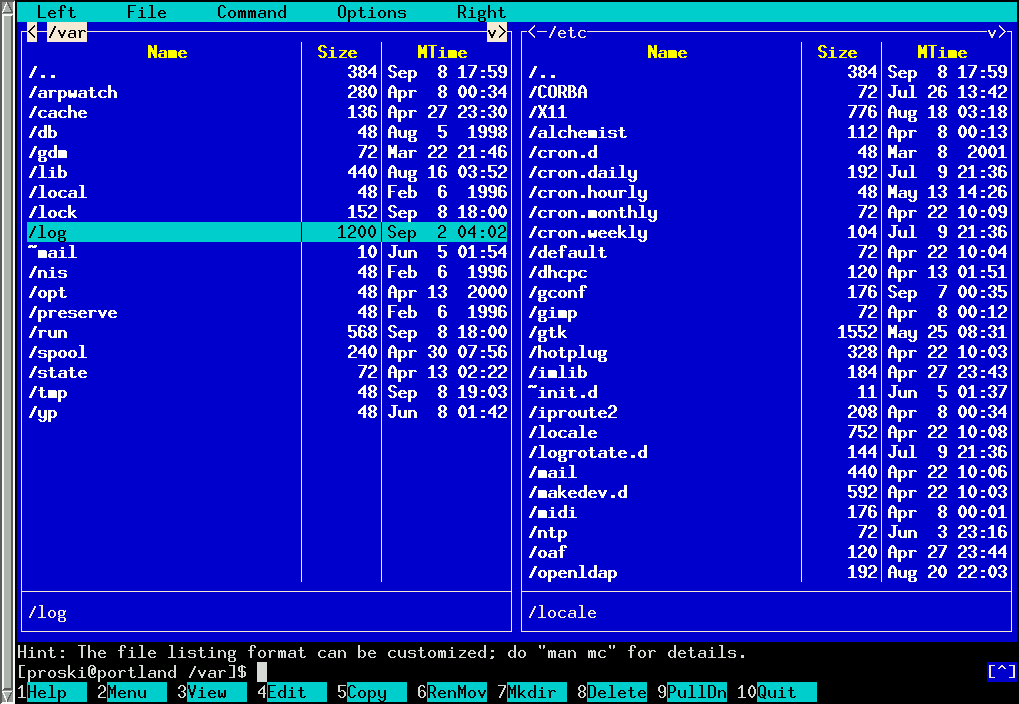
Midnight Commander is a text-mode file manager and visual command shell. It is easily Sugar-coated for access from the Activities panel. Screenshot You can also run it directly in Terminal. (Paper Writers)
Totem Media Player
The Totem media player is already installed in the OLPC XO-1. It is the engine that supports media on the system. Out of the box it does not support MP3 music or MPEG-4 video. A free driver can be downloaded to add MP3 compatability. A Sugar-coating can be applied to easily access the program from the Activities panel.
Tux4Kids
- TuxType2
- TuxType is a touch typing tutorial/game than can be installed on the OLPC XO-1 using the yum command. A Sugar-coating can be applied to easily access the program from the Activities panel.
- TuxMath
- TuxMath is an arcade game that helps kids practice their math facts. A Sugar-coating can be applied to easily access the program from the Activities panel.
- TuxPaint
- Tux Paint is a drawing program for children ages 3 to 12. It combines an easy-to-use interface, fun sound effects, and an encouraging cartoon mascot who guides children as they use the program. A Sugar-coating can be applied to easily access the program from the Activities panel.
UCBLogo
Logo was Seymour Papert's language from the 1960s for children, originally providing Turtle Graphics by controlling a robot turtle. There is a large literature on using Logo to teach programming to children.
Turtle Art can produce Logo output, but we do not have a Logo activity in Sugar. UCBLogo is available in many Linux distributions, and can be installed (with yum on XOs, yum or apt tools on other Linuces) and run in Terminal. The command window opens a graphic window that the user can drag around. Entering turtle graphic commands at the command line then causes graphic output in the Logo window.
J
J is Turing Award winner Ken Iverson's last version of APL, his language for describing computers and algorithms, designed originally for human use, not as a programming language. In order to avoid the controversy that surrounded the APL character set and keyboard layouts, J uses only ASCII. J Software, Iverson's company, put a version of J under GPL3 in March 2011. It can be installed and run from the command line. A Debian package is in preparation.
Iverson successfully used APL to teach arithmetic to first-graders on a loaned IBM 360 with Selectric printing terminals using APL typeballs. He wrote a book on teaching Arithmetic, published by APL Press but now out of print. Mokurai is preparing to add it to the Replacing Textbooks server.