Sugar Network/Tutorial

 Sugar Network annotated screen-shots
Info and How to install Sugar Network (SN)
- SN is only available on Factory
- Platform Team/Harmonic Distribution
- Sweets Distribution#Installation
- Sweets Distribution/Manual Installation
- Sugar_Network_Activities Listing which activities on SN work and where they are on the 55 pages
- Visual introduction to the Sugar Interface
Home view for Sugar Network (F3 key)
- Home view
- Hover over central XO avatar to get drop-down menu

Sugar Network in "My Settings"
- Check [x] to start SN
- These are 329 activitities on 55 pages- (Many do not work)
- Check [x] to Start Server Mode
- These are a selected set of 69 activities for testing: NEW --Satellit 15:19, 31 May 2012 (EDT)
- Reboot Computer after selecting SN
- You may be unable to Connect to Activites if you do not

Neighborhood view for Sugar Network (F1 key)
- Note many more XO Avitars than are present on jabber.sugarlabs.org
- Grey (No color) XO Avatars seem to have incomplete info on server.

Frame on Sugar Network with SN button
- Click on the SN button to access SN Activities
- F8 is an alternate way to access Activities

SN Activities
- listing and start pages for Sugar_Network_Activities
- Click on the Activity Icon to start
- Not all will start at this time.

SN Server-mode Activities
- Screen of 69 selected activities for testing
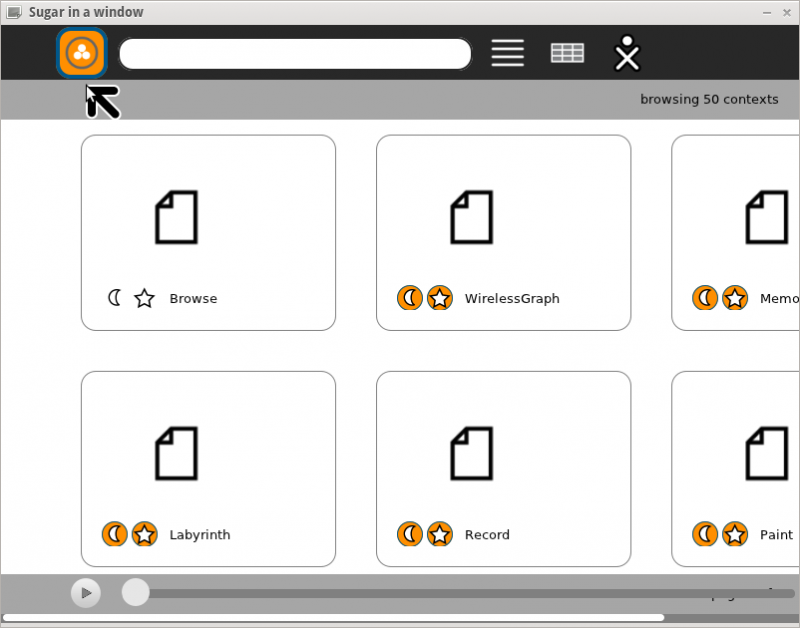

SN Activity reporting page
- Note click [=] icon to return to activities list.
- (Cursor in screenshot is over it)

SN Error report dialog
- This is not functional and will crash system requiring a restart --Satellit 10:09, 19 May 2012 (EDT)
