Features/Enhanced color selector/Testing: Difference between revisions
Created page with '# open the control panel # open the About Me panel # click on the XOs to see if the colors change and the alert message appears # exit and see if the selected colors appear on re...' |
No edit summary |
||
| (2 intermediate revisions by the same user not shown) | |||
| Line 1: | Line 1: | ||
:1. open the control panel | |||
:2. open the About Me panel | |||
:3. click on the XOs to see if the colors change and the alert message appears | |||
::The icons to the left of the central XO are used to modify the fill color; the icons to the right are used to modify the stroke color. | |||
:4. exit and see if the selected colors appear on reboot | |||
<gallery> | |||
:File:Color-selector-1.png|Initial colors with options for changing fill (left) and stroke (right) | |||
:File:Color-selector-2.png|After clicking on the left-most icon, the fill color has changed; the icon second from the left can be used to undo the change | |||
:File:Color-selector-3.png|After clicking on the right-most icon, the stroke color has changed; the icon second from the right can be used to undo the change | |||
</gallery> | |||
Latest revision as of 12:38, 3 September 2010
- 1. open the control panel
- 2. open the About Me panel
- 3. click on the XOs to see if the colors change and the alert message appears
- The icons to the left of the central XO are used to modify the fill color; the icons to the right are used to modify the stroke color.
- 4. exit and see if the selected colors appear on reboot
-
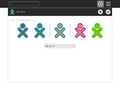 Initial colors with options for changing fill (left) and stroke (right)
 -
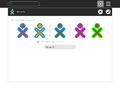 After clicking on the left-most icon, the fill color has changed; the icon second from the left can be used to undo the change
 -
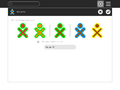 After clicking on the right-most icon, the stroke color has changed; the icon second from the right can be used to undo the change


