Sugar Creation Kit/sck/Advanced Topics: Difference between revisions
| (144 intermediate revisions by 3 users not shown) | |||
| Line 4: | Line 4: | ||
===[[Sugar_Network/Tutorial|Sugar Network Tutorial]]=== | ===[[Sugar_Network/Tutorial|Sugar Network Tutorial]]=== | ||
*Annotated screen shots with Links | *Annotated screen shots with Links | ||
Updated Aug 18, 2012 | |||
===[[Platform_Team/Sweets/Getting_started| Sweets-Getting Started]]=== | ===[[Platform_Team/Sweets/Getting_started| Sweets-Getting Started]]=== | ||
:Click on title ^ to go to topic | :Click on title ^ to go to topic | ||
*Some ideas on how to present SWEETS. (Inkyfingers) | *Some ideas on how to present SWEETS. (Inkyfingers) | ||
*look at [[Platform_Team/Infrastructure| Infrastructure]] for an overview. | *look at [[Platform_Team/Infrastructure| Infrastructure]] for an overview. | ||
===[[Sweets Distribution]]=== | ===[[Sweets Distribution]]( OLD )=== | ||
:Click on title ^ to go to topic | :Click on title ^ to go to topic | ||
:(Sweets Distribution is easier to use for Ubuntu' and its Derivatives (Adding an additional Repository to apt) as the packages are pre-configured, ready to use.) | :(Sweets Distribution is easier to use for Ubuntu' and its Derivatives (Adding an additional Repository to apt) as the packages are pre-configured, ready to use.) | ||
| Line 17: | Line 19: | ||
:Click on title ^ to go to topic | :Click on title ^ to go to topic | ||
:(Advanced) | :(Advanced) | ||
This page was last modified on 3 July 2012, at 19:51. | |||
:Debian, Ubuntu, Fedora, Mandriva, openSUSE, and Gentoo | :Debian, Ubuntu, Fedora, Mandriva, openSUSE, and Gentoo | ||
*[[Platform_Team/Guide/Sweets_Usage|Sweets Usage]] | *[[Platform_Team/Guide/Sweets_Usage|Sweets Usage]] | ||
| Line 28: | Line 31: | ||
:(For developers) | :(For developers) | ||
==[[Sugar_Network | Sugar Network]]== | ==[[Sugar_Network | Sugar Network]]( OLD )== | ||
*[[Platform_Team/Sugar_Network|Sugar Network]] | *[[Platform_Team/Sugar_Network|Sugar Network]] | ||
*Overview: [[Sugar_Network/Concept]] | *Overview: [[Sugar_Network/Concept]] | ||
:Collaboration support for Internet-less environments (but not only) | :Collaboration support for Internet-less environments (but not only) | ||
===[[Harmonic Distribution]]=== | ===[[Harmonic Distribution]]( OLD )=== | ||
*Look at this tutorial: [[Sugar_Network/Tutorial]] | *Look at this tutorial: [[Sugar_Network/Tutorial]] | ||
* The possibility to launch Base Software in heterogeneous | * The possibility to launch Base Software in heterogeneous | ||
| Line 109: | Line 112: | ||
*"This section assumes you have installed the [https://admin.fedoraproject.org/pkgdb/acls/name/mock mock package] and prepared the mock chroot" | *"This section assumes you have installed the [https://admin.fedoraproject.org/pkgdb/acls/name/mock mock package] and prepared the mock chroot" | ||
==[http://fedoraproject.org/wiki/How_to_create_a_Fedora_install_ISO_for_testing How to Create a Fedora Install ISO]== | |||
==[http://fedoraproject.org/wiki/Koji Koji]== | ==[http://fedoraproject.org/wiki/Koji Koji]== | ||
:Click on title ^ to go to topic | :Click on title ^ to go to topic | ||
| Line 114: | Line 118: | ||
:Koji is the software that builds RPM packages for the Fedora project | :Koji is the software that builds RPM packages for the Fedora project | ||
==[http://fedoraproject.org/wiki/Projects/Mock Mock ]== | ==[http://fedoraproject.org/wiki/Projects/Mock Mock ]== | ||
:Mock creates chroots and builds packages in them. Its only task is to reliably populate a chroot and attempt to build a package in that chroot. | :Mock creates chroots and builds packages in them. Its only task is to reliably populate a chroot and attempt to build a package in that chroot. | ||
==='''[https://fedoraproject.org/wiki/How_to_create_a_Fedora_install_ISO_for_testing How to create a Fedora install ISO for testing]'''=== | |||
*[https://fedoraproject.org/wiki/User:Bcl#mock_setup Mock setup] | |||
*[http://fedoraproject.org/wiki/Using_Mock_to_test_package_builds Using Mock to test package builds] | *[http://fedoraproject.org/wiki/Using_Mock_to_test_package_builds Using Mock to test package builds] | ||
==[https://wiki.gnome.org/GnomeLove/JhbuildIntroduction GnomeLove Jhbuild Introduction] == | |||
==[https://fedoraproject.org/wiki/How_to_create_an_RPM_package How to create an RPM package]== | ==[https://fedoraproject.org/wiki/How_to_create_an_RPM_package How to create an RPM package]== | ||
*How to create an RPM package in Fedora | *How to create an RPM package in Fedora | ||
| Line 126: | Line 134: | ||
*better j-build | *better j-build | ||
== | ==[http://sugarizer.org/ Sugarizer]== | ||
The Sugar Learning Platform is a leading learning platform developed for the One Laptop per Child project and used every day by nearly 3 million children around the world. With Sugarizer, you could discover the Sugar Learning Platform on any device: from the tiny Raspberry PI to the small Android/iOS tablet or the bigger PC/Mac. Enjoy the experience and help us reach every children on every device in every country. | |||
Sugarizer is distributed on the form of 3 components: | |||
:Thin Client: remote access to Sugarizer using a browser, | |||
:Client: Sugarizer running locally, | |||
:Server: place to run remote Sugarizer features. | |||
*Write your own web activity: | |||
:https://github.com/sugarlabs/sugar-docs/blob/master/activity.md | |||
* | |||
===L10n Translations=== | ===L10n Translations=== | ||
| Line 157: | Line 152: | ||
[[Translation_Team/i18n_Best_Practices#Do_not_touch_anything_inside_your_po_directory| Translation Team Best Practices]] | [[Translation_Team/i18n_Best_Practices#Do_not_touch_anything_inside_your_po_directory| Translation Team Best Practices]] | ||
==[http://0pointer.de/blog/projects/resources systemd for Administrators]== | ==[http://0pointer.de/blog/projects/resources systemd for Administrators]== | ||
"Resource Management in one way or another has been available in systemd for a while already, | "Resource Management in one way or another has been available in systemd for a while already, | ||
so it's really time we introduce this to the broader audience." | so it's really time we introduce this to the broader audience." | ||
==[[OLPC | OLPC XO links and Notes ]]( OLD content may not work)== | |||
==[[OLPC | OLPC XO | |||
:Click on title ^ to go to topic | :Click on title ^ to go to topic | ||
====[[Testing|Testing Introductory Page]]==== | ====[[Testing|Testing Introductory Page]]==== | ||
| Line 181: | Line 162: | ||
===wiki.laptop.org=== | ===wiki.laptop.org=== | ||
:http://wiki.laptop.org/go/The_OLPC_Wiki | :http://wiki.laptop.org/go/The_OLPC_Wiki | ||
=== | ===Release 13.1.0=== | ||
:http://wiki.laptop.org/go/13.1.0 | :http://wiki.laptop.org/go/13.1.0 | ||
:http://build.laptop.org/13.1.0/os15/xo-1.5/ | :http://build.laptop.org/13.1.0/os15/xo-1.5/ | ||
== | ===Release 14.1.0=== | ||
* | :build 8, a development release, not final, | ||
:based on Fedora 20, | |||
:based on Sugar 0.103.2, see release notes, | |||
:enabling OpenGL ES 2.0, | |||
:enabling the second core of the dual core CPU, which improves responsiveness, with only a slight increase in power draw, | |||
:support for new backlight LEDs to be used by factory, | |||
:support for new 16 GB eMMC internal storage, | |||
:support for new LiPoly battery used by factory, | |||
:the GNOME desktop has been replaced by the MATE desktop, because GNOME in Fedora 20 requires a full implementation of OpenGL, | |||
:Wikipedia EN and ES have been replaced by the Simple English Wikipedia activity, | |||
====Install of Release 14.1.0 for XO-4==== | |||
*Mate 1.8.1 and Sugar | |||
*Upgraded from 13.2.0 | |||
::With the help of Cerlyn and Quozl on #sugar 02/15/2015 | |||
*Notes from:'''http://wiki.laptop.org/go/Release_notes/14.1.0''' | |||
Prepare the USB or SD drive: | |||
::'''Note use a small 2 to 4 GB USB if possible.''' | |||
: Some cheap 8 GB USB's will not work here. (I had one not boot for me) | |||
*Download 41008o4.zd, | |||
::http://build.laptop.org/14.1.0/os8/xo-4/41008o4.zd | |||
*Download fs4.zip, | |||
::http://build.laptop.org/14.1.0/os8/xo-4/fs4.zip | |||
*Download Firmware: | |||
::http://wiki.laptop.org/go/OLPC_Firmware_q7c04 | |||
Save the files to the top directory of the drive, | |||
*Insert the Drive in the XO-4 | |||
::'''Be sure it is plugged in to power and has a fully charged battery.''' | |||
*Check that the drive contains the 3 files fs4.zip; 41008o4.zd and q7c04.rom | |||
:If you press ESC while the startup sound plays to get to an Open Firmware prompt, | |||
:type "dir u:\" there to see the files on the USB stick | |||
*Start installing: | |||
:Turn off the XO-4 | |||
:Hold down all four game keys above the power button, | |||
:Turn on the laptop, | |||
:Wait for the message Release the game keys to continue, | |||
:Release the game keys. | |||
:Installation progress will be displayed. Green colour will fill grey blocks. | |||
:It will take about five minutes. Once finished, the laptop will reboot automatically. | |||
:You may remove the USB or SD drive during or after the reboot. | |||
====Update Firmware==== | |||
* Do this if reboot fails. | |||
*At OK prompt after reboot: | |||
flash u:\q7c04.rom | |||
*required to use this new release | |||
*yum update will bring in a later version of sugar. | |||
====0.104 Release Notes==== | |||
:http://wiki.sugarlabs.org/go/0.104/Notes | |||
===XO-4 is still available=== | |||
:https://one-education.org/shop/ | |||
::http://wiki.laptop.org/go/Manufacturing_data#XO-4 | |||
===Tiny Core Linux on the XO=== | |||
:http://wiki.laptop.org/go/Tiny_Core_Linux | |||
==[http://wiki.sugarlabs.org/go/Education_Team/Quest_for_Data Data Collection from the Sugar Journal]== | |||
===[http://wiki.sugarlabs.org/go/Harvest Harvest]=== | |||
:OLPC AU | |||
* The Harvest system is being used to gather some basic stats; A visualization tool will be developed to enable stakeholders (funders, administrators, and classroom teachers) to monitor these data. | |||
==[http://wiki.laptop.org/go/Olpc-os-builder Olpc os builder]== | ==[http://wiki.laptop.org/go/Olpc-os-builder Olpc os builder]== | ||
*"utility that allows you to build operating system (OS) images for XO laptops" | *"utility that allows you to build operating system (OS) images for XO laptops" | ||
| Line 192: | Line 235: | ||
==[http://wiki.laptop.org/go/XO-4_Touch XO-4 Touch]== | ==[http://wiki.laptop.org/go/XO-4_Touch XO-4 Touch]== | ||
*specs | *specs | ||
*Teardown: http://www.ifixit.com/Device/OLPC_XO-4_Touch | |||
==[http://wiki.laptop.org/go/User:Holt/XS_Community_Edition XS Community Edition]== | ==[http://wiki.laptop.org/go/User:Holt/XS_Community_Edition XS Community Edition]== | ||
*School Server - Community Edition (XSCE) project | *School Server - Community Edition (XSCE) project | ||
:Software :http://download.unleashkids.org/ | |||
===Install instructions=== | |||
*https://github.com/XSCE/xsce/tree/master/docs | |||
*https://github.com/XSCE/xsce/blob/master/docs/INSTALL.rst | |||
::Updated 0116/2014 | |||
===Git Instructions=== | ===Git Instructions=== | ||
*GIT cheat sheet https://www.atlassian.com/dms/wac/images/landing/git/atlassian_git_cheatsheet.pdf | *GIT cheat sheet https://www.atlassian.com/dms/wac/images/landing/git/atlassian_git_cheatsheet.pdf | ||
| Line 200: | Line 249: | ||
:https://www.atlassian.com/git/workflows#!workflow-forking | :https://www.atlassian.com/git/workflows#!workflow-forking | ||
::https://www.atlassian.com/git/workflows#%21workflow-forking | ::https://www.atlassian.com/git/workflows#%21workflow-forking | ||
==Install XSCE on an intel NUC== | |||
== | *http://wiki.sugarlabs.org/go/XSCE | ||
* | |||
==[[Dextrose/Building|Dextrose Building]]== | ==[[Dextrose/Building|Dextrose Building]]== | ||
| Line 225: | Line 259: | ||
==XSCE in VirtualBox == | ==XSCE in VirtualBox == | ||
*''' | *'''3 Importable XSCE VirtualBox builds:''' | ||
===m-anish VM=== | ===m-anish VM=== | ||
*Local download: | *Local download: | ||
| Line 237: | Line 271: | ||
::b_1364170741.ova (1.6G) | ::b_1364170741.ova (1.6G) | ||
*Also see http://lists.laptop.org/pipermail/server-devel/2013-November/006954.html | *Also see http://lists.laptop.org/pipermail/server-devel/2013-November/006954.html | ||
[[File:XSCE-VB.JPG|800px]] | |||
*XSCE visible in firefox http://localhost:3380/ | |||
::(with VirtualBox XSCE window shown in right small window) | |||
*[Server-devel]11/18/2013 '''The three step XSCE demo!''' | *[Server-devel]11/18/2013 '''The three step XSCE demo!''' | ||
| Line 295: | Line 331: | ||
*YouTube: | *YouTube: | ||
:http://www.youtube.com/watch?v=CEE85F3Zjcs | :http://www.youtube.com/watch?v=CEE85F3Zjcs | ||
=== | ===XSCE 5.0 (aka 0.5)=== | ||
*SchoolServer.vdi 6.6GB | |||
:https://docs.google.com/uc?id=0B88Fc8ICKovFWXo0a3ZiV1dKcE0&export=download 6.6GB | |||
*Release Announcement: | |||
:http://lists.laptop.org/pipermail/server-devel/2013-December/007031.html | |||
[[File:Schoolserver.vdi.png|600px]] | |||
: | *On 1/16/2014 11:45 AM, Curt Thompson wrote: | ||
"Username: xsce | |||
Password: schoolserver.org | |||
Root/sudo password: schoolserver.org | |||
I have this set up now in "appliance mode", considering people may want | |||
to try it out without running a dhcp server and possibly breaking their | |||
network(s). Single NIC, bridged. (Apparently running this DHCP server should not cause issues with others as schoolserver's dhcp server is set to be 'not authoritative' but I will leave it this way for now) | |||
If you wanted to change the mode, I believe you only have to go into the | |||
machine settings in VirtualBox, add a NIC, boot up the VM and rerun | |||
./runansible as root from ~/xsce | |||
*Reply [Server-devel] XSCE 5.0 (aka 0.5, upgraded from 0.4) VirtualBox Files | |||
Unfortunately this XSCE VM project is on hold for me for a week or so as I'll be in Haiti. | |||
I can add anyone who wants to work on it to the "sharing" list so the files could sync between our Google Drives. | |||
I would only ask that if changing the original files whatever is done is documented and emailed to me (and/or this list). | |||
IIAB - I noticed that EN wikipedia was missing too, I think the EN module is easily added. Probably you can copy it from a full version of IIAB into the relevant directory and it will show up in the list. | |||
Midori is pointing to schoolserver/syans as the last location - | |||
I previously had some proprietary content served from that location but removed it for sharing purposes and forgot to clear the history, I guess. | |||
I installed Firefox for in-browser PDF reading (also related to the proprietary content). | |||
OVA is probably a better distribution method unless people prefer to sync the files in our Google Drives. | |||
I don't claim any ownership of these files, so feel free to create and share an OVA, link to them, etc. OVA is almost certainly a better option for 'to the world' releases of the XSCE test VM on blogs, etc. | |||
Thanks Curt Thompson" | |||
*Original Message: 1/16/2014 12:06 PM, : | |||
"downloaded SchoolServer.vdi it was 6.6 GB | |||
used it as existing disk. in new (Oracle VB 4.2.14) | |||
comments: | |||
logged in and worked fine | |||
-Need to use firefox to see it. Midori browser is pointing to .... /syans/ (spelled that way) | |||
works also if delete that part of path in browser | |||
-Moodle did not start | |||
-iiab wikipedia is in guarani cannot seem to find english | |||
I did an export to a 3.2 GB schoolserver.ova that imports back into VB | |||
- could that be a better way to distribute this? | |||
--1024 memory with 10GB dynamic expanding HD / NAT" | |||
==[http://wiki.laptop.org/go/XS_Installing_Software_0.7 XS Schoolserver 0.7]== | ==[http://wiki.laptop.org/go/XS_Installing_Software_0.7 XS Schoolserver 0.7]== | ||
| Line 381: | Line 454: | ||
:to be announced soon @ http://facebook.com/UnleashKids" | :to be announced soon @ http://facebook.com/UnleashKids" | ||
==Kernel Userspace Interfaces== | ==Kernel Userspace Interfaces== | ||
*Reference for Linux kernel 2.6.23: http://people.ee.ethz.ch/~arkeller/linux/kernel_user_space_howto.html | *Reference for Linux kernel 2.6.23: http://people.ee.ethz.ch/~arkeller/linux/kernel_user_space_howto.html | ||
==ARM== | ==ARM== | ||
===Raspberry Pi 3=== | |||
=====References===== | |||
See [[Soas/Raspberry Pi]]. | |||
=====References (old) ===== | |||
*ARM-Flock (you tube pbrobinson) Streamed live on Aug 9, 2014 | |||
::https://www.youtube.com/watch?v=5I6s0J_bw60 | |||
:http://elinux.org/RPi_Distributions | :http://elinux.org/RPi_Distributions | ||
:http://en.wikipedia.org/wiki/List_of_ARM_microprocessor_cores | :http://en.wikipedia.org/wiki/List_of_ARM_microprocessor_cores | ||
:http://www.linaro.org/downloads/ | :http://www.linaro.org/downloads/ | ||
*http://linuxgizmos.com/ | |||
*Fedora ARM 64 Bit (advanced) | |||
:http://fedoraproject.org/wiki/Architectures/ARM/AArch64/QuickStart | |||
*Fedora ARM: http://fedoraproject.org/wiki/Architectures/ARM | *Fedora ARM: http://fedoraproject.org/wiki/Architectures/ARM | ||
:https://fedoraproject.org/wiki/Architectures/ARM/F18/Remixes | :https://fedoraproject.org/wiki/Architectures/ARM/F18/Remixes | ||
:http://fedoraproject.org/wiki/Fedora_ARM_Installer | :http://fedoraproject.org/wiki/Fedora_ARM_Installer | ||
:*ARM Koji:http://arm.koji.fedoraproject.org/ | :*ARM Koji:http://arm.koji.fedoraproject.org/kojihttps://wiki.sugarlabs.org/go/Sugar_Creation_Kit/sck/Advanced_Topics#Raspberry_Pi_3/ | ||
*RPM Fusion: http://rpmfusion.org/Architectures/ARM | *RPM Fusion: http://rpmfusion.org/Architectures/ARM | ||
:fedora 17 and fedora 18 (arm/armhpf) | :fedora 17 and fedora 18 (arm/armhpf) | ||
| Line 404: | Line 483: | ||
*Write SD in a MAC:http://alltheware.wordpress.com/2012/12/11/easiest-way-sd-card-setup/ | *Write SD in a MAC:http://alltheware.wordpress.com/2012/12/11/easiest-way-sd-card-setup/ | ||
=====How to Create an ARM Remix===== | |||
*https://fedoraproject.org/wiki/Architectures/ARM/Creating_Remixes | |||
*https://fedoraproject.org/wiki/Architectures/ARM/F20/Remixes | |||
===[[Testing/Reports/ARM_TrimSlice|TrimSlice]]=== | ===[[Testing/Reports/ARM_TrimSlice|TrimSlice]]=== | ||
| Line 431: | Line 514: | ||
=====Fedora with XFCE===== | =====Fedora with XFCE===== | ||
======References====== | ======References====== | ||
:http://fedoraproject.org/wiki/Architectures/ARM | :http://fedoraproject.org/wiki/Architectures/ARM | ||
:http://fedoraproject.org/wiki/Architectures/ARM/Fedora_17_Beta | :http://fedoraproject.org/wiki/Architectures/ARM/Fedora_17_Beta | ||
:https://fedoraproject.org/wiki/Architectures/ARM/Fedora17_rawhide | :https://fedoraproject.org/wiki/Architectures/ARM/Fedora17_rawhide | ||
:http://dl.fedoraproject.org/pub/fedora-secondary/releases/test/17-Beta/Images/armhfp/ | :http://dl.fedoraproject.org/pub/fedora-secondary/releases/test/17-Beta/Images/armhfp/ | ||
::Boot from CD: http://www.trimslice.com/forum/viewtopic.php?f=25&t=412 | ::Boot from CD: http://www.trimslice.com/forum/viewtopic.php?f=25&t=412 | ||
:linux-tegra-drm:https://gitorious.org/linux-tegra-drm/pages/Host1xIntroduction | :linux-tegra-drm:https://gitorious.org/linux-tegra-drm/pages/Host1xIntroduction | ||
| Line 483: | Line 564: | ||
:works in intel PC's | :works in intel PC's | ||
*livecd-tools does not work | *livecd-tools does not work | ||
=====Resizer===== | =====Resizer===== | ||
| Line 507: | Line 573: | ||
====Archlinux-TrimSlice==== | ====Archlinux-TrimSlice==== | ||
*http://archlinuxarm.org/platforms/armv7/trimslice | *http://archlinuxarm.org/platforms/armv7/trimslice | ||
===pignus=== | |||
:https://pignus.computer/ | |||
===Raspberry Pi / RPi=== | ===Raspberry Pi / RPi=== | ||
::updated | ::updated 5/12/2019 -tg | ||
;see this linkk first: | |||
*https://wiki.sugarlabs.org/go/Fedora_30#Raspberry_Pi | |||
::(updated RPi information) | |||
====[http://pidora.ca/ '''Pidora''']==== | ====[http://pidora.ca/ '''Pidora''']==== | ||
=====Works on original rpi (ARMV6L)===== | |||
*Sugar install takes 2+ hrs on fast cable connection | |||
*Note: '''Pidora seems to be the main portal to fedora 18 on the Raspberry Pi''' | *Note: '''Pidora seems to be the main portal to fedora 18 on the Raspberry Pi''' | ||
:Direct Download: http://pidora.ca/pidora/releases/18/images/pidora-18-r2c.zip | :Direct Download: http://pidora.ca/pidora/releases/18/images/pidora-18-r2c.zip | ||
=====Install and add Sugar-Desktop to Pidora===== | |||
=====Install and add Sugar- | [[file:RPi-Connections.JPG|300px]] | ||
[[ | *-Physical Layout of RPi | ||
:1-Install Pidora on SD | :1-Install Pidora on SD | ||
::Insert | ::Insert 32 GB class 10 SD in USB SD writer | ||
::Type mount in root terminal /dev/sdb;/dev/sdc;/dev/sdd should appear in terminal use this value in /dev/sd(x) | ::Type mount in root terminal /dev/sdb;/dev/sdc;/dev/sdd should appear in terminal use this value in /dev/sd(x) | ||
::cd to directory where you have pidora-18-r2c.img (located inside folder where it was downloaded) | ::cd to directory where you have pidora-18-r2c.img (located inside folder where it was downloaded) | ||
:2- Write SD with dd command | :2- Write SD with dd command | ||
[root@localhost pidora-18-r2c]# dd if=pidora-18-r2c.img of=/dev/sd(x) | [root@localhost pidora-18-r2c]# dd if=pidora-18-r2c.img of=/dev/sd(x) see above^ | ||
3500538+0 records in | 3500538+0 records in | ||
3500538+0 records out | 3500538+0 records out | ||
| Line 539: | Line 614: | ||
* Sugar | * Sugar | ||
Xfce | Xfce | ||
======[http://koji.pidora.ca/koji/ pidora koji]====== | |||
:"Pidora is a Fedora Remix optimized for the Raspberry Pi computer." | |||
::It has its own repos separate from the older ''RPi-final.img'' | |||
====XSCE Community School Server on RPi==== | |||
* http://wiki.laptop.org/go/User:Holt/XS_Community_Edition | |||
====Notes==== | ====Notes==== | ||
| Line 632: | Line 714: | ||
===xmbc=== | ===xmbc=== | ||
*http://www.memetic.org/pre-compiled-xbmc-for-raspbian/ | *http://www.memetic.org/pre-compiled-xbmc-for-raspbian/ | ||
:http://wiki.xbmc.org/index.php?title=List_of_built-in_functions | |||
===Gentoo=== | ===Gentoo=== | ||
| Line 649: | Line 732: | ||
===arduino=== | ===arduino=== | ||
*http://linuxgizmos.com/arduino-tre-sbc-runs-linux-on-arm/ | *http://linuxgizmos.com/arduino-tre-sbc-runs-linux-on-arm/ | ||
=== | ===CuBox-i4=== | ||
:This is the CuBox-i4P-300-D MAC | |||
[[File:Solidrun_Cubox-i4.jpg|700px]] | |||
*Booted 16 GB microSD: | |||
:Inserted under HDMI plug on back | |||
====Links for CuBox-i==== | |||
*Wiki Main Page | |||
:http://imx.solid-run.com/wiki/index.php?title=Main_Page | |||
:http://server.vijge.net/cubox IRC Archive for developer discussions | |||
*Ubuntu | |||
:http://download.solid-run.com/pub/solidrun/cubox-i/Ubuntu/ubuntu-oneiric-freescale/ | |||
:Only low resolution screen Networking works | |||
*Debian | |||
:http://download.solid-run.com/pub/solidrun/cubox-i/Debian/Jessi-repackaged-trial/debian-jessi.img.xz | |||
:No networking in tests here | |||
*Android | |||
:http://imx.solid-run.com/wiki/index.php?title=Android | |||
:http://download.solid-run.com/pub/solidrun/cubox-i/Android-4.3/11-Dec-2013/beta-11-dec-2013-i4pro.img.xz | |||
:Works well | |||
*Android Recovery | |||
:http://imx.solid-run.com/wiki/index.php?title=Android#Android_recovery | |||
*XBMC | |||
:http://download.solid-run.com/pub/solidrun/cubox-i/GeexBox-xbmc/geexbox-devel-20131212-r16611.cuboxi/ | |||
*Schematics: | |||
:http://download.solid-run.com/pub/solidrun/cubox-i/Hardware/Schematics-rev-1.1/ | |||
*XSCE Schoolserver Fedora 20 (experimental) | |||
:http://wiki.sugarlabs.org/go/Sugar_Creation_Kit/sck/Advanced_Topics#FC20forXSCE.zip | |||
:http://timmoody.com/downloads/FC20Base2.zip | |||
===Testing=== | |||
:I ended up writing the FC20Bxxx.img [4][5] with WIN32diskimager[1] after using 7-zip [2] to expand it first. | |||
:Instructions from the cubibox wiki [3] to a 16 GB microSD (PNY) class 10; Using a SD adapter in a Yoga-Pro 2 running win 8.1 | |||
:[1] http://sourceforge.net/projects/win32diskimager/?source=dlp | |||
:[2] http://www.7-zip.org/download.html | |||
:[3] http://imx.solid-run.com/wiki/index.php?title=Main_Page | |||
====FC20Base2.zip==== | |||
:[[File:XSCE1.jpg|800px]] | |||
;[4] http://timmoody.com/downloads/FC20Base2.zip | |||
====Install XSCE==== | |||
*Default new install | |||
*Booted 16 GB microSD: | |||
:Inserted under HDMI plug on back | |||
:I Write the FC20Bxxx.img [4][5] with WIN32diskimager[1] after using 7-zip [2] to expand it first. | |||
:Instructions from the cubibox wiki [3] to a 16 GB microSD (PNY) class 10; Using a SD adapter in a Yoga-Pro 2 running win 8.1 | |||
:[1] http://sourceforge.net/projects/win32diskimager/?source=dlp | |||
:[2] http://www.7-zip.org/download.html | |||
:[3] http://imx.solid-run.com/wiki/index.php?title=Main_Page | |||
:both wired (plugged in) and wireless AP (wep - not logged in) available via apple airport extreme. | |||
*Login root/fedora | |||
;https://github.com/XSCE/xsce/blob/master/docs/INSTALL.rst | |||
:using ansible (runs but not certain will work) 03/20/2014 | |||
::Installs ansible 1.5 | |||
::run ./runansible 2 times... hung up on jabber finally restarted and ran ./runansible 2nd time | |||
*completed install ifconfig | |||
[[File:Schoolserver-ifconfig.JPG|900px]] | |||
*http://archlinuxarm.org/platforms/armv7/freescale/cubox-i | |||
=====Ping 8.8.8.8===== | |||
[[File:Ping_8888.JPG|800px]] | |||
*freenode #schoolserver | |||
:<timm_> "satellit: you are probably the first to do an install in this configuration. jabber is slow starting and sometimes times out." 03/21/2014 | |||
=====TESTS===== | |||
======Test 1 Make .img from working 16 GB microSD====== | |||
:03/26/2014 tg | |||
*root terminal: | |||
dd if=/dev/sdb of=XSCE_schoolserver.img bs=2M | |||
7711+1 records in | |||
7711+1 records out | |||
16172187648 bytes (16 GB) copied, 911.25 s, 17.7 MB/s | |||
*Compressed to xz makes 2.7 GB file | |||
*Uncompressed this file and used dd to write the XSCE_schoolserver.img to a 16 GB microSD and it boots. | |||
*I cannot reach http://schoolserver; http://schoolserver:5000 and http://schoolserver.local from this setup but I may be blocked with a firewall or have a bad config in eth0 or the wifi. | |||
:Tested with XO-1.75 | |||
*Response from alex kleider | |||
Tom, thanks for your response. Based on what I see | |||
"""wlan0 ...... | |||
Mode: managed Access Point: Not associated | |||
""" | |||
and the fact that it has no IP address, | |||
I'm guessing that it's not doing much of anything in its current state | |||
but the fact that "Access Point" is even mentioned, suggests that | |||
perhaps we can be guardedly optimistic that it might be do-able. | |||
Please let me know if you make any progress in this regard. | |||
It would probably require low level configuration commands similar to | |||
""" | |||
# We always bootup in AP mode. Delete any stale files | |||
#rm -f /etc/wlanclient.mode | |||
curdir=/root/k2.6.39.4 | |||
insmod $curdir/mlan.ko | |||
i nsmod $curdir/sd8787.ko drv_mode=2 | |||
ifconfig uap0 192.168.1.1 up | |||
""" | |||
======TEST2 ifconfig wlan0 192.168.1.1====== | |||
ifconfig wlan0 192.168.1.1 up | |||
wlan0: flags=4099<up,BROADCAST,MULTICAST> mtu 1500 | |||
inet 192.168.1.1 netmask 255.255.255.0 broadcast 192.168.1.255 | |||
inet6 fe80:422c:f4ff:feae:2144 prefixlen 64 scopeid 0x20<link> | |||
ether 40:2c:f4:ae:21:44 txquelen 1000 (ethernet)s | |||
........ | |||
cheers, | |||
alex kleider | |||
======Test3 Expand 16GB to 32GB ====== | |||
:Used '''gparted''' in a fedora laptop SD slot witj SD adapter to expand the 3rd partition on the class 10 microSD to the full 32 GB size. | |||
:Booted correctly after the expansion in the CuBox-i4P | |||
*Note must hit {TAB} and {space} repeatedly to get boot to work? | |||
=====Hot Plug===== | |||
:with the 3.10 kernel, you can use the eSATA port even if there is no drive enabled when the system boots; add this to the kernel arguments: | |||
ahci_imx.hotplug=1 | |||
:Esatap is a single cable supplying power and data, so you want esata+ USB to esatap male | |||
:Link http://www.ebay.com/itm/USB-A-male-eSATA-to-SATA-22pin-Power-eSATA-cable-0-5M-5V-2-5-inch-/150830976241 | |||
=====Testing List===== | |||
Suggestions: | |||
:https://github.com/XSCE/xsce/blob/master/docs/TESTING.rst | |||
:https://github.com/XSCE/xsce/blob/master/tests.sh%E0%A8%8D | |||
====References==== | |||
:http://web.dodds.net/~vorlon/wiki/blog/My_CuBox-i_has_arrived/ | |||
:https://wiki.debian.org/ArmHardFloatPort/CuBox-i | |||
:https://github.com/jmontleon/fedora-20-cubox-i4pro-binary | |||
*GitHub | |||
:https://github.com/SolidRun | |||
===CubieBoard1=== | |||
[[File:Cubieboard1.jpg|400px]] | |||
*"Cubieboard is a small (10x6cm), hacker friendly, extendable and very low-cost while powerful ARM board with Allwinner A10 SoC." | *"Cubieboard is a small (10x6cm), hacker friendly, extendable and very low-cost while powerful ARM board with Allwinner A10 SoC." | ||
* http://docs.cubieboard.org/how_to_make_a_sd_image_from_sd_bootable_os | |||
* http://docs.cubieboard.org/tutorials/a10-cubieboard_lubuntu_desktop_releases | |||
====[http://www.cnx-software.com/2012/12/09/cubieboard-unboxing-and-quick-start-guide/ Getting Started]==== | ====[http://www.cnx-software.com/2012/12/09/cubieboard-unboxing-and-quick-start-guide/ Getting Started]==== | ||
*http://cubieboard.org/ | *http://cubieboard.org/ | ||
| Line 656: | Line 882: | ||
: Download:http://cubieboard.org/\ | : Download:http://cubieboard.org/\ | ||
: https://fedoraproject.org/wiki/Architectures/ARM/F18/Remixes#Allwinner_A10 | : https://fedoraproject.org/wiki/Architectures/ARM/F18/Remixes#Allwinner_A10 | ||
: https://fedoraproject.org/wiki/Cubie_Board#Cubieboard_Fedora_Remix | |||
: http://scotland.proximity.on.ca/contrib-images/hansg/README | : http://scotland.proximity.on.ca/contrib-images/hansg/README | ||
| Line 662: | Line 889: | ||
*Review:http://blog.bulte.net/01-09-2013/cubie-board-quick-look-raspberry-pi-comparison.html | *Review:http://blog.bulte.net/01-09-2013/cubie-board-quick-look-raspberry-pi-comparison.html | ||
===[http://beagleboard.org/Products/BeagleBone%20Black BeagleBone Black]=== | |||
*Plug in the supplied USB cable to your laptop to read the BeagleBone Black on-board files | |||
:start.htm file when USB is plugged in: (screenshot below) | |||
*'''NOTE click on screenshot to see full size hit <= on browser to retun here''' | |||
[[File:BeagleBone-start.png|1200px]] | |||
*http://beagleboard.org/ | |||
*http://fedoraproject.org/en/get-fedora#arm | |||
*http://elinux.org/Beagleboard:Ubuntu_On_BeagleBone_Black | |||
===Pengpod=== | ===Pengpod=== | ||
| Line 679: | Line 916: | ||
=====[http://www.soliforum.com/topic/1954/fullfledged-lcd-touchscreen/ pengpod as touchscreen for solidoodle 3d printer]===== | =====[http://www.soliforum.com/topic/1954/fullfledged-lcd-touchscreen/ pengpod as touchscreen for solidoodle 3d printer]===== | ||
"I now have a fully-functional touchscreen pronterface installation that can drive the [http://www.solidoodle.com/faq/ '''Solidoodle''']..." | "I now have a fully-functional touchscreen pronterface installation that can drive the [http://www.solidoodle.com/faq/ '''Solidoodle''']..." | ||
===PPC=== | ===PPC=== | ||
| Line 700: | Line 934: | ||
:http://www.utilite-computer.com/wiki/index.php/Utilite_Getting_Started | :http://www.utilite-computer.com/wiki/index.php/Utilite_Getting_Started | ||
:https://help.ubuntu.com/community/Installation/FromImgFiles | :https://help.ubuntu.com/community/Installation/FromImgFiles | ||
====[http://sugarizer.org Sugarizer]==== | |||
:"A taste of Sugar on any device" | |||
====Archlinux on Trimslice==== | ====Archlinux on Trimslice==== | ||
*http://archlinuxarm.org/platforms/armv7/nvidia/trimslice | *http://archlinuxarm.org/platforms/armv7/nvidia/trimslice | ||
==Chromebook== | ==Chromebook( OLD content may not work)== | ||
*http://parasense.fedorapeople.org/ new images for Chromebook 07/18/2013 | *http://parasense.fedorapeople.org/ new images for Chromebook 07/18/2013 | ||
*https://fedoraproject.org/wiki/Architectures/ARM/Samsung_Chromebook_2012 | *https://fedoraproject.org/wiki/Architectures/ARM/Samsung_Chromebook_2012 | ||
| Line 779: | Line 1,016: | ||
*Latest Cloud Images:http://mattdm.fedorapeople.org/cloud-images/ | *Latest Cloud Images:http://mattdm.fedorapeople.org/cloud-images/ | ||
:http://git.fedorahosted.org/cgit/cloud-kickstarts.git/ | :http://git.fedorahosted.org/cgit/cloud-kickstarts.git/ | ||
Latest revision as of 12:15, 12 May 2019
Sweets Distribution
Sugar Network Tutorial
- Annotated screen shots with Links
Updated Aug 18, 2012
Sweets-Getting Started
- Click on title ^ to go to topic
- Some ideas on how to present SWEETS. (Inkyfingers)
- look at Infrastructure for an overview.
Sweets Distribution( OLD )
- Click on title ^ to go to topic
- (Sweets Distribution is easier to use for Ubuntu' and its Derivatives (Adding an additional Repository to apt) as the packages are pre-configured, ready to use.)
- (Developed for Trisquel-sugar-Toast )
Sweets
- Click on title ^ to go to topic
- (Advanced)
This page was last modified on 3 July 2012, at 19:51.
- Debian, Ubuntu, Fedora, Mandriva, openSUSE, and Gentoo
- (This guide describes how to run Sugar using Sugar Packaging Management System, Sweets.)
- Request for better Documentation of installs
- (For developers)
Sugar Network( OLD )
- Sugar Network
- Overview: Sugar_Network/Concept
- Collaboration support for Internet-less environments (but not only)
Harmonic Distribution( OLD )
- Look at this tutorial: Sugar_Network/Tutorial
* The possibility to launch Base Software in heterogeneous
  software and hardware environments.
* Using Base Software, provide access to various Content
  (Sugar activities, artifacts created by Sugar activities, books, etc.)
  created within the Sugar community.
* Using Base Software, provide collaborative functionality to
  support Social activity around the Content.
* Instruments and workflows to adapt Content and Base Software
  to specific needs that Sugar Deployment might face,
  including extreme ones like off-line environments and restricting
  hardware.
- [Sugar-devel] [SWEETS] Testing collaboration related fixes 05/07/2012
Hi all!
Following the plan for Harmonic Distribution v0.2 (which will be a basis
for Sugar Distribution to use in peruvian pilot), in Sugar Shell code
were made fixes that are intended to make Telepathy (everything related to
Neighbourhood view and Sugar Activities sharing/joining) more stable
(that was broken since global redesign started after 0.88 release).
Fixes are accessible from SweetsDistribution:Factory repository. Follow
regular Sweets Distribution installation instructions[1] to install
fixed Sugar Shell on all supported platforms[2].
Some visible changes in F1 view:
* the number of buddies should be increased from ~20 to 70-90
  some Sugar versions (maybe 0.90-0.92) don't publish information about
  nickname/colors on regular basis; this information are being stored on
  disk for now
* for some buddies, server still don't have information about colors
  (replaced by gray) and nick names (jabber ids)
If you have a time and want to help Puno deployment pilot, please,
consider possibility to install sweets-desktop from Factory repository
and do some testing of collaboration functionality.

Some tips:

* while interacting with another buddies, make sure that all
  participants use Sweets Distribution (some F1 buddies might misbehave)
* the good criteria of stability level of new Sugar is comparing with
  how collaboration happen in 0.88 Sugar.
Source code, for interested in people, can be found in top commits from:

* http://git.sugarlabs.org/desktop/sugar
* http://git.sugarlabs.org/desktop/sugar-toolkit
* http://git.sugarlabs.org/server/prosody-sugar
[1] Sweets_Distribution#Installation
[2] Sweets_Distribution/Supported_platforms

-- Aleksey
Sugar-devel mailing list Sugar-devel@lists.sugarlabs.org
http://lists.sugarlabs.org/listinfo/sugar-devel
BoxGrinder
- BoxGrinder Build is an easy to use command line tool to create appliances (virtual images) from simple plaintext appliance definition files. BoxGrinder can produce appliances for a variety of virtual and cloud platforms using plugins supporting technologies such as VMware or EC2.
- http://boxgrinder.org
- http://boxgrinder.org/community/
- http://boxgrinder.org/tutorials/
- http://boxgrinder.org/tutorials/boxgrinder-build-meta-appliance/
- http://boxgrinder.org/download/boxgrinder-build-meta-appliance/
Pungi
- Advanced
- used to build non-live CD/DVD isos
Pungi needs to run on the arch it is composing, as root, and with an install of what it is composing, eg if you are composing Fedora 8, you need to be running Fedora 8.
This is so that the correct userland tools are used to create the images and such used by anaconda.
The eventual usage of pungi will most likely be in mock chroots to facilitate this.
It needs to run on the arch it is composing due to how anaconda-runtime determines what files to put in the boot images at this time.
Currently the releases of pungi are designed to run on an updated Rawhide system. Development of pungi always tracks Rawhide.
- The following sections..." assume you have installed the mock package and prepared the mock chroot"
Build a boot.iso
- "This section provides instruction on creating PXEboot and boot.iso images"
Build a DVD.iso
- "This section assumes you have installed the mock package and prepared the mock chroot"
How to Create a Fedora Install ISO
Koji
- Click on title ^ to go to topic
- (Very Advanced)
- Koji is the software that builds RPM packages for the Fedora project
Mock
- Mock creates chroots and builds packages in them. Its only task is to reliably populate a chroot and attempt to build a package in that chroot.
How to create a Fedora install ISO for testing
GnomeLove Jhbuild Introduction
How to create an RPM package
- How to create an RPM package in Fedora
sugar-build
- better j-build
Sugarizer
The Sugar Learning Platform is a leading learning platform developed for the One Laptop per Child project and used every day by nearly 3 million children around the world. With Sugarizer, you could discover the Sugar Learning Platform on any device: from the tiny Raspberry PI to the small Android/iOS tablet or the bigger PC/Mac. Enjoy the experience and help us reach every children on every device in every country. Sugarizer is distributed on the form of 3 components:
- Thin Client: remote access to Sugarizer using a browser,
- Client: Sugarizer running locally,
- Server: place to run remote Sugarizer features.
- Write your own web activity:
L10n Translations
There is a git user named "pootle" that acts as the proxy by which all
PO file translations are committed from the Pootle server.  Please
make pootle a committer on the repo and I will make the connections
between git and the Pootle server.
Some "best practices" about working with git and Pootle are described here.
 Translation Team Best Practices
systemd for Administrators
"Resource Management in one way or another has been available in systemd for a while already,
so it's really time we introduce this to the broader audience."
OLPC XO links and Notes ( OLD content may not work)
- Click on title ^ to go to topic
Testing Introductory Page
- Help/Info Wiki Page
wiki.laptop.org
Release 13.1.0
Release 14.1.0
- build 8, a development release, not final,
- based on Fedora 20,
- based on Sugar 0.103.2, see release notes,
- enabling OpenGL ES 2.0,
- enabling the second core of the dual core CPU, which improves responsiveness, with only a slight increase in power draw,
- support for new backlight LEDs to be used by factory,
- support for new 16 GB eMMC internal storage,
- support for new LiPoly battery used by factory,
- the GNOME desktop has been replaced by the MATE desktop, because GNOME in Fedora 20 requires a full implementation of OpenGL,
- Wikipedia EN and ES have been replaced by the Simple English Wikipedia activity,
Install of Release 14.1.0 for XO-4
- Mate 1.8.1 and Sugar
- Upgraded from 13.2.0
- With the help of Cerlyn and Quozl on #sugar 02/15/2015
Prepare the USB or SD drive:
- Note use a small 2 to 4 GB USB if possible.
- Some cheap 8 GB USB's will not work here. (I had one not boot for me)
- Download 41008o4.zd,
- Download fs4.zip,
- Download Firmware:
Save the files to the top directory of the drive,
- Insert the Drive in the XO-4
- Be sure it is plugged in to power and has a fully charged battery.
- Check that the drive contains the 3 files fs4.zip; 41008o4.zd and q7c04.rom
- If you press ESC while the startup sound plays to get to an Open Firmware prompt,
- type "dir u:\" there to see the files on the USB stick
- Start installing:
- Turn off the XO-4
- Hold down all four game keys above the power button,
- Turn on the laptop,
- Wait for the message Release the game keys to continue,
- Release the game keys.
- Installation progress will be displayed. Green colour will fill grey blocks.
- It will take about five minutes. Once finished, the laptop will reboot automatically.
- You may remove the USB or SD drive during or after the reboot.
Update Firmware
- Do this if reboot fails.
- At OK prompt after reboot:
flash u:\q7c04.rom
- required to use this new release
- yum update will bring in a later version of sugar.
0.104 Release Notes
XO-4 is still available
Tiny Core Linux on the XO
Data Collection from the Sugar Journal
Harvest
- OLPC AU
- The Harvest system is being used to gather some basic stats; A visualization tool will be developed to enable stakeholders (funders, administrators, and classroom teachers) to monitor these data.
Olpc os builder
- "utility that allows you to build operating system (OS) images for XO laptops"
XO-4 Touch
- specs
- Teardown: http://www.ifixit.com/Device/OLPC_XO-4_Touch
XS Community Edition
- School Server - Community Edition (XSCE) project
- Software :http://download.unleashkids.org/
Install instructions
- https://github.com/XSCE/xsce/tree/master/docs
- https://github.com/XSCE/xsce/blob/master/docs/INSTALL.rst
- Updated 0116/2014
Git Instructions
- https://sugardextrose.org/projects/dxs/wiki/git
- https://www.atlassian.com/git/workflows#!workflow-forking
Install XSCE on an intel NUC
Dextrose Building
Dextrose uses olpc-os-builder, a tool create by OLPC to build official and customized system images.
The Dextrose git repository contains, olpc-os-builder, local customizations specific to Dextrose,
and fixes and enhancements waiting to be pushed upstream.
XSCE in VirtualBox
- 3 Importable XSCE VirtualBox builds:
m-anish VM
- Local download:
- http://people.sugarlabs.org/Tgillard/XSCE.ova
- Uploaded with permission
- Click on the XSCE.ova icon and It begins import into VirtualBox (If you have it installed)
- Tested in f20 VirtualBox 11/19/2013
- Google download:
- https://docs.google.com/file/d/0B3eW2YPe6koIVXRVbDhSR0xXQ1U/edit
- b_1364170741.ova (1.6G)

- XSCE visible in firefox http://localhost:3380/
- (with VirtualBox XSCE window shown in right small window)
- [Server-devel]11/18/2013 The three step XSCE demo!
Hi, Had some time on my hand this week to try out XSCE in a virtual environment. It actually worked out pretty well, and now there's a working appliance. Here's the three step XSCE demo!
Step #1 - Download and install Virtualbox
    Head to https://www.virtualbox.org/wiki/Downloads to download the Virtualbox package for your OS.
    Install instructions may vary for different platforms but should be pretty straightforward.
Step #2 - Download and install the XSCE appliance
    Download the XSCE Virtualbox appliance from here https://docs.google.com/file/d/0B3eW2YPe6koIVXRVbDhSR0xXQ1U (approx 1.6 GB)
    [optional] Verify the md5sum to see if the image is not corrupt - 56a4f141b564b0d2bd65c543a5e585c6
    Open Virtualbox. Go to File -> Import Appliance.
    A dialog will appear asking you to "Open Appliance"
    Select the file you just downloaded "b_1364170741.ova"
    Click "Next" and then click "Import"
    A new virtual machine will get created
Step #3 - Play!
    Start the virtual machine just created. It will open a window, and an OS will appear to boot.
    Wait till it boots. Once it has booted, a login prompt will appear in a text console. Your XSCE is now up and ready!
    To test/demo, on the host OS (i.e., the one where you are running the virtualbox software in) open a browser
        XSCE homepage: http://localhost:3380/
            From the homepage you should be able to navigate to Internet In A Box. This image contains a test dataset.
            The link to the moodle homepage will NOT work. To access moodle, go to http://localhost:3380/moodle/login/index.php. I am not able to login, and there seems some issue with the homepage loading.
        Administrative GUI: http://localhost:9990 (username=root, password=admin)
        Server monitoring tool - Munin: http://localhost:3380/munin (username=admin, password=munindxs)
        To check the authserver, go to http://localhost:5000/ (It will probably say "No Sugar platform detected, please register your laptop")
Notes:
    This is only meant to be a quick demo to see what an XSCE is on your laptop/PC.
    I didn't setup root login (or atleast don't know the password to it). So you won't be able to login to the XSCE once it's running. Should not be a huge issue just for end-user demo purposes.
    This is just a weekend hack, I did based on a Vagrantfile supplied by Santi. At this moment, this is not officially supported or anything (but as far as I know in my testing, it works!)
    If this is a useful thing to maintain (based on feedback to this thread :-) ) I (or somebody else) can propose this as a feature for 0.5/6. So there are officially supported demo appliances.
    A wiki page is in the works.
Please try it out and let me know what you think of it!
Thanks, Anish
- added Info ///18/2013
It is a vagrant generated virtual machine so:
- the user/password are vagrant/vagrant
- user 'vagrant' is in sudoers group
- ssh access is possible using port 2222 in localhost
- I have an entry in .ssh/config so I can access using `ssh vagrant`:
Host vagrant
 HostName 127.0.0.1
 User vagrant
 Port 2222
 UserKnownHostsFile /dev/null
 StrictHostKeyChecking no
 PasswordAuthentication no
 IdentityFile "~/.vagrant.d/insecure_private_key"
 IdentitiesOnly yes
 LogLevel FATAL
The insecure private key is available Github [1].
1: https://github.com/mitchellh/vagrant/tree/master/keys
Contributing to DXS using Github
- YouTube:
XSCE 5.0 (aka 0.5)
- SchoolServer.vdi 6.6GB
- Release Announcement:

- On 1/16/2014 11:45 AM, Curt Thompson wrote:
"Username: xsce
Password: schoolserver.org
Root/sudo password: schoolserver.org
I have this set up now in "appliance mode", considering people may want
to try it out without running a dhcp server and possibly breaking their
network(s).  Single NIC, bridged. (Apparently running this DHCP server should not cause issues with others as schoolserver's dhcp server is set to be 'not authoritative' but I will leave it this way for now)
If you wanted to change the mode, I believe you only have to go into the
machine settings in VirtualBox, add a NIC, boot up the VM and rerun
./runansible as root from ~/xsce
- Reply [Server-devel] XSCE 5.0 (aka 0.5, upgraded from 0.4) VirtualBox Files
Unfortunately this XSCE VM project is on hold for me for a week or so as I'll be in Haiti.
I can add anyone who wants to work on it to the "sharing" list so the files could sync between our Google Drives.
I would only ask that if changing the original files whatever is done is documented and emailed to me (and/or this list).
IIAB - I noticed that EN wikipedia was missing too, I think the EN module is easily added.  Probably you can copy it from a full version of IIAB into the relevant directory and it will show up in the list.
Midori is pointing to schoolserver/syans as the last location -
I previously had some proprietary content served from that location but removed it for sharing purposes and forgot to clear the history, I guess.
 I installed Firefox for  in-browser PDF reading (also related to the proprietary content).
OVA is probably a better distribution method unless people prefer to sync the files in our Google Drives.
I don't claim any ownership of these files, so feel free to create and share an OVA, link to them, etc.  OVA is almost certainly a better option for 'to the world' releases of the XSCE test VM on blogs, etc.
Thanks Curt Thompson"
- Original Message: 1/16/2014 12:06 PM, :
"downloaded SchoolServer.vdi it was 6.6 GB
used it as existing disk. in new (Oracle VB 4.2.14)
comments:
logged in and worked fine
-Need to use firefox to see it. Midori browser is pointing  to .... /syans/  (spelled that way)
works also if delete that part of path in browser
-Moodle did not start
-iiab wikipedia is in guarani  cannot seem to find english
I did an export to a 3.2 GB schoolserver.ova that imports back into VB
- could that be a better way to distribute this?
--1024 memory with 10GB dynamic expanding HD / NAT"
XS Schoolserver 0.7
- Click on title ^ to go to topic
- How to install:http://wiki.laptop.org/go/XS_Installing_Software_0.7
- Download: http://dev.laptop.org/xs/OLPC-School-Server-0.7beta2-i386.iso
- http://schoolserver.wordpress.com/xs-installation/community-edition-xs-on-xo-1-75/
- Work in Progress: http://schoolserver.wordpress.com/xs-installation/xsce-on-xo-1-5/
Install of XS 0.7 on Centos-6.4
- Terminal output of install 08/02/2013
- Full instructions used:
wiki4schools
Re: [support-gang] Status update of the installation of the new school server and IIAB at Rahnuma School Karachi
On 08/04/2013 06:00 AM, Braddock wrote:
 When the IIAB registers via DHCP it advertises its name as "know", and if the DHCP server and the DNSserver talk to each other the DNS server will resolve the name.
dnsmasq does this, so I suspect that might be what School Server runs?)
The only down side to this is that if you reboot the school server,you may find you need to then reboot the IIAB device so it gets afresh DHCP lease because the school server may forget it exists.
...
Tony Anderson:
The school server is gateway and dns for the XOs and can certainly resolve http://know to a fixed address, which is the more orthodox way to do this.
Incidentally, I believe the problem with the wiki is that the url is http://schoolserver/wiki4schools/ not http://schoolserver/wiki.
Normally, the XOs access everything from the Browse home page so that keyboard entry of urls is not needed. However, because of the xo-custom script problems this was not set up.
Manuals
Adobe Flash on the XO-4
"It says that for the XO-4 (but not the same for the 1.75 OLPC will provide the player because it has paid the fees to Marvell.
Copied form the wiki page but without the links supported...
OLPC support will provide a libflashplayer.so at the same time as providing access to the video drivers.
download and install the video drivers,
copy the libflashplayer.so file to the XO-1.75 or XO-4,
start the Terminal Activity,
copy the plugin, paste this:
sudo cp libflashplayer.so /usr/lib/mozilla/plugins/libflashplayer.so
wrap the plugin, paste this:
yum -y install nspluginwrapper && \
/usr/lib/nspluginwrapper/npconfig -n \
-p nswrapper_32_32 \
-d /usr/lib/mozilla/plugins-wrapped \
-i /usr/lib/mozilla/plugins/libflashplayer.so
"
Internet in a Box
- Internet in a Box website http://internet-in-a-box.org
- Installation: https://github.com/braddockcg/internet-in-a-box/blob/master/INSTALL.txt
- Read Me:https://github.com/braddockcg/internet-in-a-box/blob/master/README.md
Start iiab-server
# iiab-server
werkzeug --  * Running on http://0.0.0.0:25000/
werkzeug --  * Restarting with reloader
- Enter address in browser
Screenshots
- Click on screenshot to enlarge; hit <== return arrow on browser to return
- Installed on a i7 Laptop with the above installation link
- This is a reduced version [1] of Internet in a Box (not the full 1 TB )
- [1] IIAB_QuickStart_Sampler_20130809.tgz


- iiab Main Menu
- iiab-books Project Guttenburg


- iiab-Video
- iiab-settings (credits)
Also see:

- Browse looking at local School Server on a XO-4 with XSCE RC-1 installed with USB containing /knowledge directory of iiab inserted
Unleash Kids
- " all-volunteer Unleash Kids efforts shipping XO-4 community kits (hopefully including XS Community Edition!) to volunteers a bit later this summer, at the most minimal cost we can muster,
- to be announced soon @ http://facebook.com/UnleashKids"
Kernel Userspace Interfaces
- Reference for Linux kernel 2.6.23: http://people.ee.ethz.ch/~arkeller/linux/kernel_user_space_howto.html
ARM
Raspberry Pi 3
See Soas/Raspberry Pi.
References (old)
- ARM-Flock (you tube pbrobinson) Streamed live on Aug 9, 2014
- http://elinux.org/RPi_Distributions
- http://en.wikipedia.org/wiki/List_of_ARM_microprocessor_cores
- http://www.linaro.org/downloads/
- http://linuxgizmos.com/
- Fedora ARM 64 Bit (advanced)
- Fedora ARM: http://fedoraproject.org/wiki/Architectures/ARM
- https://fedoraproject.org/wiki/Architectures/ARM/F18/Remixes
- http://fedoraproject.org/wiki/Fedora_ARM_Installer
- RPM Fusion: http://rpmfusion.org/Architectures/ARM
- fedora 17 and fedora 18 (arm/armhpf)
- https://fedoraproject.org/wiki/Architectures/ARM/AArch64/FoundationModel
- chromium-os Secure Boot Info: http://www.chromium.org/chromium-os/chromiumos-design-docs/verified-boot-crypto
- Tutorial: Android Development: https://fedoraproject.org/wiki/HOWTO_Setup_Android_Development
- //fedoraproject.org/wiki/Architectures/ARM/Quality_Assurance/Kernel_Testing
- Write SD in a MAC:http://alltheware.wordpress.com/2012/12/11/easiest-way-sd-card-setup/
How to Create an ARM Remix
- https://fedoraproject.org/wiki/Architectures/ARM/Creating_Remixes
- https://fedoraproject.org/wiki/Architectures/ARM/F20/Remixes
TrimSlice
Firmware Updater
Ubuntu on a TrimSlice
- Testing of TrimSlicePro
- Testing of TrimSlice H250

- TrimSlicePro Setup Booted from 64 GB SDXC Card in front slot
- (SDXC card is expanded to 30 GB with gparted)

- TrimSlicePro Running KDE-Desktop -plus sugar-emulator (0.90.1)
- Beautiful Display on Samsung SyncMaster S20B350 HDMI 1600x900 @60Hz PP
- https://wiki.ubuntu.com/ARM
- https://wiki.ubuntu.com/ARM/Server/Install
- https://wiki.ubuntu.com/ARM/RootfsFromScratch
- http://cdimage.ubuntu.com/daily-preinstalled/current/
Fedora on a TrimSlice
Fedora with XFCE
References
- http://fedoraproject.org/wiki/Architectures/ARM
- http://fedoraproject.org/wiki/Architectures/ARM/Fedora_17_Beta
- https://fedoraproject.org/wiki/Architectures/ARM/Fedora17_rawhide
- http://dl.fedoraproject.org/pub/fedora-secondary/releases/test/17-Beta/Images/armhfp/
- Boot from CD: http://www.trimslice.com/forum/viewtopic.php?f=25&t=412
- linux-tegra-drm:https://gitorious.org/linux-tegra-drm/pages/Host1xIntroduction
Tegra
- http://developer.nvidia.com/tegra-2-technical-reference-manual
- http://www.trimslice.com/wiki/index.php/OS_Installation_and_update
- http://www.trimslice.com/wiki/index.php/Trim-Slice_Linux_Kernel
- http://lists.linux-foundation.org/pipermail/ksummit-2012-discuss/2012-June/000304.html
- Beta-Tegra Graphics drivers: https://launchpad.net/ubuntu/+source/nvidia-graphics-drivers-tegra/15~beta1-0ubuntu2
- Problem with permissions:http://forums.developer.nvidia.com/devforum/discussion/6296/console-broken-on-linux-tegra-nv-3-1
- https://gitorious.org/linux-tegra-drm
- linux-tegra-drm:https://gitorious.org/linux-tegra-drm/pages/Host1xIntroduction
f17-fedora-arm
- Release Jun 19, 2012 : http://fedoraproject.org/wiki/Architectures/ARM/Fedora_17_GA
- https://fedoraproject.org/wiki/Category:Fedora_ARM_Hardware
- http://fedoraproject.org/wiki/Architectures/ARM
- http://fedoraproject.org/wiki/Architectures/ARM/HowToQemu
f17 Nightly Images
- Nightly Composes: http://scotland.proximity.on.ca/arm-nightlies/
- Beta Release Criteria: http://fedoraproject.org/wiki/Architectures/ARM/Quality_Assurance/Beta_Release_Criteria
live media creator on arm
- http://fedoraproject.org/wiki/Anaconda/Features/ReworkLiveCD
- http://www.redhat.com/archives/anaconda-devel-list/2011-November/msg00081.html
- http://lists.fedoraproject.org/pipermail/arm/2012-May/003358.html
Trimslice Pro and H250
Serial interface ONLY
- Mac-Trimslice Pro Connections:
- Nice Terminal Emulator for Mac:http://www.macupdate.com/app/mac/31352/coolterm
- Connection Diagram:
[MacBookPro USB port]---[usb to serial adapter (&)]---[null modem]--[serial cable]--(TrimSlice serial to mini cable]--[TrimSlice serial port]
- (&) DYNEX USB_PDA/Serial Adapter (Dynex DX-UD889)
- Console Speed 115200 bps, 8n1,
- root password: -Displays in serial terminal-
- root=fedoraarm
- Note these are experimental FOR TESTING ONLY - Still in development; use with caution
- The kernel used does not support startx
- No graphical interfaces are available at this time for TrimSlicePro and TrimSlice -h
- dd will write a live USB but it will not boot in arm devices.
- works in intel PC's
- livecd-tools does not work
Resizer
- Resizer Script and systemd file
- http://scotland.proximity.on.ca/fedora-arm/rootfs-resize/rootfs-resize-0.3/
- expects 2 partitions on SD card; will not work if a 3rd exists
- http://scotland.proximity.on.ca/arm-nightlies/vault/mknightly.tar.xz
Archlinux-TrimSlice
pignus
Raspberry Pi / RPi
- updated 5/12/2019 -tg
- see this linkk first
- (updated RPi information)
Pidora
Works on original rpi (ARMV6L)
- Sugar install takes 2+ hrs on fast cable connection
- Note: Pidora seems to be the main portal to fedora 18 on the Raspberry Pi
- Direct Download: http://pidora.ca/pidora/releases/18/images/pidora-18-r2c.zip
Install and add Sugar-Desktop to Pidora
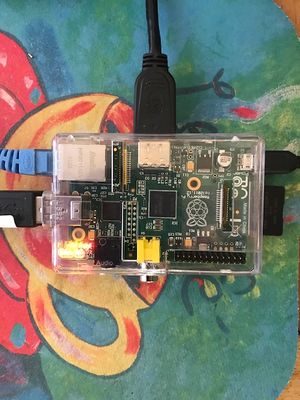

- -Physical Layout of RPi
- 1-Install Pidora on SD
- Insert 32 GB class 10 SD in USB SD writer
- Type mount in root terminal /dev/sdb;/dev/sdc;/dev/sdd should appear in terminal use this value in /dev/sd(x)
- cd to directory where you have pidora-18-r2c.img (located inside folder where it was downloaded)
- 2- Write SD with dd command
[root@localhost pidora-18-r2c]# dd if=pidora-18-r2c.img of=/dev/sd(x) see above^
3500538+0 records in
3500538+0 records out
1792275456 bytes (1.8 GB) copied, 470.625 s, 3.8 MB/s
[root@localhost pidora-18-r2c]#
- 3-Unmount SD and Place it in RPi
- 4-Boot and configure Pidora Pidora_18_Firstboot
- After reboot Pidora will pause while it resizes files on SD Card
- 5-Start Terminal and go to root
su
Password
Yum install @sugar-desktop
- 7-Full screen sugar:
- logout and log in selecting sugar
* Sugar
  Xfce
pidora koji
- "Pidora is a Fedora Remix optimized for the Raspberry Pi computer."
- It has its own repos separate from the older RPi-final.img
XSCE Community School Server on RPi
Notes
"Production of the popular Raspberry Pi computer is switching from China to south Wales."
- Coder is a free, open source project that turns a Raspberry Pi into a simple platform that educators and parents can use to teach the basics of building for the web.
- New coders can craft small projects in HTML, CSS, and Javascript, right from the web browser.
- Software Downloads: http://www.raspberrypi.org/downloads
- Fedora 18 Remix: https://fedoraproject.org/wiki/Architectures/ARM/F18/Remixes
- http://zenit.senecac.on.ca/wiki/index.php/Raspberry_Pi_Fedora_Remix_Installation
- Raspberry Hub WIKI: http://elinux.org/RaspberryPiBoard
- Good overview of RaspberryPi
- Wayland Preview:http://www.raspberrypi.org/archives/4053
- http://www.collabora.com/services/case-studies/raspberrypi
- Script: http://scotland.proximity.on.ca/raspberrypi/f17-releases/v5/latest/rpfr17-xfce-compose
- http://zenit.senecac.on.ca/wiki/index.php/Fedora_ARM_Secondary_Architecture
- element 14-Specs and Software List: http://www.element14.com/community/groups/raspberry-pi
- element14 Rpi Accessories: http://www.element14.com/community/groups/raspberry-pi-accessories?et_cid=22512767&et_rid=3810139&Linkid=Raspberry-Pi_Accessoris-Webinar-&CMP=EMC-22512767
- New 03/28/2013
- adafruit-Rpi:http://www.adafruit.com/category/105
- Pi: Operating Systems Development! Course: http://www.cl.cam.ac.uk/freshers/raspberrypi/tutorials/os/
- RPi Store: http://store.raspberrypi.com/ NEW
Write SD in a MAC:http://alltheware.wordpress.com/2012/12/11/easiest-way-sd-card-setup/
- http://zenit.senecac.on.ca/wiki/index.php/Raspberry_Pi_Fedora_Remix
- http://elinux.org/RaspberryPiBoard#Software_.26_OS_Distribution
- http://elinux.org/RPi_Distributions#What_is_armhf
"...BCM2835 used in the Raspberry Pi is the first ARM-based multimedia SoC with fully-functional,
vendor-provided (as opposed to partial, reverse engineered) fully open-source drivers,..."
- Quick Start Guide:http://www.raspberrypi.org/quick-start-guide
- http://www.raspbian.org/
- http://www.raspbian.org/RaspbianImages
- http://www.memetic.org/pre-compiled-xbmc-for-raspbian/
- http://michael.gorven.za.net/blog/2012/08/06/xbmc-packages-raspberry-pi-running-raspbian
- http://elinux.org/R-Pi_Hub
- http://elinux.org/RPi_config.txt - How to set Overclocking / Video on RPi
- http://elinux.org/RPi_Performance
- http://elinux.org/RPi_Distributions#Comparison
- RPi resolution fix:"disable_overscan=1"
- http://elinux.org/RPi_VerifiedPeripherals#Working_USB_Wifi_Adapters
- fedora 17 Remix:ftp://ftp.ges.redhat.com/raspberrypi/test-releases/raspberrypi-fedora-remix-17/
- R-PI can use three different "memory models", that is splits of the 256MB RAM
- RPi Configuration:http://elinux.org/RPiconfig
- RPi Troubleshooting
- Chromium Browser for RPi (beta)
- Update and install software before flashing .img using chroot
Projects and Courses
Kernel Testing
Kernel Compilation
raspberry-pi-root-fs-on-usb-drive
Xorg and LXDE
Mate on RPi
Testing Pages
- List of Test Pages
Testing/Reports/ARM_RPi
Tests of f18/ f17-remixes; Raspbian-PiscesMATE; and rasbian Debian on the RPi
- http://scotland.proximity.on.ca/raspberrypi/test-releases/rpfr17/
- http://www.raspbian.org/PiscesMATEImages
- http://downloads.raspberrypi.org/images/raspbian/2012-07-15-wheezy-raspbian/2012-07-15-wheezy-raspbian.zip
Testing Sweets on a RPi armhf
- Install of Sweets Sugar 0.94 on a RPi
redsleeve
"RedSleeve is different from CentOS and Scientific Linux in that it isn’t a mere clone of the upstream distribution it is based on
 – it is a port to a new platform, since the upstream distribution does not include a version for ARM."
xmbc
Gentoo
Mageia-arm
This ARM port supports the Kirkwood series from Marvell.
Most frequent are: Open-RD, computer plugs (SheevaPlug, GuruPlug).
It runs also in qemu as a virtual machine.
- Install to QEMU: http://packages.rtp-net.org/mageia/1/armv5tl/docs/README.ARMv5TL
- Prebuilt Images: http://packages.rtp-net.org/mageia/1/imgs/
- http://dx.com/p/u2-mini-android-4-0-network-multi-media-player-w-wi-fi-hdmi-tf-black-4gb-ddr-iii-1gb-145864?Utm_rid=93072394&Utm_source=affiliate
- http://www.cnx-software.com/2013/01/03/smallart-u-host-allwinner-a10-mini-pc-is-available-for-20/
arduino
CuBox-i4
- This is the CuBox-i4P-300-D MAC

- Booted 16 GB microSD:
- Inserted under HDMI plug on back
Links for CuBox-i
- Wiki Main Page
- http://imx.solid-run.com/wiki/index.php?title=Main_Page
- http://server.vijge.net/cubox IRC Archive for developer discussions
- Ubuntu
- http://download.solid-run.com/pub/solidrun/cubox-i/Ubuntu/ubuntu-oneiric-freescale/
- Only low resolution screen Networking works
- Debian
- http://download.solid-run.com/pub/solidrun/cubox-i/Debian/Jessi-repackaged-trial/debian-jessi.img.xz
- No networking in tests here
- Android
- http://imx.solid-run.com/wiki/index.php?title=Android
- http://download.solid-run.com/pub/solidrun/cubox-i/Android-4.3/11-Dec-2013/beta-11-dec-2013-i4pro.img.xz
- Works well
- Android Recovery
- XBMC
- Schematics:
- XSCE Schoolserver Fedora 20 (experimental)
- http://wiki.sugarlabs.org/go/Sugar_Creation_Kit/sck/Advanced_Topics#FC20forXSCE.zip
- http://timmoody.com/downloads/FC20Base2.zip
Testing
- I ended up writing the FC20Bxxx.img [4][5] with WIN32diskimager[1] after using 7-zip [2] to expand it first.
- Instructions from the cubibox wiki [3] to a 16 GB microSD (PNY) class 10; Using a SD adapter in a Yoga-Pro 2 running win 8.1
- [1] http://sourceforge.net/projects/win32diskimager/?source=dlp
- [2] http://www.7-zip.org/download.html
- [3] http://imx.solid-run.com/wiki/index.php?title=Main_Page
FC20Base2.zip

Install XSCE
- Default new install
- Booted 16 GB microSD:
- Inserted under HDMI plug on back
- I Write the FC20Bxxx.img [4][5] with WIN32diskimager[1] after using 7-zip [2] to expand it first.
- Instructions from the cubibox wiki [3] to a 16 GB microSD (PNY) class 10; Using a SD adapter in a Yoga-Pro 2 running win 8.1
- [1] http://sourceforge.net/projects/win32diskimager/?source=dlp
- [2] http://www.7-zip.org/download.html
- [3] http://imx.solid-run.com/wiki/index.php?title=Main_Page
- both wired (plugged in) and wireless AP (wep - not logged in) available via apple airport extreme.
- Login root/fedora
- https://github.com/XSCE/xsce/blob/master/docs/INSTALL.rst
- using ansible (runs but not certain will work) 03/20/2014
- Installs ansible 1.5
- run ./runansible 2 times... hung up on jabber finally restarted and ran ./runansible 2nd time
- completed install ifconfig

Ping 8.8.8.8

- freenode #schoolserver
- <timm_> "satellit: you are probably the first to do an install in this configuration. jabber is slow starting and sometimes times out." 03/21/2014
TESTS
Test 1 Make .img from working 16 GB microSD
- 03/26/2014 tg
- root terminal:
dd if=/dev/sdb of=XSCE_schoolserver.img bs=2M
7711+1 records in
7711+1 records out
16172187648 bytes (16 GB) copied, 911.25 s, 17.7 MB/s
- Compressed to xz makes 2.7 GB file
- Uncompressed this file and used dd to write the XSCE_schoolserver.img to a 16 GB microSD and it boots.
- I cannot reach http://schoolserver; http://schoolserver:5000 and http://schoolserver.local from this setup but I may be blocked with a firewall or have a bad config in eth0 or the wifi.
- Tested with XO-1.75
- Response from alex kleider
Tom, thanks for your response. Based on what I see
"""wlan0   ......
           Mode: managed  Access Point: Not associated
"""
and the fact that it has no IP address, I'm guessing that it's not doing much of anything in its current state but the fact that "Access Point" is even mentioned, suggests that perhaps we can be guardedly optimistic that it might be do-able. Please let me know if you make any progress in this regard. It would probably require low level configuration commands similar to
"""
# We always bootup in AP mode. Delete any stale files
#rm -f /etc/wlanclient.mode
curdir=/root/k2.6.39.4
insmod $curdir/mlan.ko
i nsmod $curdir/sd8787.ko drv_mode=2
ifconfig uap0 192.168.1.1 up
"""
TEST2 ifconfig wlan0 192.168.1.1
ifconfig wlan0 192.168.1.1 up
wlan0: flags=4099<up,BROADCAST,MULTICAST> mtu 1500
inet 192.168.1.1 netmask 255.255.255.0 broadcast 192.168.1.255
inet6 fe80:422c:f4ff:feae:2144 prefixlen 64 scopeid 0x20<link>
ether 40:2c:f4:ae:21:44 txquelen 1000 (ethernet)s
........
cheers,
alex kleider
Test3 Expand 16GB to 32GB
- Used gparted in a fedora laptop SD slot witj SD adapter to expand the 3rd partition on the class 10 microSD to the full 32 GB size.
- Booted correctly after the expansion in the CuBox-i4P
- Note must hit {TAB} and {space} repeatedly to get boot to work?
Hot Plug
- with the 3.10 kernel, you can use the eSATA port even if there is no drive enabled when the system boots; add this to the kernel arguments:
ahci_imx.hotplug=1
- Esatap is a single cable supplying power and data, so you want esata+ USB to esatap male
- Link http://www.ebay.com/itm/USB-A-male-eSATA-to-SATA-22pin-Power-eSATA-cable-0-5M-5V-2-5-inch-/150830976241
Testing List
Suggestions:
- https://github.com/XSCE/xsce/blob/master/docs/TESTING.rst
- https://github.com/XSCE/xsce/blob/master/tests.sh%E0%A8%8D
References
- http://web.dodds.net/~vorlon/wiki/blog/My_CuBox-i_has_arrived/
- https://wiki.debian.org/ArmHardFloatPort/CuBox-i
- https://github.com/jmontleon/fedora-20-cubox-i4pro-binary
- GitHub
CubieBoard1

- "Cubieboard is a small (10x6cm), hacker friendly, extendable and very low-cost while powerful ARM board with Allwinner A10 SoC."
- http://docs.cubieboard.org/how_to_make_a_sd_image_from_sd_bootable_os
- http://docs.cubieboard.org/tutorials/a10-cubieboard_lubuntu_desktop_releases
Getting Started
- http://linux-sunxi.org/Cubieboard
- Download:http://cubieboard.org/\
- https://fedoraproject.org/wiki/Architectures/ARM/F18/Remixes#Allwinner_A10
- https://fedoraproject.org/wiki/Cubie_Board#Cubieboard_Fedora_Remix
- http://scotland.proximity.on.ca/contrib-images/hansg/README
BeagleBone Black
- Plug in the supplied USB cable to your laptop to read the BeagleBone Black on-board files
- start.htm file when USB is plugged in: (screenshot below)
- NOTE click on screenshot to see full size hit <= on browser to retun here

- http://beagleboard.org/
- http://fedoraproject.org/en/get-fedora#arm
- http://elinux.org/Beagleboard:Ubuntu_On_BeagleBone_Black
Pengpod
"The PengPods are a line of Linux/Android tablets and mini PCs. All devices have an Allwinner A10 or A13 processor. They are designed to run Android on their internal flash and boot Linux from an SD card for the best of both. These devices are hacker friendly and there is an active community working to make them better. You can pre-order a PengPod from our crowd funding project on Indiegogo. "
- Wiki: http://pengpod.com/pengwiki/index.php?title=Main_Page
- http://www.pengpod.com/pengstore/index.php/products/pengpods.html
- Blog:http://pengpod.com/
Software
- Download: http://pengpod.com/images/ul/
- http://pengpod.com/blog/entry/flash-card-images-for-easier-linux-flashing-of-your-pengpod
pengpod as touchscreen for solidoodle 3d printer
"I now have a fully-functional touchscreen pronterface installation that can drive the Solidoodle..."
PPC
- Power PC
- Ubuntu/PPC
- http://fedoraproject.org/wiki/Architectures/PowerPC
- Latest Fedora release for PPC is currently Fedora 12
- Doing builds again for fedora 16
- IRC: #fedora-ppc on irc.freenode.net
Utilite
- http://utilite-computer.com/web/utilite-models
- http://www.utilite-computer.com/wiki/index.php/Utilite_Linux
Archlinux on Utilite
Android
- http://www.utilite-computer.com/wiki/index.php/Utilite_Getting_Started
- https://help.ubuntu.com/community/Installation/FromImgFiles
Sugarizer
- "A taste of Sugar on any device"
Archlinux on Trimslice
Chromebook( OLD content may not work)
- http://parasense.fedorapeople.org/ new images for Chromebook 07/18/2013
- https://fedoraproject.org/wiki/Architectures/ARM/Samsung_Chromebook_2012
- Complete step by step procedure to install fedora on SD or internal ssd of Chromebook
- Linux on a Chromebook: http://blogs.arm.com/software-enablement/848-running-linux-on-the-series-3-chromebook/
- Latest: http://fedoraproject.org/wiki/Architectures/ARM/Samsung_Chromebook_2012
- U-boot:http://www.denx.de/wiki/U-Boot
- Original writeup: https://plus.google.com/109993695638569781190/posts/b2fazijJppZ
- Updated: http://people.redhat.com/wcohen/chromebook/chrome_kernel.txt 01/20/2013
- Blog Post :http://mcpierce.blogspot.com/2013/02/loading-fedora-on-samsung-chromebook.html 02/06/2013
Automated install of fedora 18
- https://www.berrange.com/posts/2013/03/31/automated-install-of-fedora-18-arm-on-a-samsung-google-chromebook/
- Writes fedora to the chromebook ssd
Fedora-17-on-samsung-chromebook-series-3-arm
- EXPERIMENTAL run Fedora 17 on Chromebook
- Note danger of blowing out the speakers.
Building your own kernel and installing it in the Chromebook
using-nv-u-boot-on-the-samsung-arm-chromebook
Recover your Chrome device
Install a new version of the Chrome operating system on your Chrome device by going through the recovery process. You may want to go through this process if you’re having problems updating your Chrome device or if your Chrome device stops working.
Fedora on a Chromebook
- NEW--Satellit 01:57, 6 December 2012 (EST)
Chrubuntu-1204
- ChrUbuntu 12.04 for the new Google Chromebook with ARM processor!
Ubuntu on Chromebook
- https://plus.google.com/109993695638569781190/posts/b2fazijJppZ
- https://sites.google.com/a/chromium.org/dev/
- http://liliputing.com/2012/10/samsungs-arm-powered-chromebook-can-run-ubuntu.html
- http://www.samsung.com/global/business/semiconductor/minisite/Exynos/products5dual.html
- http://www.tigerdirect.com/applications/SearchTools/item-details.asp?EdpNo=4917324
Debian on Chromebook
- Entering Developer Mode
"On this device, both the recovery button and the dev-switch have been virtualized.
Our partners don't really like physical switches - they cost money, take up space on the motherboard, and require holes in the case.
To invoke Recovery mode, you hold down the ESC and Refresh keys and poke the Power button.
To enter Dev-mode you first invoke Recovery, and at the Recovery screen press Ctrl-D (there's no prompt - you have to know to do it).
It will ask you to confirm, then reboot into dev-mode.
Dev-mode works the same as always: It will show the scary boot screen and you need to press Ctrl-D or wait 30 seconds to continue booting.
You'll still have to run "crossystem dev_boot_usb=1" and reboot once to boot from USB drives with Ctrl-U.
To leave Dev-mode and go back to normal mode, just follow the instructions at the scary boot screen. It will prompt you to confirm.
If you want to leave Dev-mode programmatically, you can run "crossystem disable_dev_request=1; reboot" from a root shell  .
Th ere's no way to enter Dev-mode programmatically, and just seeing the Recovery screen isn't enough -
you have to use the three-finger salute which hard-resets the machine first.
 That's to prevent a remote attacker from tricking your machine into dev-mode without your knowledge.
An unrelated note: Holding just Refresh and poking the Power button hard-resets the machine without entering Recovery.
 That's occasionally useful, but use it with care - it doesn't sync the disk or shut down politely,
 so there's a nonzero chance of trashing the contents of your stateful partition."
gitweb
Fedora
- TESTING Section
- Hope to install Fedora on it.--Satellit 02:32, 26 October 2012 (EDT)
- IRC #fedora-arm freenode
openSUSE
- IRC #opensuse-arm on freenode
- http://www.muktware.com/4655/opensuse-running-249-google-chromebook#.UIotWdEhjY5
- Detailed instructions: https://plus.google.com/u/0/109993695638569781190/posts/b2fazijJppZ
opensuse-on-arm-release-candidate-1
- http://news.opensuse.org/2012/10/01/announcing-opensuse-on-arm-release-candidate-1/
- http://download.opensuse.org/repositories/openSUSE:/12.2:/ARM:/Contrib:/Origen/images/