Tutorials/Introduction to the Sugar Interface: Difference between revisions
No edit summary |
No edit summary |
||
| Line 1: | Line 1: | ||
<noinclude>[[Category:Tutorial]]</noinclude>__TOC__ | <noinclude>[[Category:Tutorial|Sugar]]</noinclude>__TOC__ | ||
* You can run Sugar in several ways: | * You can run Sugar in several ways: | ||
*: See [[Supported systems|Ways to run Sugar]]. | *: See [[Supported systems|Ways to run Sugar]]. | ||
| Line 148: | Line 148: | ||
# Will contain icons of clippings. | # Will contain icons of clippings. | ||
;Top | ;Top | ||
# F1 Neighborhood view | # F1 '''Neighborhood''' view | ||
# F2 Group view - (See the avatars of your friends. This view has not yet been exploited very much in Sugar.) | # F2 '''Group''' view - (See the avatars of your friends. This view has not yet been exploited very much in Sugar.) | ||
# F3 Home view - (Ring/Spiral and List views) | # F3 '''Home''' view - (Ring/Spiral Favorites and List views) | ||
# F4 Activity view | # F4 '''Activity''' view | ||
# F5 Journal view - (Display the Journal) - Hover drop down: Show contents and xxx MB Free storage space | # F5 '''Journal''' view - (Display the Journal) - Hover drop down: Show contents and xxx MB Free storage space | ||
* '''Move the mouse pointer away from the screen or window edge to retract the Frame.''' | * '''Move the mouse pointer away from the screen or window edge to retract the Frame.''' | ||
[[File:Screenshot_of_f1_Network-Neighborhood_on_jabber.png|700px]] | [[File:Screenshot_of_f1_Network-Neighborhood_on_jabber.png|700px]] | ||
Revision as of 22:56, 6 July 2012
- You can run Sugar in several ways:
- See Ways to run Sugar.
- Read the FAQ's on Sugar (Listed on the sidebar of all wiki pages.)

First Start screens
- When Sugar is started for the first time it boots to a screen that shows:
- First screen, where you enter a name
- NAME:(_____________)
_________________________(=>Next)
- Click on (=>Next) and Sugar goes to the
- Second screen where you choose your XO "avatar" colors
- _______Click to change color:
- ______________XO
- (<= Back)____________(=>Done)
- (The color of the central XO avatar changes each time it is clicked.)
- These screens set the name and color of your XO "avatar" and generate a unique ssh user key for this Sugar instance.
- These screens run only one time and do not repeat on next boot if there is data persistence (changes can be saved).
- Click on (=>Done) and Sugar goes to the Home view.
Home (F3) view screen
- Sugar boots to this screen
- It contains a ring of Activities icons.
- It becomes a spiral if a large number of Activities are designated as "Favorites".
- It is reached by pressing the Home key (F3) or clicking its icon in the Frame.
- Click on any of the Activities in the circle and the Activity will start.
-
- This links to the Sugar Labs wiki page listing information and descriptions on most Sugar Activities and how to download them.
- Also look at the OLPC Activities List (outdated, for reference only).
- You will leave this Introduction if you click these links above ^.
- To return to the tutorial, click the <== back arrow on your browser.

- If you hover over the round icon, in the top Frame bar, it will show a drop-down menu palette (Not shown)
- With 2 icons:
- Stack of 3 boxes in a triangle - (changes the Home view display to a random one. You can drag the Activity icons into an arrangement you prefer.)
- Circle with dot in center - (Ring/Spiral view)
- Hover over the center XO avatar and a pop-up menu palette appears (shown above).
- On the top right of the upper Frame bar there are 2 icons.
- Click on the one with horizontal lines (the Home list view).

- Click on any of the Activities in the list and the Activity will start.
-
- Click on the "star" to the left of the Activity on the list view;
- It will alternate as a colored or outlined star.
- If the star is colored, it becomes a "Favorite" Activity and will be listed in the Activity ring/spiral on the regular Home view.
- Click on the circular icon on the top bar
- You switch back to the regular Home view.
- In the center of the screen is the Learners XO figure.
- Hover over the XO figure and a pop-up menu palette appears.
My Settings
- (This is a "Control Panel" page where you set the configuration of Sugar.)
- Select the "My Settings" menu option.
- You switch to the "Control Panel"

- Here you can click on each of the items to make changes to how Sugar works.
- Like Language or Keyboard setting
- Also look at OLPC Sugar Control Panel.
- You will leave this Introduction if you click this link above ^.
- To return to this tutorial, click the <== back arrow on your browser.
- This is a very complete description - (Important Information)
- Slightly out of date as it covers an older version of Sugar for the OLPC XO-1.
- Also look at OLPC Sugar Control Panel.
About Me

- (From Fedora 16 Sugar on a Stick Pineapple)
- Change the color of your XO identity figure.
- This will vary with the version of Sugar you are using.
- Row of 5 avatars: Click on any version of the XO except the center one, which shows your current colors.
- 1 avatar: Click on the XO "avatar", if there is only one shown.
- Colors change with each click.
- Change your name (edit it)
- Click (check mark), to save, Click (X), to escape with no changes.
- You will have to restart Sugar after these changes.
About My Computer
- Shows Sugar Version and operating system information.

Accessibility
- Not present in most Sugar versions
- (This is Trisquel 5.0, which has some Dextrose 3 features.)

Date & Time
- Set your Timezone.
Frame
- Sets the corner and edge sensitivity of the Frame to the cursor.

- Move the bottom slider fully left to have instantaneous Frame activation, or
- Select an intermediate delay setting, or
- Fully right to never activate the Frame when touching the screen edge with the pointer.
Keyboard and Language
Language and Keyboard Settings
- Requires a reboot after changes are made.
Modem Configuration
- Set up mobile broadband connection to a cellular (3G) network.

Network
- Shows the Jabber Connection Information

- Fill in the field of the jabber server:
- jabber.sugarlabs.org (default on SoaS)
- This field is blank on an OLPC XO laptop.
- Community Jabber Servers Listing of other jabber servers. (They may not always be working.)
Software Update
- Updates the applications installed in your instance of Sugar.

- Check the Activities you want to upgrade.
- This will only upgrade Activities that you have installed.
- (Some versions of Sugar may allow you to install new ones.)
- This may be customized in deployments with a School server.
- To exit the "Control Panel" hit the (X) or (check mark if it appears; it saves changes) in the header bar's right corner.
Network Neighborhood
- Click
 in the Frame or hit F1 key and you switch to the Neighborhood view.
 - Move the mouse pointer to any corner of the screen to expose the Frame.
- (Wait a couple of seconds for it to appear as there is a time delay.)
- The delay and sensitivity of this is set in the "Control Panel".
- See the section on the Frame discussed above.


- This is a description of what is showing in this Frame:
- Starting in the top right corner and moving clockwise ===>
- Right side
- The Learner's XO avatar - (The same pop-up palette menu will be shown here as in the Home view. Any other Learners you are Collaborating with will be shown below the Learner's avatar.)
- Bottom
- Battery indicator (% Charge Level)
- Speaker - (Set Volume and Mute)
- Wired Network - (Connection and Speed and IP Address.)
- Wireless or Ad hoc Network Connection - (Connected-disconnect Channel IP Address)
- System Resources - (CPU and Memory Usage in % ) - on Trisquel and Dextrose3 only
- Feedback - (Submit comments) - on Trisquel and Dextrose3 only
- Left Side
- Will contain icons of clippings.
- Top
- F1 Neighborhood view
- F2 Group view - (See the avatars of your friends. This view has not yet been exploited very much in Sugar.)
- F3 Home view - (Ring/Spiral Favorites and List views)
- F4 Activity view
- F5 Journal view - (Display the Journal) - Hover drop down: Show contents and xxx MB Free storage space
- Move the mouse pointer away from the screen or window edge to retract the Frame.

- You are represented by the XO figure in the center.
- Hover on it and the same pop-up menu palette will appear as its version in the Home view.
- All the other XO figures are other Learners on the network.
- Hover the pointer over any other XO figure and a pop-up palette will give their name.
- NOTE: icons of shared Activities may appear here.
- Hover over the Activity icon and click "Join" on the pop-up palette menu to begin Collaboration (working with the other Learner) in the Activity.
- (There are no shared Activities shown in the screenshot.)
- Hit Home view and return to the Home view screen.
Shutdown Sugar
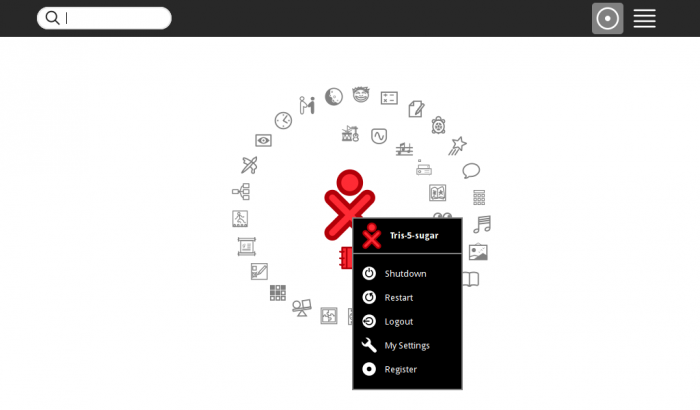
- Choose Shutdown on the pop-up palette menu.

Re-login to Trisquel after restart
- If you encounter a re-start of the Trisquel 5.0 Sugar live CD
- caused by a color/name change or other change in My Settings that requires a restart,
- (NOT the same as the central figure's drop-down menu selection Restart on the Home view, which shuts down the CD and ejects it.)
- It will come up on a login screen:
- (other) <===Click on it
- [_______]<==Enter trisquel here
- Password: (leave it blank)
- hit (Login)
- Sugar will restart with the changes.