Fedora 31: Difference between revisions
| Line 304: | Line 304: | ||
:::Insert card in RPi4 and power up: | :::Insert card in RPi4 and power up: | ||
*RPi4 (with 4 GB Memory) booted and changed memory in Preferences / Raspberry Pi4 Configuration to | *RPi4 (with 4 GB Memory) booted and changed memory in "Preferences / Raspberry Pi4 Configuration" to [356] from [76] | ||
::( 2019-07-10-raspbian-buster-full - allows changing the allocated amount of memory in the RPi4) | ::( 2019-07-10-raspbian-buster-full - allows changing the allocated amount of memory in the RPi4) | ||
*in add/remove software: install firefox ESR | |||
*in terminal: | *in terminal: | ||
curl d.iiab.io/install.txt | sudo bash | curl d.iiab.io/install.txt | sudo bash | ||
*chose | *chose maximum iiab install size | ||
*used middle selection for type of install (single point) | |||
*Start Ansible install | |||
Photograph terminal screen when it shows: "Internet-In-A Box (IIAB) software install is complete" | Photograph terminal screen when it shows: "Internet-In-A Box (IIAB) software install is complete" | ||
| Line 318: | Line 325: | ||
::Reboot (by hitting [enter] key) | ::Reboot (by hitting [enter] key) | ||
Change iiab-admin's password before connecting your server to the Internet. | *Change iiab-admin's password before connecting your server to the Internet. | ||
You can do this within http://box.lan/admin -> Utilities menu — or at the command line, if you type "passwd iiab-admin". | You can do this within http://box.lan/admin -> Utilities menu — or at the command line, if you type "passwd iiab-admin". | ||
*in firefox enter (in command line): 10.0.0.208 with iiab-admin and the password you entered above ^ | |||
::Starts Admin console | |||
(1) http://wiki.laptop.org/go/IIAB/FAQ#Is_a_quick_installation_possible.3F | (1) http://wiki.laptop.org/go/IIAB/FAQ#Is_a_quick_installation_possible.3F | ||
Revision as of 14:31, 3 August 2019
 Fedora® version page: 17 | 18 | 19 | 20 | 21 | 22 | 23 | 24 | 25 | 26 | 27 | 28 | 29 | 30 | 31 | 32 |
Fedora and the Infinity design logo are trademarks of Red Hat, Inc.
- some of the older versions listed here ^ may be security risks- for archive purposes only
Fedora 31
Fedora 31-rawhide
- updated June/06/2019
f28 end of life
"Fedora 28 will be EOL on Tuesday, May 28th, 2019. On this day we are going to close all of the Fedora 28 bugs which remain open [1]. You have a few weeks remaining to submit updates, if you have any, before the Fedora 28 release becomes unsupported. [1] https://fedoraproject.org/wiki/Releases/30/HouseKeeping#Fedora_28_EOL_Clo... -- Ben Cotton "
Upgrading f30 to f31
f30 Common Bugs
FEDORA User Docs
setting-kernel-command-line-arguments-with-fedora-30
Download
- https://dl.fedoraproject.org/pub/fedora/linux/development/rawhide/Spins/x86_64/iso/
- test builds : http://koji.fedoraproject.org/koji/tasks?start=0&state=all&view=tree&method=livemedia&order=-id
- rawhide .ks : https://kojipkgs.fedoraproject.org//work/tasks/7414/34687414/fedora-live-soas.ks
- Cloud : https://alt.fedoraproject.org/cloud/
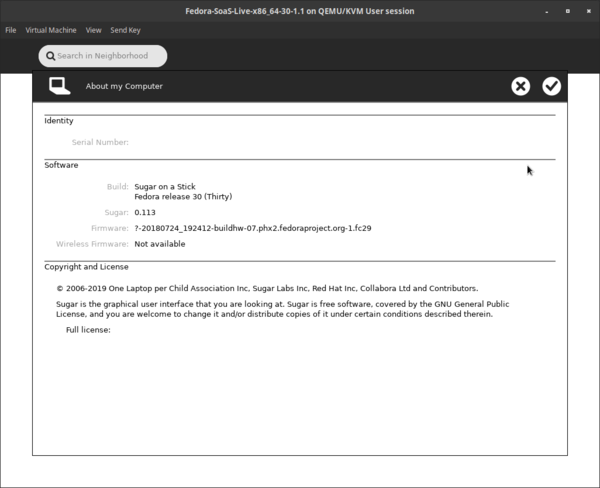
- new sugar 0.113 version:
- works fine in VMM

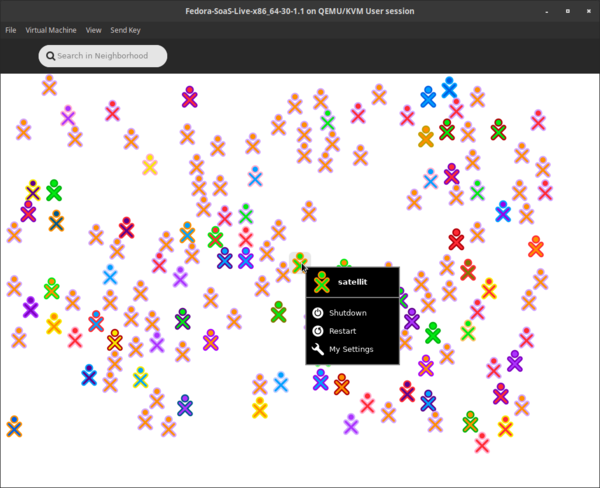
- f1 network neighborhood with XO's when "jabber.sugarlabs.org" is added to network:

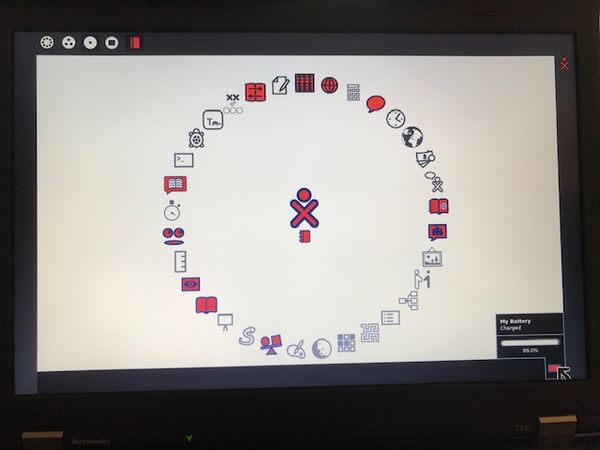
- battery indicator in frame

Fedora MediaWriter
- https://github.com/FedoraQt/MediaWriter/releases
- https://fedoraproject.org/wiki/Test_Day:2019-04-30_Fedora_Media_Writer
"What changes when Rpi 3B+;Rpi2B+; or "other is selected in version 4.1.4.1-fc30 ?"
- satellit May 19, 2019
"Nothing, really. The tentative plan was to support more ARM spins in the future but no work towards that was done yet."
- Martin Bříza:5/20/2019
Multimedia
NVIDIA
- ask for help on IRC freenode #cinnamon
QEMU/KVM
- Install Virtual Machine Manager in gnome software or (Virtual Machine Manager) virt-manager
- add: QEMU/KVM user session (Use this to install from ...iso)
- Install Virtual Machine Manager in gnome software or (Virtual Machine Manager) virt-manager
Install Documents
- https://docs.fedoraproject.org/en-US/fedora/f30/install-guide/
- https://docs.fedoraproject.org/en-US/fedora/f30/install-guide/advanced/VNC_Installations/
Raspberry_Pi
"Fedora supports the the Raspberry Pi Model 2B and 3-series of devices including the 3B, 3B+, 3A+, 3CM and 3CM+ in Fedora 29 and later releases."
- https://www.balena.io/etcher/ ( Used to flash micro-sd)
- https://fedoraproject.org/wiki/Architectures/ARM/Raspberry_Pi (read this first)
- https://dl.fedoraproject.org/pub/fedora/linux/releases/30/Spins/armhfp/images/ (f30-1.2 release)
- https://www.tomshardware.com/reviews/raspberry-pi-command-line-commands,6159.html
- https://mirrors.rit.edu/fedora/fedora/linux/releases/29/Spins/armhfp/images/
- https://fedoraproject.org/wiki/Architectures/ARM
- https://dl.fedoraproject.org/pub/fedora/linux/development/30/Spins/armhfp/images/
- https://dl.fedoraproject.org/pub/fedora/linux/development/rawhide/Spins/armhfp/images/ (f31 rawhide)
- https://github.com/sugarlabs/sugar/blob/master/docs/rpi-soas.md
- https://wiki.sugarlabs.org/go/Sugar_Creation_Kit/sck/Advanced_Topics#Raspberry_Pi_.2F_RPi (old work)
- https://wiki.cdot.senecacollege.ca/wiki/Raspberry_Pi_Fedora_Remix_Installation
- https://www.raspberrypi.org/downloads/
- https://elinux.org/RPi_Distributions#Fedora_Remix
- https://fedoraproject.org/wiki/QA:Testcase_Virt_ARM_on_x86 (install arm in VMM)
Sugar on other distributions
- https://elinux.org/RPi_Distributions#Fedora_Remix
- https://elinux.org/Category:RaspberryPi
- https://medium.com/@petermcd/housekeeping-steps-to-take-after-installing-raspbian-on-a-raspberry-pi-5226be6ddc82
- http://www.pidora.ca/
- http://wiki.sugarlabs.org/go/Ubuntu_on_rpi3 (Ubuntu)
- https://people.sugarlabs.org/rishabh/ (debian)
- https://wiki.debian.org/RaspberryPi
- https://en.opensuse.org/HCL:Raspberry_Pi2 (OpenSuse)
- http://mirror.centos.org/altarch/7/isos/ (centos)
- http://ftp.osuosl.org/pub/centos-altarch/7.6.1810/isos/armhfp/
- https://buildlogs.centos.org/rolling/7/isos/armhfp/
- https://wiki.centos.org/SpecialInterestGroup/AltArch/armhfp
- https://buildlogs.centos.org/c7-kernels.armhfp/raspberrypi2/20190615125423/4.14.126-v7.1.el7.armhfp/
- https://wiki.centos.org/SpecialInterestGroup/AltArch/armhfp#head-2c416cfaecdf675f43a5be7a81ad50e81e640c93 (add epl)
Rpi3B+ vs Rpi4
- https://medium.com/pi-top/raspberrypi4-f38f12633345
- https://medium.com/@ghalfacree/benchmarking-the-raspberry-pi-4-73e5afbcd54b (benchmarking the Rpi4)
- important review
- Note that USB3 Ports on RPi4 are Blue
- Note that the Red and white enclosure of the Rpi4 allows overheating of the board; run with cover off
- (lightning bolt warning in right upper corner appears when too hot)
- important review
Rpi-3b installer+
- https://fedoraproject.org/wiki/Architectures/ARM/Installation#Arm_Image_Installer
- https://www.balena.io/etcher/ (Raspbian installer)
- https://downloads.raspberrypi.org/raspbian_full_latest (2019-07-10-raspbian-buster-full.zip RpiB3+/RPi4 compatable)
Rpi3B+
- Testing of f31 arm (raw) images
Installation method used for testing
- Download Fedora-SoaS-armhfp-Rawhide-20190619.n.0-sda.raw.xz file to /Downloads
- extract here to expand to Fedora-SoaS-armhfp-Rawhide-20190619.n.0-sda.raw file
- start Fedora Media Writer/select Fedora-SoaS-armhfp-Rawhide-20190619.n.0-sda.raw file in "Custom"
- insert micro SD into usb Card Reader and plug in it's USB
- select RPiB3+ and write Fedora-SoaS-armhfp-Rawhide-20190619.n.0-sda.raw file
- exit Fedora MediaWriter
- start gparted and expand partition 3 to full size of micro SD (Class 10 32 GB)
- insert mico SD in RPi3B+ slot and power up.
- install Nodebug kernel https://fedoraproject.org/wiki/RawhideKernelNodebug
- Suggestion save command for nodebug on USB key as text file; copy paste it into terminal when running booted sd.
Working images
- Fedora-Mate-armhfp-Rawhide-20190722.n.1-sda.raw
- https://kojipkgs.fedoraproject.org/compose/rawhide/Fedora-Rawhide-20190722.n.1/compose/Spins/armhfp/images/Fedora-Mate-armhfp-Rawhide-20190722.n.1-sda.raw.xz (Tuesday nodebug kernel)
- sugar-desktop and sugar-runner installed and work
- Fedora-SoaS-armhfp-Rawhide-20190722.n.1-sda.raw
- https://kojipkgs.fedoraproject.org/compose/rawhide/Fedora-Rawhide-20190722.n.1/compose/Spins/armhfp/images/Fedora-SoaS-armhfp-Rawhide-20190722.n.1-sda.raw.xz (Tuesday nodebug kernel)
- Fedora-Mate-armhfp-Rawhide-20190716.n.0-sda.raw
- https://kojipkgs.fedoraproject.org/compose/rawhide/Fedora-Rawhide-20190716.n.0/compose/Spins/armhfp/images/Fedora-Mate-armhfp-Rawhide-20190716.n.0-sda.raw.xz
- NOTE recent arm images use debug kernel and this fills up the microSD cards quickly; making them freeze up
-
- fills up sd: bcm2835-dma (messages never stop)
- Tuesday builds should use nodebug kernel
- Use these to test in Rpi3B+
Enabling the rawhide kernel nodebug repository
$ sudo dnf config-manager --add-repo=http://dl.fedoraproject.org/pub/alt/rawhide-kernel-nodebug/fedora-rawhide-kernel-nodebug.repo
$ sudo dnf update
- Terminal:
- sudo dnf groupinstall sugar-desktop-environment
- sudo dnf install sugar-runner
- Fedora-Mate-armhfp-Rawhide-20190704.n.1-sda.raw

- Fedora-SoaS-armhfp-Rawhide-20190703.n.0-sda.raw
-
- https://dl.fedoraproject.org/pub/fedora/linux/development/rawhide/Spins/armhfp/images/Fedora-SoaS-armhfp-Rawhide-20190703.n.0-sda.raw.xz
- seems to lock up when using wired and wireless AP
- https://dl.fedoraproject.org/pub/fedora/linux/development/rawhide/Spins/armhfp/images/Fedora-SoaS-armhfp-Rawhide-20190703.n.0-sda.raw.xz
- Fedora-Xfce-armhfp-Rawhide-20190621.n.0-sda.raw
- Fedora-SoaS-armhfp-Rawhide-20190619.n.0-sda.raw
- Inital-setup after boot

- F1 network neighborhood with jabber.sugarlabs.org entered in networking

- Fedora-Xfce-armhfp-Rawhide-20190601.n.0-sda.raw
- Fedora-LXQt-armhfp-Rawhide-20190601.n.0-sda.raw
-
- https://kojipkgs.fedoraproject.org/compose/rawhide/Fedora-Rawhide-20190601.n.0/compose/Spins/armhfp/images/Fedora-LXDE-armhfp-Rawhide-20190601.n.0-sda.raw.xz
- https://kojipkgs.fedoraproject.org/compose/rawhide/Fedora-Rawhide-20190611.n.2/compose/Spins/armhfp/images/Fedora-LXDE-armhfp-Rawhide-20190611.n.2-sda.raw.xz
- Sugar-desktop-environment + sugar-runner (both install)
- Fedora-Mate-armhfp-Rawhide-20190609.n.1-sda.raw
Not Working
interupt waits too long before GRUB if no network cable connection
- "lan78xx_eth Waiting for PHY auto negotiation to complete..."
- That happens without ethernet cable plugged in. You can interrupt the waiting by CTRL+C.
- "lan78xx_eth Waiting for PHY auto negotiation to complete..."
uEFIforARMv7
a1-a2 microsd-cards: comparison
sugar desktop in 2nd DE
- in terminal:
- sudo dnf groupinstall sugar-desktop-environment
- sudo dnf install sugar-runner
- run each command separately
How to Clear ./sugar

=
livedcd-tools installed in mounted soas f30 usb
livecd-creator
"Why not just use livecd-creator? It is still maintained by the community (mainly Neal Gompa, see https://github.com/livecd-tools/livecd-tools ) and it supports this IMHO essential feature. And livecd-creator typically accepts kickstarts written for livemedia-creator with few to no changes, unlike the other way round. Kevin Kofler"
virtualbox
"Freely available for Windows, Mac OS X, Linux and Solaris x86 platforms under GPLv2:"
Available Groups
- dnf grouplist -v
Available Environment Groups:
  Fedora Custom Operating System (custom-environment)
  Minimal Install (minimal-environment)
  Fedora Server Edition (server-product-environment)
  Fedora Workstation (workstation-product-environment)
  Fedora Cloud Server (cloud-server-environment)
  KDE Plasma Workspaces (kde-desktop-environment)
  Xfce Desktop (xfce-desktop-environment)
  LXDE Desktop (lxde-desktop-environment)
  LXQt Desktop (lxqt-desktop-environment)
  Cinnamon Desktop (cinnamon-desktop-environment)
  Deepin Desktop (deepin-desktop-environment)
  Development and Creative Workstation (developer-workstation-environment)
  Web Server (web-server-environment)
  Infrastructure Server (infrastructure-server-environment)
  Basic Desktop (basic-desktop-environment)
Installed Environment Groups:
  MATE Desktop (mate-desktop-environment)
  Sugar Desktop Environment (sugar-desktop-environment)
Installed Groups:
  Administration Tools (admin-tools)
  LibreOffice (libreoffice)
Available Groups:
  3D Printing (3d-printing)
  Audio Production (audio)
  Authoring and Publishing (authoring-and-publishing)
  Books and Guides (books)
  C Development Tools and Libraries (c-development)
  Cloud Infrastructure (cloud-infrastructure)
  Cloud Management Tools (cloud-management)
  Compiz (compiz)
  Container Management (container-management)
  D Development Tools and Libraries (d-development)
  Design Suite (design-suite)
  Development Tools (development-tools)
  Domain Membership (domain-client)
  Fedora Eclipse (eclipse)
  Editors (editors)
  Educational Software (education)
  Electronic Lab (electronic-lab)
  Engineering and Scientific (engineering-and-scientific)
  FreeIPA Server (freeipa-server)
  Games and Entertainment (games)
  Headless Management (headless-management)
  MATE Applications (mate-applications)
  Medical Applications (medical)
  Milkymist (milkymist)
  Network Servers (network-server)
  Office/Productivity (office)
  Python Classroom (python-classroom)
  Python Science (python-science)
  Robotics (robotics-suite)
  RPM Development Tools (rpm-development-tools)
  Security Lab (security-lab)
  Sound and Video (sound-and-video)
  System Tools (system-tools)
  Text-based Internet (text-internet)
  Window Managers (window-managers)
Raspberry-Pi-IIAB
- http://wiki.laptop.org/go/IIAB/FAQ
- https://en.wikipedia.org/wiki/Raspbian
- http://downloads.raspberrypi.org/raspbian/release_notes.txt
- https://www.raspberrypi.org/documentation/installation/installing-images/linux.md
- https://www.raspberrypi.org/downloads/raspbian/
- https://github.com/iiab/iiab/wiki/Raspberry-Pi-IIAB-Images
- https://en.wikipedia.org/wiki/Raspberry_Pi#Third_party_application_software
- http://med.iiab.me/home/ (live medical iiAB sample)
Install of IIAB on RPi4
- Installed "Raspbian Buster with desktop and recommended software" (1)
- 2019-07-10-raspbian-buster-full.img (extracted: 6.4 GB)
- 256 GB SanDisk Ultra micoSDXC A1 card
- 2019-07-10-raspbian-buster-full.img (extracted: 6.4 GB)
Install with Etcher:
- In microSD reader
- Insert card in RPi4 and power up:
- In microSD reader
- RPi4 (with 4 GB Memory) booted and changed memory in "Preferences / Raspberry Pi4 Configuration" to [356] from [76]
- ( 2019-07-10-raspbian-buster-full - allows changing the allocated amount of memory in the RPi4)
- in add/remove software: install firefox ESR
- in terminal:
curl d.iiab.io/install.txt | sudo bash
- chose maximum iiab install size
- used middle selection for type of install (single point)
- Start Ansible install
Photograph terminal screen when it shows: "Internet-In-A Box (IIAB) software install is complete"

- Reboot (by hitting [enter] key)
- Change iiab-admin's password before connecting your server to the Internet.
You can do this within http://box.lan/admin -> Utilities menu — or at the command line, if you type "passwd iiab-admin".
- in firefox enter (in command line): 10.0.0.208 with iiab-admin and the password you entered above ^
- Starts Admin console
(1) http://wiki.laptop.org/go/IIAB/FAQ#Is_a_quick_installation_possible.3F
gosc/2019
" Fedora is proud to have been accepted as a GSoC mentoring organization. Student applications open on March 25, 2019."
Fedora Internet of Things (iot)
Silverblue
- still in development
"Fedora Silverblue is an immutable desktop operating system, which aims to be extremely stable and reliable. It also aims to be an excellent platform for developers and for those using container-focused workflows."
rpmfusion
flatpacks
Endless OS
- https://endlessos.com/download/ (eos-eos3.6-amd64-amd64.190709-170830.en.iso torrent only - free)
- "Endless OS is a free, easy-to-use operating system preloaded with over 100 apps.." (32GB installer usb - uses flatpacks)
- https://betanews.com/2019/06/12/debian-10-buster-endless-os-linux/
- https://github.com/endlessm (github)
- https://firefox-flatpak.mojefedora.cz/ (firefox flatpack that installs)
- "This is an unofficial Firefox flatpak repository provided by Fedora and Red Hat maintainers and made for testing purposes. "
- https://github.com/flathub/org.fedoraproject.MediaWriter/issues/5 (Fedora MediaWriter bug in flatpack)
- "Endless OS is built on top of decades of efforts from the free and open-source software community, and we acknowledge a great debt to it. We contribute back to open source projects whenever we can, but not all the software shipped on our computer is open source. Please refer to https://endlessm.com/for-developers developer for more information."
- https://betanews.com/2019/06/12/debian-10-buster-endless-os-linux/