Fedora 30: Difference between revisions
| (100 intermediate revisions by 2 users not shown) | |||
| Line 2: | Line 2: | ||
<br> | <br> | ||
''Fedora and the Infinity design logo are trademarks of Red Hat, Inc.'' | ''Fedora and the Infinity design logo are trademarks of Red Hat, Inc.'' | ||
==Fedora 30== | ==Fedora 30== | ||
* updated | * page updated July 9 2019 | ||
* | *Released 04/30/2019 | ||
===Download=== | ===Download=== | ||
* https://spins.fedoraproject.org/soas/download/index.html ( | * https://getfedora.org/ (new) | ||
* https://dl.fedoraproject.org/pub/alt/unofficial/releases/30/ | |||
* https://dl.fedoraproject.org/pub/fedora-secondary/development/30/Spins/i386/iso/ | |||
* https://spins.fedoraproject.org/soas/download/index.html | |||
* [https://drive.google.com/open?id=1keflpDVnJs4HGmsq-I2nbj7TgMrt1YWK Fedora 30 Sugar on a Stick for Raspberry Pi] | |||
* https://drive.google.com/drive/folders/1x70jhY5S18TB6lXPI7QYjDFuWelLm6ov (Respin: F30-SOAS-x86_64-20190708.iso has XO's in jabber.sugarlabs.org in networking CP) | |||
* https:// | ==upgrading-fedora-30-to-fedora-31== | ||
* https:// | *https://fedoramagazine.org/upgrading-fedora-30-to-fedora-31/ | ||
==Upgrading f29 to f30== | |||
*https://fedoraproject.org/wiki/DNF_system_upgrade | |||
* | *Fedora 28 will be EOL on Tuesday, May 28th, 2019 | ||
===f30 Common Bugs=== | |||
* https://fedoraproject.org/wiki/Common_F30_bugs | |||
===setting-kernel-command-line-arguments-with-fedora-30=== | |||
* https://fedoramagazine.org/setting-kernel-command-line-arguments-with-fedora-30/ | |||
*new sugar 0.113 version | *new sugar 0.113 version: | ||
[[File:F30-software.png| | [[File:F30-software.png|400px]] | ||
*f1 network neighborhood with XO's when "jabber.sugarlabs.org" is added to network | *f1 network neighborhood with XO's when "jabber.sugarlabs.org" is added to network: | ||
[[File:F30-network_neighborhood.png| | [[File:F30-network_neighborhood.png|400px]] | ||
=====testing-sugar-runner===== | =====testing-sugar-runner===== | ||
| Line 31: | Line 43: | ||
*https://github.com/FedoraQt/MediaWriter/releases | *https://github.com/FedoraQt/MediaWriter/releases | ||
*https://fedoraproject.org/wiki/Test_Day:2019-04-30_Fedora_Media_Writer | *https://fedoraproject.org/wiki/Test_Day:2019-04-30_Fedora_Media_Writer | ||
"What changes when Rpi 3B+;Rpi2B+; or "other is selected in version | |||
4.1.4.1-fc30 ?" | |||
*satellit May 19, 2019 | |||
"Nothing, really. The tentative plan was to support more ARM spins in the future but no work towards that was done yet." | |||
*Martin Bříza:5/20/2019 | |||
==Livemedia-creator== | |||
*https://fedoraproject.org/wiki/Livemedia-creator-_How_to_create_and_use_a_Live_CD | |||
==Multimedia== | ==Multimedia== | ||
* https://fedoraproject.org/wiki/Multimedia | * https://fedoraproject.org/wiki/Multimedia | ||
| Line 40: | Line 62: | ||
: ask for help on IRC freenode #cinnamon | : ask for help on IRC freenode #cinnamon | ||
==multiboot-media-creator== | |||
:https://github.com/spotrh/multiboot-media-creator | |||
==Install Documents== | ==Install Documents== | ||
:https://docs.fedoraproject.org/en-US/fedora/f30/install-guide/ | :https://docs.fedoraproject.org/en-US/fedora/f30/install-guide/ | ||
:https://docs.fedoraproject.org/en-US/fedora/ | :https://docs.fedoraproject.org/en-US/fedora/f30/install-guide/advanced/VNC_Installations/ | ||
===Testing f30=== | |||
* https://www.happyassassin.net/testcase_stats/30/Installation.html | |||
* https://fedoraproject.org/wiki/QA:Testcase_arm_image_deployment | |||
* https://fedoraproject.org/wiki/Test_Results:Fedora_30_RC_1.2_Installation#ARM_disk_images | |||
=Raspberry_Pi= | |||
"Fedora supports the the Raspberry Pi Model 2B and 3-series of devices including the 3B, 3B+, 3A+, 3CM and 3CM+ in Fedora 29 and later releases." | |||
::May work with Rpi3 (older model) | |||
* https://www.balena.io/etcher/ ( Used to flash micro-sd) | |||
::Prefered method: Fedora Mediawriter (see above) | |||
* https://fedoraproject.org/wiki/Architectures/ARM/Raspberry_Pi (read this first) | |||
* https://dl.fedoraproject.org/pub/fedora/linux/releases/30/Spins/armhfp/images/ (f30-1.2 release) | |||
* https://fedoraproject.org/wiki/Architectures/ARM#Current_stable_release | |||
:: https://arm.fedoraproject.org/ (armhfp) | |||
:: https://alt.fedoraproject.org/alt/ (AArch64) | |||
* https://mirrors.rit.edu/fedora/fedora/linux/releases/30/Spins/armhfp/images/ | |||
* https://fedoraproject.org/wiki/Architectures/ARM | |||
* https://dl.fedoraproject.org/pub/fedora/linux/development/30/Spins/armhfp/images/ | |||
* https://dl.fedoraproject.org/pub/fedora/linux/development/rawhide/Spins/armhfp/images/ (f31 rawhide) | |||
* https://github.com/sugarlabs/sugar/blob/master/docs/rpi-soas.md | |||
::https://wiki.sugarlabs.org/go/Sugar_Creation_Kit/sck/Advanced_Topics#Raspberry_Pi_.2F_RPi (old work) | |||
::https://wiki.cdot.senecacollege.ca/wiki/Raspberry_Pi_Fedora_Remix_Installation | |||
::https://www.raspberrypi.org/downloads/ | |||
::https://elinux.org/RPi_Distributions#Fedora_Remix | |||
==Sugar on other distributions== | |||
:https://elinux.org/RPi_Distributions#Fedora_Remix | |||
:https://elinux.org/Category:RaspberryPi | |||
::http://www.pidora.ca/ | |||
::http://wiki.sugarlabs.org/go/Ubuntu_on_rpi3 (Ubuntu) | |||
::https://people.sugarlabs.org/rishabh/ (debian) | |||
:::https://wiki.sugarlabs.org/go/Debian/Raspberry_Pi#Comparison | |||
::https://en.opensuse.org/HCL:Raspberry_Pi2 (OpenSuse) | |||
:::https://en.opensuse.org/Portal:ARM | |||
===Rpi-2/3=== | |||
* https://mirrors.rit.edu/fedora/fedora/linux/releases/29/Spins/armhfp/images/ | |||
* http://download.fedberry.org/?dir=releases/29/images/armhfp/29.1 (armv7hl) illustrated below | |||
: 32 GB micro sd | |||
::Older model Rpi-2 | |||
::(sudo dnf groupinstall sugar-desktop-environment) | |||
::(sudo dnf install sugar-runner) | |||
;LATER arm builds require Rpi-2b/3b to boot | |||
;Tested with f29/f30/f31-rawhide which do not boot on Rpi-2 | |||
[[File:If29-rpi2-2.jpg|400px]] [[File:If29-rpi2.jpg|400px]] | |||
::fedberry-f29.1 - sugar 0.112 no jabber | |||
===Rpi-3b+=== | |||
*https://fedoraproject.org/wiki/Architectures/ARM/Installation#Arm_Image_Installer | |||
====Working in Rpi3B+==== | |||
:[[File:F30_arm_sugar_net.jpg|400px]] | |||
; Fedora-Mate-armhfp-30-20190427.n.0-sda.raw ^ | |||
::sugar-runner in mate f30 arm | |||
:: sugar 0.113 - jabber works | |||
:[[File:Kde_f30_arm_initial_setup.jpg|400px]] | |||
*intial setup | |||
:[[File:Kde_f30_arm_ver.jpg|400px]] | |||
;Fedora-KDE-armhfp-30-20190427.n.0-sda.raw ^ | |||
; Fedora-LXDE-armhfp-30-1.2-sda.raw (works) | |||
*https://gparted.org/display-doc.php%3Fname%3Dmoving-space-between-partitions | |||
[[File:Gparted.jpg|400px]] | |||
:move partition 3 to fullsize ^ | |||
*32GB micro sd | |||
:install GParted | |||
::sudo dnf install gparted | |||
====soas f30 1.2 with fix (aperez)==== | |||
*https://drive.google.com/open?id=1keflpDVnJs4HGmsq-I2nbj7TgMrt1YWK | |||
:soas f30 1.2 with fix (aperez) | |||
====not working==== | |||
*;soas does not start: | |||
::https://bugzilla.redhat.com/show_bug.cgi?id=1711475 | |||
"<pwhalen> satellit, seeing the same issue. it looks like the initramfs is host-only for some reason. Looking at the kickstart I think I see why. | |||
<pwhalen> we remove dracut-config-generic in post, but it looks like we also rebuild the initramfs for sugar as well..seems like the rebuild happens after we remove dracut-config-generic.. so host only :( | |||
<pwhalen> satellit, broken in rawhide as well - 15M May 14 15:59 initramfs-5.1.0-1.fc31.armv7hl.img | |||
<pwhalen> should be around 40-50M" | |||
"<pwhalen> satellit, if you replace the initramfs with this one - https://fedorapeople.org/~pwhalen/soas/initramfs-5.0.9-301.fc30.armv7hl.img | |||
<pwhalen> it will boot. Thanks for bringing this to our attention." | |||
*may 15: | |||
<pwhalen> satellit, mount the sd, the look for the partition labelled boot | |||
<pwhalen> might be easiest to then right click and open in terminal, then 'su -c "wget https://fedorapeople.org/~pwhalen/soas/initramfs-5.0.9-301.fc30.armv7hl.img"' | |||
<pwhalen> then 'sudo mv initramfs-5.0.9-301.fc30.armv7hl.img.1 initramfs-5.0.9-301.fc30.armv7hl.img' | |||
<pwhalen> should od it | |||
<pwhalen> or do it even | |||
<pwhalen> and we'll get it fixed for f31. As it is it will only work in qemu. | |||
*;fix applied (20 may 2019) | |||
:Download https://fedorapeople.org/~pwhalen/soas/initramfs-5.0.9-301.fc30.armv7hl.img (to Downloads/f30/) | |||
:satellit@localhost ~]$ cd /run/media/satellit/__boot/ | |||
::[satellit@localhost __boot]$ su | |||
::Password: | |||
::[root@localhost __boot]# chmod 777 initramfs-5.0.9-301.fc30.armv7hl.img | |||
::[root@localhost __boot]# rm initramfs-5.0.9-301.fc30.armv7hl.img | |||
:::rm: remove regular file 'initramfs-5.0.9-301.fc30.armv7hl.img'? | |||
::: y | |||
::[root@localhost __boot]# cp /home/satellit/Downloads/f30/initramfs-5.0.9-301.fc30.armv7hl.img /run/media/satellit/__boot/initramfs-5.0.9-301.fc30.armv7hl.img | |||
[root@localhost __boot]# | |||
:[[File:Soas-fixed.jpg|400px]] | |||
: [[File:F30_soas_fixed_2.jpg|400px]] | |||
::128 GB microsd with gparted | |||
"since I had 128 GB; I installed:Cinnamon-desktop-environment; then did an update." | |||
*;workstation stops at starting GDM | |||
=Trimslice= | |||
*https://wiki.sugarlabs.org/go/Testing/Reports/ARM_TrimSlice | |||
;::old page with testing | |||
=livedcd-tools installed in mounted soas f30 usb= | =livedcd-tools installed in mounted soas f30 usb= | ||
*https://wiki.sugarlabs.org/go/Sugar_on_a_Stick/Linux/Installation | |||
SoaS 30 does come with the livecd-tools installed and the livecd-iso-to-disk installation script is copied to the /LiveOS/ directory on the .iso filesystem (so it is available from a mounted .iso file at <mountpoint>/LiveOS/livecd-iso-to-disk). The wiki instructions have been updated. | SoaS 30 does come with the livecd-tools installed and the livecd-iso-to-disk installation script is copied to the /LiveOS/ directory on the .iso filesystem (so it is available from a mounted .iso file at <mountpoint>/LiveOS/livecd-iso-to-disk). The wiki instructions have been updated. | ||
| Line 57: | Line 211: | ||
=8 GB f30 soas USB with persistence= | =8 GB f30 soas USB with persistence= | ||
* usb (Used gnome disks: to format to fat and marked bootable) | * usb (Used gnome disks: to format to fat and marked bootable) | ||
""NOTE: Will not do an install if USB is Persistent "" | |||
[satellit@localhost ~]$ cd Downloads/f30 | [satellit@localhost ~]$ cd Downloads/f30 | ||
[satellit@localhost f30]$ su | [satellit@localhost f30]$ su | ||
Password: | Password: | ||
[root@localhost f30]# mount | [root@localhost f30]# mount | ||
*mount | |||
;( to show mounted 8 GB usb formatted in disks as fat (x)bootable ) | |||
[root@localhost f30]# livecd-iso-to-disk --reset-mbr --overlay-size-mb 2000 --home-size-mb 2000 --delete-home --unencrypted-home Fedora-SoaS-Live-x86_64-30-1.2.iso /dev/sdb1 | [root@localhost f30]# livecd-iso-to-disk --reset-mbr --overlay-size-mb 2000 --home-size-mb 2000 --delete-home --unencrypted-home Fedora-SoaS-Live-x86_64-30-1.2.iso /dev/sdb1 | ||
Verifying image... | Verifying image... | ||
| Line 121: | Line 274: | ||
Target device is now set up with a Live image! | Target device is now set up with a Live image! | ||
[root@localhost f30]# | [root@localhost f30]# | ||
=Internet-in-a-Box= | =Internet-in-a-Box= | ||
*http://wiki.laptop.org/go/IIAB/FAQ | *http://wiki.laptop.org/go/IIAB/FAQ | ||
*https://wiki.sugarlabs.org/go/Sugar_Creation_Kit/sck/Advanced_Topics#Internet_in_a_Box (old) | |||
*http://download.unleashkids.org/ (older links) | *http://download.unleashkids.org/ (older links) | ||
*Interesting project to create a schoolserver | *Interesting project to create a schoolserver | ||
| Line 198: | Line 283: | ||
==live demos of Internet-in-a-Box== | ==live demos of Internet-in-a-Box== | ||
*http://med.iiab.me/home/ | *http://med.iiab.me/home/ | ||
=Available Groups= | |||
Use to install a second Desktop Environment | |||
dnf groupinstall ...... | |||
Available Environment Groups: | |||
Fedora Custom Operating System (custom-environment) | |||
Minimal Install (minimal-environment) | |||
Fedora Server Edition (server-product-environment) | |||
Fedora Workstation (workstation-product-environment) | |||
Fedora Cloud Server (cloud-server-environment) | |||
KDE Plasma Workspaces (kde-desktop-environment) | |||
Xfce Desktop (xfce-desktop-environment) | |||
LXDE Desktop (lxde-desktop-environment) | |||
LXQt Desktop (lxqt-desktop-environment) | |||
MATE Desktop (mate-desktop-environment) | |||
Sugar Desktop Environment (sugar-desktop-environment) | |||
Development and Creative Workstation (developer-workstation-environment) | |||
Web Server (web-server-environment) | |||
Infrastructure Server (infrastructure-server-environment) | |||
Basic Desktop (basic-desktop-environment) | |||
Cinnamon Desktop (cinnamon-desktop-environment) | |||
Available Groups: | |||
3D Printing (3d-printing) | |||
Administration Tools (admin-tools) | |||
Ansible node (ansible-node) | |||
Authoring and Publishing (authoring-and-publishing) | |||
Books and Guides (books) | |||
C Development Tools and Libraries (c-development) | |||
Cloud Infrastructure (cloud-infrastructure) | |||
Cloud Management Tools (cloud-management) | |||
Compiz (compiz) | |||
Container Management (container-management) | |||
D Development Tools and Libraries (d-development) | |||
Design Suite (design-suite) | |||
Development Tools (development-tools) | |||
Domain Membership (domain-client) | |||
Fedora Eclipse (eclipse) | |||
Editors (editors) | |||
Educational Software (education) | |||
Electronic Lab (electronic-lab) | |||
Engineering and Scientific (engineering-and-scientific) | |||
FreeIPA Server (freeipa-server) | |||
Games and Entertainment (games) | |||
Headless Management (headless-management) | |||
LibreOffice (libreoffice) | |||
MATE Applications (mate-applications) | |||
Medical Applications (medical) | |||
Milkymist (milkymist) | |||
Network Servers (network-server) | |||
Office/Productivity (office) | |||
Python Classroom (python-classroom) | |||
Python Science (python-science) | |||
Robotics (robotics-suite) | |||
RPM Development Tools (rpm-development-tools) | |||
Security Lab (security-lab) | |||
Sound and Video (sound-and-video) | |||
System Tools (system-tools) | |||
Text-based Internet (text-internet) | |||
Window Managers (window-managers) | |||
group persistor md version: 0.6.0 | |||
='''Following content is untested''' (Copied from f25)= | ='''Following content is untested''' (Copied from f25)= | ||
| Line 391: | Line 537: | ||
rm: remove directory 'lmc'? y | rm: remove directory 'lmc'? y | ||
[root@localhost var]# | [root@localhost var]# | ||
==Silverblue== | |||
*https://docs.fedoraproject.org/en-US/fedora-silverblue/ | |||
Latest revision as of 10:33, 27 November 2019
 Fedora® version page: 17 | 18 | 19 | 20 | 21 | 22 | 23 | 24 | 25 | 26 | 27 | 28 | 29 | 30 | 31 | 32 |
Fedora and the Infinity design logo are trademarks of Red Hat, Inc.
Fedora 30
- page updated July 9 2019
- Released 04/30/2019
Download
- https://getfedora.org/ (new)
- https://dl.fedoraproject.org/pub/alt/unofficial/releases/30/
- https://dl.fedoraproject.org/pub/fedora-secondary/development/30/Spins/i386/iso/
- https://spins.fedoraproject.org/soas/download/index.html
- Fedora 30 Sugar on a Stick for Raspberry Pi
- https://drive.google.com/drive/folders/1x70jhY5S18TB6lXPI7QYjDFuWelLm6ov (Respin: F30-SOAS-x86_64-20190708.iso has XO's in jabber.sugarlabs.org in networking CP)
upgrading-fedora-30-to-fedora-31
Upgrading f29 to f30
- Fedora 28 will be EOL on Tuesday, May 28th, 2019
f30 Common Bugs
setting-kernel-command-line-arguments-with-fedora-30
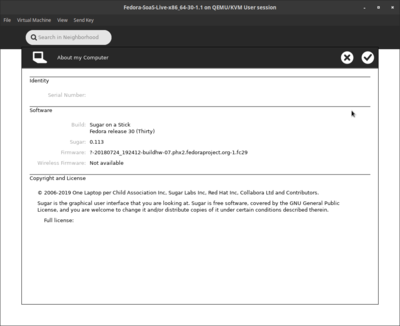
- new sugar 0.113 version:

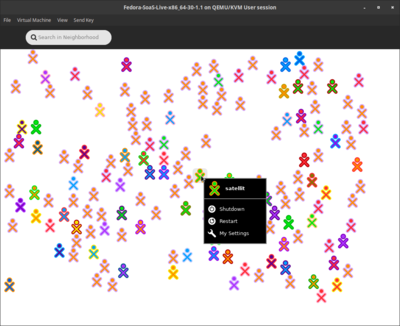
- f1 network neighborhood with XO's when "jabber.sugarlabs.org" is added to network:

testing-sugar-runner
Sugar control panel/About my computer: Fedora release 30 (Thirty) Sugar: 0.113 Sugar control panel/Network: jabber.sugarlabs.org
https://bugzilla.redhat.com/show_bug.cgi?id=1660597 XO show in F1 network neighborhood (wireless connected)
unable to test invited friend to chat (maybe because are mainly spanish speakers ((Ceibal))
testing-logged in to sugar
Also works on logout of sugar-runner login to sugar note sugar-runner settings for jabber.sugarlabs.org did not transfer and had to be re-entered to see XO's in F1 network neighborhood (T-400 wireless)
Fedora MediaWriter
- https://github.com/FedoraQt/MediaWriter/releases
- https://fedoraproject.org/wiki/Test_Day:2019-04-30_Fedora_Media_Writer
"What changes when Rpi 3B+;Rpi2B+; or "other is selected in version 4.1.4.1-fc30 ?"
- satellit May 19, 2019
"Nothing, really. The tentative plan was to support more ARM spins in the future but no work towards that was done yet."
- Martin Bříza:5/20/2019
Livemedia-creator
Multimedia
NVIDIA
- ask for help on IRC freenode #cinnamon
multiboot-media-creator
Install Documents
- https://docs.fedoraproject.org/en-US/fedora/f30/install-guide/
- https://docs.fedoraproject.org/en-US/fedora/f30/install-guide/advanced/VNC_Installations/
Testing f30
- https://www.happyassassin.net/testcase_stats/30/Installation.html
- https://fedoraproject.org/wiki/QA:Testcase_arm_image_deployment
- https://fedoraproject.org/wiki/Test_Results:Fedora_30_RC_1.2_Installation#ARM_disk_images
Raspberry_Pi
"Fedora supports the the Raspberry Pi Model 2B and 3-series of devices including the 3B, 3B+, 3A+, 3CM and 3CM+ in Fedora 29 and later releases."
- May work with Rpi3 (older model)
- https://www.balena.io/etcher/ ( Used to flash micro-sd)
- Prefered method: Fedora Mediawriter (see above)
- https://fedoraproject.org/wiki/Architectures/ARM/Raspberry_Pi (read this first)
- https://dl.fedoraproject.org/pub/fedora/linux/releases/30/Spins/armhfp/images/ (f30-1.2 release)
- https://fedoraproject.org/wiki/Architectures/ARM#Current_stable_release
- https://arm.fedoraproject.org/ (armhfp)
- https://alt.fedoraproject.org/alt/ (AArch64)
- https://mirrors.rit.edu/fedora/fedora/linux/releases/30/Spins/armhfp/images/
- https://fedoraproject.org/wiki/Architectures/ARM
- https://dl.fedoraproject.org/pub/fedora/linux/development/30/Spins/armhfp/images/
- https://dl.fedoraproject.org/pub/fedora/linux/development/rawhide/Spins/armhfp/images/ (f31 rawhide)
- https://github.com/sugarlabs/sugar/blob/master/docs/rpi-soas.md
Sugar on other distributions
Rpi-2/3
- https://mirrors.rit.edu/fedora/fedora/linux/releases/29/Spins/armhfp/images/
- http://download.fedberry.org/?dir=releases/29/images/armhfp/29.1 (armv7hl) illustrated below
- 32 GB micro sd
- Older model Rpi-2
- (sudo dnf groupinstall sugar-desktop-environment)
- (sudo dnf install sugar-runner)
- LATER arm builds require Rpi-2b/3b to boot
- Tested with f29/f30/f31-rawhide which do not boot on Rpi-2


- fedberry-f29.1 - sugar 0.112 no jabber
Rpi-3b+
Working in Rpi3B+

- Fedora-Mate-armhfp-30-20190427.n.0-sda.raw ^
-
- sugar-runner in mate f30 arm
- sugar 0.113 - jabber works

- intial setup

- Fedora-KDE-armhfp-30-20190427.n.0-sda.raw ^
- Fedora-LXDE-armhfp-30-1.2-sda.raw (works)
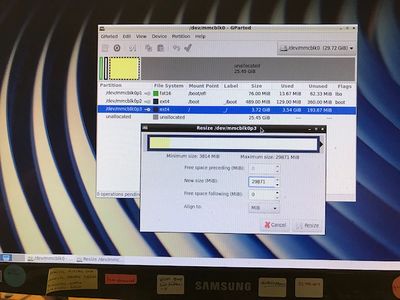

- move partition 3 to fullsize ^
- 32GB micro sd
- install GParted
- sudo dnf install gparted
soas f30 1.2 with fix (aperez)
- soas f30 1.2 with fix (aperez)
not working
- soas does not start
"<pwhalen> satellit, seeing the same issue. it looks like the initramfs is host-only for some reason. Looking at the kickstart I think I see why. <pwhalen> we remove dracut-config-generic in post, but it looks like we also rebuild the initramfs for sugar as well..seems like the rebuild happens after we remove dracut-config-generic.. so host only :(
<pwhalen> satellit, broken in rawhide as well - 15M May 14 15:59 initramfs-5.1.0-1.fc31.armv7hl.img <pwhalen> should be around 40-50M" "<pwhalen> satellit, if you replace the initramfs with this one - https://fedorapeople.org/~pwhalen/soas/initramfs-5.0.9-301.fc30.armv7hl.img <pwhalen> it will boot. Thanks for bringing this to our attention."
- may 15:
<pwhalen> satellit, mount the sd, the look for the partition labelled boot
<pwhalen> might be easiest to then right click and open in terminal, then 'su -c "wget https://fedorapeople.org/~pwhalen/soas/initramfs-5.0.9-301.fc30.armv7hl.img"' <pwhalen> then 'sudo mv initramfs-5.0.9-301.fc30.armv7hl.img.1 initramfs-5.0.9-301.fc30.armv7hl.img' <pwhalen> should od it <pwhalen> or do it even <pwhalen> and we'll get it fixed for f31. As it is it will only work in qemu.
- fix applied (20 may 2019)
- Download https://fedorapeople.org/~pwhalen/soas/initramfs-5.0.9-301.fc30.armv7hl.img (to Downloads/f30/)
- satellit@localhost ~]$ cd /run/media/satellit/__boot/
- [satellit@localhost __boot]$ su
- Password:
- [root@localhost __boot]# chmod 777 initramfs-5.0.9-301.fc30.armv7hl.img
- [root@localhost __boot]# rm initramfs-5.0.9-301.fc30.armv7hl.img
- rm: remove regular file 'initramfs-5.0.9-301.fc30.armv7hl.img'?
- y
- [root@localhost __boot]# cp /home/satellit/Downloads/f30/initramfs-5.0.9-301.fc30.armv7hl.img /run/media/satellit/__boot/initramfs-5.0.9-301.fc30.armv7hl.img
[root@localhost __boot]#
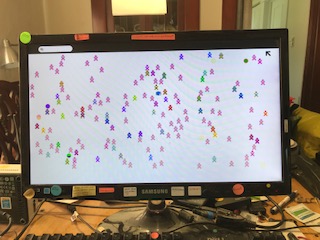
- 128 GB microsd with gparted


"since I had 128 GB; I installed:Cinnamon-desktop-environment; then did an update."
- workstation stops at starting GDM
Trimslice
- old page with testing
livedcd-tools installed in mounted soas f30 usb
SoaS 30 does come with the livecd-tools installed and the livecd-iso-to-disk installation script is copied to the /LiveOS/ directory on the .iso filesystem (so it is available from a mounted .iso file at <mountpoint>/LiveOS/livecd-iso-to-disk). The wiki instructions have been updated.
Installation via dd does not provide persistence of file system changes between boots (and never did). Persistence requires installation using the livecd-iso-to-disk installation script and requesting an overlay.
See https://fedoraproject.org/wiki/LiveOS_image for a discussion of the USB flash disk usage limitations and the different file systems available to the LiveOS user.
The dracut produced initial ram filesystem offers a large variety of storage configurations, see https://github.com/dracutdevs/dracut/blob/master/dracut.cmdline.7.asc#booting-live-images. One new configuration with OverlayFS will allow the overlay to consume the whole USB flash drive file system if the USB flash drive file system is formatted with ext4 or xfs file system types. The OverlayFS configuration is less mature than the Device-mapper configuration, so experimental feedback is welcome.
Apr 30, 2019 at 4:49 PM Tony Anderson
8 GB f30 soas USB with persistence
- usb (Used gnome disks: to format to fat and marked bootable)
""NOTE: Will not do an install if USB is Persistent ""
[satellit@localhost ~]$ cd Downloads/f30
[satellit@localhost f30]$ su Password: [root@localhost f30]# mount
- mount
- ( to show mounted 8 GB usb formatted in disks as fat (x)bootable )
[root@localhost f30]# livecd-iso-to-disk --reset-mbr --overlay-size-mb 2000 --home-size-mb 2000 --delete-home --unencrypted-home Fedora-SoaS-Live-x86_64-30-1.2.iso /dev/sdb1 Verifying image... /home/satellit/Downloads/f30/Fedora-SoaS-Live-x86_64-30-1.2.iso: bac65eaf45ad370f6e9ddf793f436e33 Fragment sums: 82358a8de12fab19be3e83c22431837827fbe4b8be6d9be46695f853676f Fragment count: 20 Supported ISO: no Press [Esc] to abort check. Checking: 100.0%
The media check is complete, the result is: PASS.
It is OK to use this media.
Copying LiveOS image to target device... squashfs.img
887,312,384 100% 220.53MB/s 0:00:03 (xfr#1, to-chk=0/1)
Syncing filesystem writes to disc.
Please wait, this may take a while...
Setting up /EFI/BOOT Copying /images directory to the target device. efiboot.img
10,213,376 100% 202.27MB/s 0:00:00 (xfr#1, to-chk=0/1)
macboot.img
21,495,808 100% 222.49MB/s 0:00:00 (xfr#1, to-chk=0/1)
initrd.img
48,620,200 100% 212.55MB/s 0:00:00 (xfr#1, to-chk=0/1)
vmlinuz
8,868,040 100% 165.22MB/s 0:00:00 (xfr#1, to-chk=0/1)
Updating boot config files. Initializing persistent overlay... 2000+0 records in 2000+0 records out 2097152000 bytes (2.1 GB, 2.0 GiB) copied, 3.46921 s, 605 MB/s Initializing persistent /home 2000+0 records in 2000+0 records out 2097152000 bytes (2.1 GB, 2.0 GiB) copied, 649.882 s, 3.2 MB/s Formatting unencrypted home.img mke2fs 1.44.6 (5-Mar-2019) Creating filesystem with 512000 4k blocks and 128000 inodes Filesystem UUID: 54f0dc3b-8f3f-4039-aa09-c2ce2a4ca509 Superblock backups stored on blocks: 32768, 98304, 163840, 229376, 294912
Allocating group tables: done Writing inode tables: done Creating journal (8192 blocks): done Writing superblocks and filesystem accounting information: done
tune2fs 1.44.6 (5-Mar-2019) Setting maximal mount count to -1 Setting interval between checks to 0 seconds Installing boot loader... Target device is now set up with a Live image! [root@localhost f30]#
Internet-in-a-Box
- http://wiki.laptop.org/go/IIAB/FAQ
- https://wiki.sugarlabs.org/go/Sugar_Creation_Kit/sck/Advanced_Topics#Internet_in_a_Box (old)
- http://download.unleashkids.org/ (older links)
- Interesting project to create a schoolserver
"irc:#schoolserver on freenode"
live demos of Internet-in-a-Box
Available Groups
Use to install a second Desktop Environment
dnf groupinstall ......
Available Environment Groups:
  Fedora Custom Operating System (custom-environment)
  Minimal Install (minimal-environment)
  Fedora Server Edition (server-product-environment)
  Fedora Workstation (workstation-product-environment)
  Fedora Cloud Server (cloud-server-environment)
  KDE Plasma Workspaces (kde-desktop-environment)
  Xfce Desktop (xfce-desktop-environment)
  LXDE Desktop (lxde-desktop-environment)
  LXQt Desktop (lxqt-desktop-environment)
  MATE Desktop (mate-desktop-environment)
  Sugar Desktop Environment (sugar-desktop-environment)
  Development and Creative Workstation (developer-workstation-environment)
  Web Server (web-server-environment)
  Infrastructure Server (infrastructure-server-environment)
  Basic Desktop (basic-desktop-environment)
  Cinnamon Desktop (cinnamon-desktop-environment)
Available Groups:
  3D Printing (3d-printing)
  Administration Tools (admin-tools)
  Ansible node (ansible-node)
  Authoring and Publishing (authoring-and-publishing)
  Books and Guides (books)
  C Development Tools and Libraries (c-development)
  Cloud Infrastructure (cloud-infrastructure)
  Cloud Management Tools (cloud-management)
  Compiz (compiz)
  Container Management (container-management)
  D Development Tools and Libraries (d-development)
  Design Suite (design-suite)
  Development Tools (development-tools)
  Domain Membership (domain-client)
  Fedora Eclipse (eclipse)
  Editors (editors)
  Educational Software (education)
  Electronic Lab (electronic-lab)
  Engineering and Scientific (engineering-and-scientific)
  FreeIPA Server (freeipa-server)
  Games and Entertainment (games)
  Headless Management (headless-management)
  LibreOffice (libreoffice)
  MATE Applications (mate-applications)
  Medical Applications (medical)
  Milkymist (milkymist)
  Network Servers (network-server)
  Office/Productivity (office)
  Python Classroom (python-classroom)
  Python Science (python-science)
  Robotics (robotics-suite)
  RPM Development Tools (rpm-development-tools)
  Security Lab (security-lab)
  Sound and Video (sound-and-video)
  System Tools (system-tools)
  Text-based Internet (text-internet)
  Window Managers (window-managers)
group persistor md version: 0.6.0
Following content is untested (Copied from f25)
- Please test and update (it is a wiki)
livemedia-creator
- SEE https://fedoraproject.org/wiki/Livemedia-creator-_How_to_create_and_use_a_Live_CD
- for older method (namely for Fedora 23) using livecd-tools (livecd-creator) visit https://fedoraproject.org/wiki/How_to_create_and_use_a_Live_CD
- If you simply want to burn a pre-made ISO to a disc, visit http://fedoraproject.org/en/get-fedora to download a LiveCD or LiveDVD, then see the install guide or burning how-to for further instructions.
- Examples in f25 root terminal:
mock
you should always do all work in mock, this will allow you to esure that the compose environment matches the target environment
to setup a Fedora 25 x86_64 environment you would run the following
$ mock -r fedora-25-x86_64 --init
$ mock -r fedora-25-x86_64 --install lorax-lmc-novirt git vim-minimal pykickstart
if you wanted a different arch or release you would use the correct mock configuration file
Install files
updated from fedora page 12/15/2016
- ksflatten is part of pykickstart
# dnf install mock
Documentation
- Important
- https://docs.fedoraproject.org/en-US/docs/
- http://lorax.readthedocs.io/en/latest/livemedia-creator.html
- https://github.com/rhinstaller/lorax/blob/master/docs/livemedia-creator.rst
mock
you should always do all work in mock, this will allow you to esure that the compose environment matches the target environment
to setup a Fedora 25 x86_64 environment you would run the following
$ mock -r fedora-25-x86_64 --init
$ mock -r fedora-25-x86_64 --install lorax-lmc-novirt git vim-minimal pykickstart
if you wanted a different arch or release you would use the correct mock configuration file
kickstarts
inside the mock chroot, clone the kickstarts
$ git clone https://pagure.io/fedora-kickstarts.git
Install files
- livemedia-creator and ksflatten are part of lorax
# dnf install lorax virt-install libvirt-daemon-config-network pykickstart
- Must be done first:
- You must be in the same fedora version (f25) first. This is so that packages can be installed to livecd without SELinux errors and is relabeled at boot time.
setenforce 0
Notes
- Important
- Jun 28, 2016 at 12:28:27PM -0500, Bruno Wolff III wrote:
"In --no-virt mode it's calling anaconda
directly so kickstart processing of the %include may work, depending on
the location of the files. But if you're using it in virt mode only the
top level ks gets passed into the vm so ksflatten is required in that
case."
pagure kickstarts Links
- alternately: git clone the repo and not get each piece manually
- Kickstarts need to flattened before use:
- hit raw tab and save-page-as to a local directory (/home/(user)/Downloads/pagure/)
- https://pagure.io/fedora-kickstarts/blob/f25/f/fedora-live-soas.ks
- https://pagure.io/fedora-kickstarts/blob/f25/f/fedora-live-base.ks
- https://pagure.io/fedora-kickstarts/blob/f25/f/fedora-live-minimization.ks
- https://pagure.io/fedora-kickstarts/blob/f25/f/fedora-repo.ks
- https://pagure.io/fedora-kickstarts/blob/f25/f/fedora-repo-not-rawhide.ks
- https://pagure.io/fedora-kickstarts/blob/f25/f/fedora-repo-rawhide.ks
- https://pagure.io/fedora-kickstarts/blob/f25/f/fedora-soas-packages.ks
- switch root terminal to the local directory with the kickstart files (/home/(user)/Downloads/pagure/)
ksflatten
- updated 06/28/2016
ksflatten -v, --config fedora-live-soas.ks -o flat-fedora-live-soas.ks --version F25
livemedia-creator examples
livemedia-creator --ks /home/(user)/Downloads/pagure/flat-fedora-live-soas.ks --logfile /var/lmc-logs/livemedia-out.log --no-virt --resultdir /var/lmc --project Fedora-soas-Live --make-iso --volid Fedora-SoaS-flat-live --iso-only --iso-name Fedora-SoaS-flat-live.iso --releasever 25 --title Fedora-SoaS-flat-live --macboot
livemedia-creator --ks /home/(user)/Downloads/pagure/flat-fedora-live-kde.ks --logfile /var/lmc-logs/livemedia-out.log --no-virt --resultdir /var/lmc --project Fedora-kde-Live --make-iso --volid Fedora-kde-f25-live --iso-only --iso-name Fedora-kde-f25-live.iso --releasever 25 --title Fedora-kde-f25-live --macboot
livemedia-creator --ks /home/(user)/Downloads/pagure/flat-fedora-live-cinnamon.ks --logfile /var/lmc-logs/livemedia-out.log --no-virt --resultdir /var/lmc --project Fedora-cinnamon-Live --make-iso --volid Fedora-cinnamon-live --iso-only --iso-name Fedora-cinnamon-live.iso --releasever 25 --title Fedora-cinnamon-25-live --macboot
- "If you're using /tmp/lmc you need to make sure you have enough RAM available (assuming it is mounted using tmpfs)"
- use /var/lmc if low on memory
- "Right, if you only have 3.8G then 50% will be assigned to tmpfs and it's likely
you'll run out of ram when using /tmp/ for the resultdir."
warning
- 12/14/2016
- There is a problem using LMC this way:
<adamw> satellit: you really *really* shouldn't be running lmc directly on the system with --no-virt anyway <adamw> it's a fundamentally risky thing to do
Make a remix
- edit the bottom of the flat-fedora-live-soas.ks
- that you produce with ksflatten (above)
- in this section of the flattened.ks:
%packages
- add a program (add name)
- - delete a program ( put - in front)
- put # in front of listed program to not install it
kickstart-docs
terminal output of livemedia-creator build
- Build takes a long time wait for completion
- ends with:
..........clip........
..........clip........
2016-07-05 14:46:20,011: Performing post-installation setup tasks
2016-07-05 14:46:20,012: Performing post-installation setup tasks
2016-07-05 14:46:21,970: .
2016-07-05 14:46:21,970:
2016-07-05 14:46:21,971: Configuring installed system
2016-07-05 14:46:22,147: .
2016-07-05 14:46:22,148: Creating users
2016-07-05 14:46:22,149: .
2016-07-05 14:46:22,149: Configuring addons
2016-07-05 14:46:22,151: .BDB2053 Freeing read locks for locker 0x1: 3376/140705511982848
--clip--
2016-07-05 14:47:01,333:
2016-07-05 14:47:01,334: Generating initramfs
2016-07-05 14:47:06,185: .
2016-07-05 14:47:06,186: Running post-installation scripts
2016-07-05 14:47:06,189: .
2016-07-05 14:47:38,953: Shutting down log processing
2016-07-05 14:47:41,246: Disk Image install successful
2016-07-05 14:47:41,247: working dir is /var/tmp/lmc-work-n26biv0m
2016-07-05 14:59:34,529: Rebuilding initrds
2016-07-05 14:59:34,530: dracut args = ['--xz', '--add', 'livenet dmsquash-live convertfs pollcdrom qemu qemu-net', '--omit', 'plymouth', '--no-hostonly', '--debug', '--no-early-microcode']
2016-07-05 14:59:34,532: rebuilding boot/initramfs-4.7.0-0.rc5.git3.1.fc25.x86_64.img
2016-07-05 15:01:36,027: Building boot.iso
2016-07-05 15:01:36,122: running x86.tmpl
2016-07-05 15:01:56,462: Disk image erased
2016-07-05 15:01:59,749: SUMMARY
2016-07-05 15:01:59,750: -------
2016-07-05 15:01:59,750: Logs are in /home/(user)/Downloads/pagure
2016-07-05 15:01:59,751: Results are in /home/(user)/lmc
[root@localhost pagure]#
Retrieve finished live.iso
"Results are in /home/(user)/lmc"
- start files application
- click on Files system
- open lmc folder
- click on the .....iso you just built
copy to (mouse right click) pagure with files application
- Check that it is in pagure
Clean Up
- delete the instance in lmc
- delete the lmc directory (cannot run new build unless this is done?)
root@localhost pagure]# cd /
[root@localhost /]# cd var
[root@localhost var]# ls
account  adm  cache  crash  db  empty  ftp  games  gopher kerberos  lib  lmc  local  lock  log  mail  nis  opt  preserve run  spool  tmp  www  yp
[root@localhost var]# rm -r lmc
rm: descend into directory 'lmc'? y
rm: remove regular file 'lmc/Fedora-SoaS-var-live.iso'? y
rm: remove directory 'lmc'? y
[root@localhost var]#