Activities/Reflection: Difference between revisions
Created page with "== Reflection == Reflection is a symmetry game. The goal is to create a reflective symmetry. 300px === How to play Reflection === Click on th..." |
|||
| Line 11: | Line 11: | ||
<gallery> | <gallery> | ||
File:Reflection-challenge.png|Each time you play a new game, a randomly generated pattern is created. | File:Reflection-challenge.png|Each time you play a new game, a randomly generated pattern is created. | ||
File:Reflection-vertical.png|You can also play with vertical symmetry | |||
</gallery> | </gallery> | ||
Revision as of 09:15, 7 December 2011
Reflection
Reflection is a symmetry game. The goal is to create a reflective symmetry.

How to play Reflection
Click on the dots to change the colors until you have a reflective symmetry.
-
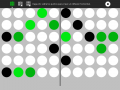 Each time you play a new game, a randomly generated pattern is created.
 -
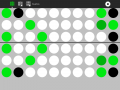 You can also play with vertical symmetry


The Toolbars

- from left to right
- the Activity toolbar button (shown in the closed position)
- the New-horizontal game button (start a new game to create a horizontal reflective symmetry)
- the New-vertical game button (start a new game to create a vertical reflective symmetry)
- an area for messages
- the Activity-stop button
Where to get Reflection
The Reflection activity is available for download from the Sugar activity portal: Reflection
The source code is available on the Sugar Labs Gitorious server.