Activities/Sliderule: Difference between revisions
No edit summary |
|||
| Line 1: | Line 1: | ||
== How to use a slide rule == | == How to use a slide rule == | ||
There are three parts to the slide rule: (1) a fixed rule (either the D scale or the L scale); (2) a sliding rule (the A, C, or L scales); and a reticule, which moves independently of the rules. | |||
''' | To move the sliding rules, simply drag them. Also to move the reticule, drag it. ('''Note:''' The entire slide rule does not fit on the screen. By dragging on the fixed rule, you can scroll the canvas to reveal different sections.) | ||
Most calculations on a slide rule require three steps: | |||
# position the end of the top slide above a number on the bottom slide; | |||
# position the reticule over a number on the top slide; | |||
# read the result from the bottom slide. | |||
The Sliderule Activity displays these three values on tabs attached t the top slider and the reticule. The calculation is also displayed on the activity toolbar. | |||
=== Multiplication === | === Multiplication === | ||
To multiply... | To multiply, first position the end of the C slide over one of the multiplicands on the D slide. Then position the reticule over the other multiplicand on the C slide. Read the result off of the D slide. | ||
'''Example:''' 2 × 1.31 = 2.62 | |||
<gallery> | <gallery> | ||
File:Sliderule-2D.png|Position the end of the C slide over 2 on the D slide | |||
File:SLiderule-1.31C.png|Position the reticule over 1.31 on the C slide | |||
</gallery> | </gallery> | ||
| Line 64: | Line 34: | ||
=== Subtraction === | === Subtraction === | ||
Revision as of 10:46, 7 June 2010
How to use a slide rule
There are three parts to the slide rule: (1) a fixed rule (either the D scale or the L scale); (2) a sliding rule (the A, C, or L scales); and a reticule, which moves independently of the rules.
To move the sliding rules, simply drag them. Also to move the reticule, drag it. (Note: The entire slide rule does not fit on the screen. By dragging on the fixed rule, you can scroll the canvas to reveal different sections.)
Most calculations on a slide rule require three steps:
- position the end of the top slide above a number on the bottom slide;
- position the reticule over a number on the top slide;
- read the result from the bottom slide.
The Sliderule Activity displays these three values on tabs attached t the top slider and the reticule. The calculation is also displayed on the activity toolbar.
Multiplication
To multiply, first position the end of the C slide over one of the multiplicands on the D slide. Then position the reticule over the other multiplicand on the C slide. Read the result off of the D slide.
Example: 2 × 1.31 = 2.62
-
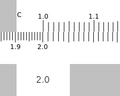 Position the end of the C slide over 2 on the D slide
 -
Position the reticule over 1.31 on the C slide

