Activities/Turtle Art/Getting started: Difference between revisions
< Activities | Turtle Art
Tonyforster (talk | contribs) |
Tonyforster (talk | contribs) |
||
| Line 30: | Line 30: | ||
File:Namedstacks.jpg|Named 'stacks' of blocks can be reused | File:Namedstacks.jpg|Named 'stacks' of blocks can be reused | ||
File:Collapsestack.jpg|Collapse a 'stack' of blocks to save space | File:Collapsestack.jpg|Collapse a 'stack' of blocks to save space | ||
File:Pushpop.jpg|Store data in the first in last out heap using 'push' and 'pop' | |||
</gallery> | </gallery> | ||
Revision as of 22:10, 28 February 2011
Getting Started

Start by clicking on (or dragging) blocks from the Turtle palette. Use multiple blocks to create drawings; as the turtle moves under your control, colorful lines are drawn.
You add blocks to your program by clicking on or dragging them from the palette to the main area. You can delete a block by dragging it back onto the palette. Click anywhere on a "stack" of blocks to start executing that stack or by clicking in the Rabbit (fast) , Turtle (slow) or Bug (debug) buttons  on the Project Toolbar.
The basics
-
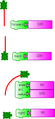 Basic turtle graphics: 'forward', 'back', 'arc', and 'right' blocks
 -
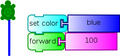 Pen attributes: 'set pen color' block
 -
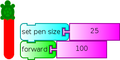 'set pen size' block
 -
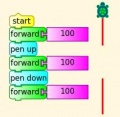 Pen up and pen down


Drawing shapes
-
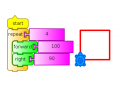 Use the repeat block to draw shapes
 -
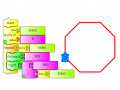 This can be generalised to n sided polygons, store n in Box1
 -
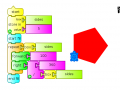 Use 'start fill' and 'end fill' to draw filled shapes


Boxes, Stacks and the Heap
(aka variables, subroutines and the stack)
-
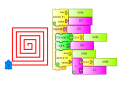 named variables:'store in' block
 -
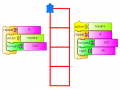 Named 'stacks' of blocks can be reused
 -
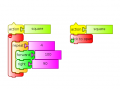 Collapse a 'stack' of blocks to save space
 -
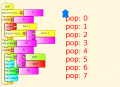 Store data in the first in last out heap using 'push' and 'pop'


Displaying things
-
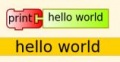 Using 'print'
 -
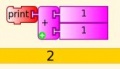 'print' and 'show' can display numbers including results of calculations
 -
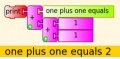 'print' with text and numbers
 -
 'show' block used for text
 -
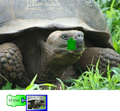 'show' an image, (movies, audio)
 -
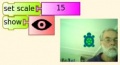 'show' the camera output


Keyboard and mouse input
Mathematics
-
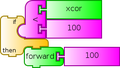 logical operations: 'if' block
